Manual security operations don’t just slow teams down. They make breaches more expensive. Organizations that implement advanced security automation cut breach response time by over 100 days and save an average of $3.05 million per incident, according to JumpCloud’s 2024 analysis. That number reframes the conversation. Automation in security isn’t a convenience feature for mature SOCs. It’s an operating model.
Security professionals commonly experience operational pain. Analysts drown in alerts. Investigations stall because logs live in too many places. The same containment steps get repeated by hand. Then compliance enters the picture and makes everything slower, because evidence collection often happens after the fact instead of during the incident.
That split is where many programs break down. Security teams optimize for speed. Compliance teams optimize for documentation. The result is friction, delay, and brittle workflows that nobody fully trusts. A better model treats response and evidence collection as the same pipeline.
The practical shift is simple to describe and hard to implement well. Collect telemetry centrally. Normalize it. Correlate it. Trigger actions through playbooks. Preserve evidence at each step. Escalate only the incidents that require judgment. That’s what turns manual chaos into an automated defense posture that is faster, more consistent, and easier to audit.
The Four Pillars of Security Automation
Security automation works a lot like assisted driving. At first, the system handles narrow, repeatable tasks. Then it starts coordinating multiple actions based on context. You still need a human for exceptions, but the machine carries the repetitive load and reacts faster than a person can.
That mental model helps because many teams use one phrase, automation in security, to describe very different capabilities. In practice, there are four pillars. If you blur them together, playbooks become messy and ownership gets fuzzy.
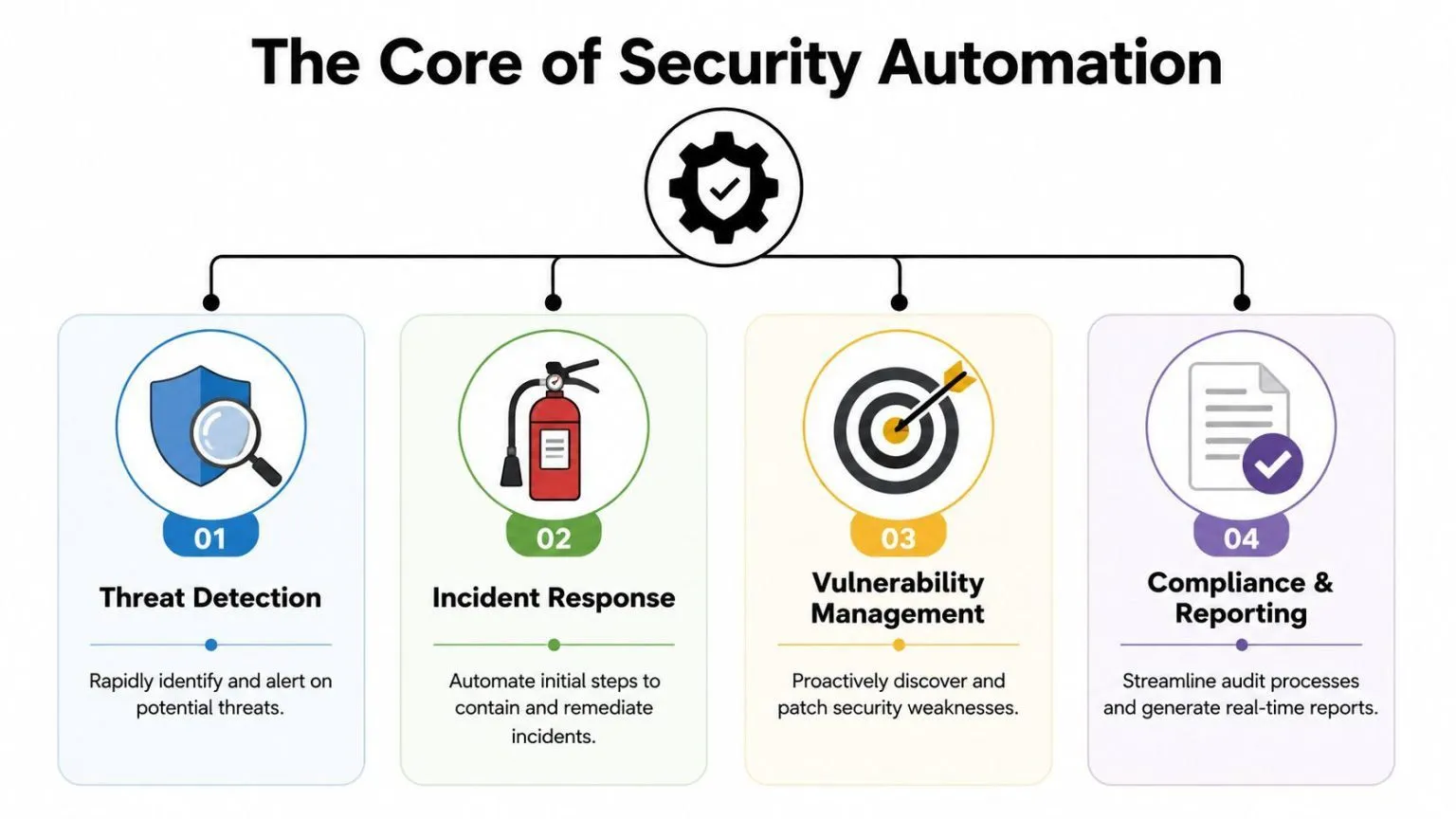
Detection automation
Detection automation answers one question fast: does this event deserve attention?
A mature detection pipeline ingests logs from endpoints, cloud services, identity providers, firewalls, and applications. It normalizes those events, applies correlation logic, and enriches alerts with threat context. Instead of handing an analyst ten isolated signals, it presents one incident with enough context to act.
Examples include:
- Impossible travel login alerts: The platform correlates identity events and flags a suspicious access pattern.
- Malware execution signals: Endpoint telemetry, hash reputation, and process lineage are tied together automatically.
- Cloud privilege changes: A ruleset identifies unusual administrative actions in cloud control planes.
Response automation
Response automation executes the first containment and remediation steps. At this stage, teams either gain trust in automation or lose it.
Good response playbooks start with actions that are reversible and low-risk. Quarantining an email, disabling a risky session, collecting volatile data, or opening a ticket are common examples. More disruptive actions, such as host isolation or account disablement, often include approval gates unless the confidence is very high.
Practical rule: Automate the actions you repeat every week. Add human approval to the actions that can interrupt business operations.
Orchestration automation
Orchestration is the connective tissue. It doesn’t just detect or respond. It coordinates tools that otherwise operate in silos.
A phishing incident is a good example. Email security flags the message. The SIEM pulls related mailbox activity. Threat intelligence checks the sender artifacts. The identity platform looks for suspicious sign-ins. The ticketing system opens a case. Chat notifications go to the right responders. None of that is useful if each task still requires a human to swivel between consoles.
APIs, Syslog, and agents play a vital role. Without integrations, “automation” becomes a script on the side. With integrations, it becomes an operating workflow.
Compliance automation
Most guides underplay this pillar, which is a mistake. Compliance automation isn’t just scheduled report generation. It’s the automatic creation of evidence during operational workflows.
When a playbook isolates a device, it should also preserve the triggering alert, the user context, the decision path, the action timestamp, and the follow-up record. That evidence shouldn’t depend on whether an analyst remembered to document it later. If your security controls and your audit trail are separate systems of work, you’re building friction into every incident.
A simple way to think about the four pillars is this:
| Pillar | Primary job | Typical output |
|---|---|---|
| Detection | Identify suspicious activity | Prioritized, enriched alert |
| Response | Contain or remediate | Executed action and case update |
| Orchestration | Coordinate multiple tools | End-to-end workflow |
| Compliance | Preserve proof of control | Searchable evidence trail |
Teams usually start with detection and response. Mature teams add orchestration. The teams that scale in regulated environments treat compliance as native to the workflow from day one.
The Business Value and ROI of Automation
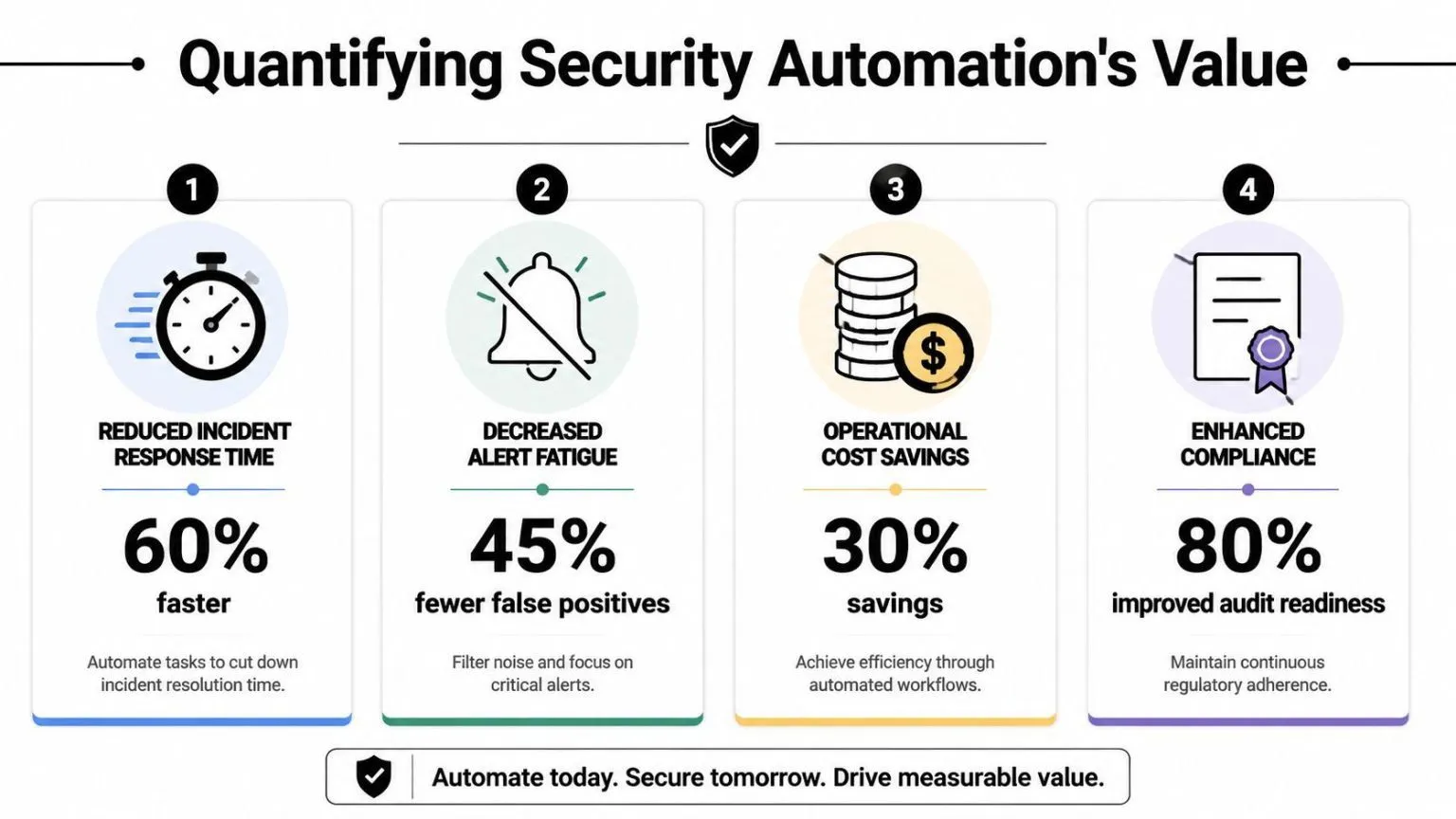
Security teams rarely win budget with abstract promises about risk reduction. They win it by showing that automation shortens response time, lowers operational cost, and produces audit evidence as part of daily work.
That last point matters more than many programs admit. A response workflow that contains an incident but leaves the team scrambling for screenshots, timestamps, approvals, and case history still carries hidden cost. The stronger model is to design automation so the same workflow that triages and responds also records evidence for auditors, internal control owners, and leadership.
Why boards approve automation programs
Boards fund security programs that tie spending to business outcomes. Automation supports that case in three concrete ways:
- Lower incident cost: Faster triage and containment reduce the time an attacker has to move, persist, or disrupt operations.
- Better use of skilled staff: Analysts spend less time on repetitive enrichment, routing, and documentation, and more time on decisions that require judgment.
- More consistent control execution: Playbooks run the same way under pressure, which reduces variation between shifts, analysts, and incident types.
Compliance belongs in the same business case. If evidence is generated during the workflow, audit preparation stops being a separate project with its own labor cost. Teams evaluating that model can look at UTMStack’s compliance management capabilities as an example of how incident handling and evidence collection can live in the same operating process.
Where the return comes from
The return on automation does not come from cutting analysts out of the loop. It comes from removing the manual steps that waste analyst time and slow down response.
In most SOCs, those steps are familiar. An alert fires. An analyst checks asset context in one tool, user activity in another, threat intel in a third, then opens a ticket, copies details into chat, and starts collecting proof for later review. Each task is reasonable on its own. Together, they create delay, inconsistency, and fatigue.
That is where ROI shows up.
A unified platform such as UTMStack changes the economics by reducing console switching and turning those tasks into one workflow. The alert is enriched, the case is created, the action is taken, and the evidence trail is preserved in the same process. That shortens mean time to respond, but it also reduces the labor tied to post-incident reporting and audit follow-up.
There is also a staffing benefit. Repetitive queues burn out good analysts and push senior responders into clerical work. Automation helps teams keep experienced people focused on exceptions, investigations, and tuning decisions instead of routine handling.
What weakens ROI
Poorly chosen automation creates cleanup work instead of savings. I see the same failure patterns repeatedly:
- Automating noisy detections before tuning the signal
- Triggering high-impact actions without approval logic or guardrails
- Building playbooks that stop at containment and ignore documentation
- Treating compliance evidence as a manual task after the incident closes
The teams that get strong returns start smaller. They choose high-volume, high-confidence use cases such as phishing triage, suspicious login response, malware containment, and privileged account changes. They define who owns each playbook, what conditions trigger action, when human approval is required, and what evidence must be captured every time.
That discipline is what turns automation into a business asset instead of a pile of scripts.
A practical way to evaluate value is simple. Measure reduced exposure, analyst hours returned to higher-skill work, faster case resolution, and cleaner audit readiness from the same workflow. If response and compliance improve together, the program is producing real ROI.
Common Architectures and Key Components
Automation fails when the architecture is fragmented. If your logs are inconsistent, your integrations are partial, or your action layer can’t enforce decisions, even a well-designed playbook becomes unreliable.
The technical backbone is straightforward. Security events flow in from multiple systems. The platform normalizes and correlates them. Response logic triggers action through connected controls. The hard part is getting each layer clean enough that automation can be trusted.
The ingestion layer
This layer collects telemetry through APIs, Syslog, and agents. In a hybrid environment, that usually means network devices, endpoint tools, identity providers, SaaS applications, cloud services, and internal infrastructure.
Data quality matters more here than teams expect. If one firewall reports actions in one format and a cloud service labels similar events differently, your correlation logic becomes fragile. The architecture has to normalize event types, timestamps, asset identifiers, usernames, and severity labels before automation can make reliable decisions.
Effective automation requires the collection and normalization of security events from multiple sources into a centralized SIEM or SOAR platform that uses correlation rules to identify suspicious activity, often processing over 30 billion IOC elements, as described by UTMStack’s platform overview.
For teams building this foundation, centralized log management is usually the first real milestone. Without centralized telemetry, every downstream automation decision is weaker.
The decision layer
The central brain is usually a SIEM, SOAR, or a combined platform. This layer correlates events, enriches them with threat intelligence, and decides whether a workflow should start.
A strong decision layer does more than trigger rules. It also reduces noise. It should merge duplicate detections, attach contextual data, map incidents to assets and users, and record why a playbook took a specific action. In regulated environments, that decision record becomes just as important as the response itself.
This is also where privacy and governance concerns enter the design. Automated systems that process identity data, endpoint events, and application logs need careful boundaries around retention, access, and data use.
The action layer
The action layer connects automation to enforcement, enabling playbooks to talk to EDR tools, firewalls, email security platforms, ticketing systems, IAM platforms, and collaboration tools.
Typical actions include:
- Containment actions: isolate an endpoint, revoke a token, disable an account, quarantine a message.
- Investigation actions: collect host details, fetch related logs, enrich file hashes, query recent sign-ins.
- Workflow actions: create a case, notify a responder, update a CMDB record, attach evidence to a ticket.
The strongest architecture isn’t the one with the most integrations. It’s the one where each integration supports a clear, tested decision path.
Many teams overbuild here. They connect everything before defining what should happen when an alert fires. A better sequence is to start with one incident type, map the telemetry path, define the response path, then add integrations only where they remove friction or increase confidence.
Measuring Success with the Right Metrics and KPIs
Security leaders often say automation is helping because the team feels less overwhelmed. That’s useful, but it isn’t enough. If you want sustained investment, you need metrics that reflect operational change.
The most important pair is MTTD and MTTR. MTTD tells you how quickly the team identifies a real incident. MTTR tells you how quickly the team contains or resolves it. In automation programs, MTTR is usually where the first big gains appear because playbooks remove the lag between triage and first action.
Organizations using SOAR platforms can reduce MTTR by up to 80%, according to IBM’s SOAR overview. That matters because the attacker’s window of opportunity shrinks when containment starts immediately instead of waiting in a queue.
Metrics that reflect real operational change
MTTD and MTTR are essential, but they aren’t enough on their own. A team can make MTTR look better by closing low-quality incidents quickly. The KPI set needs enough context to show whether automation is improving the operation or shifting numbers.
Use a scorecard like this:
| KPI | What it tells you | What good looks like |
|---|---|---|
| MTTD | Detection speed | Alerts reach analysts with enough context to act quickly |
| MTTR | Response speed | First containment happens without waiting on manual triage |
| Automation rate | Workflow coverage | Routine incidents are handled without manual handoffs |
| Escalation quality | Trust in playbooks | Analysts receive fewer but better cases |
| Evidence completeness | Audit readiness | Each incident leaves a consistent activity record |
Notice what’s absent. Vanity metrics. Counting total alerts processed can be misleading if the platform is still flooding the team with noise.
A practical KPI scorecard
A useful measurement cadence mixes trend review with incident review.
- Track workflow-level MTTR: Measure by playbook, not just by SOC aggregate.
- Review exception paths: Count where automation paused, failed, or needed override.
- Sample evidence quality: Check whether incidents include timestamps, triggering indicators, response actions, and approvals.
- Compare analyst time allocation: Look for movement away from repetitive triage toward investigation and improvement work.
One operational lesson stands out. Metrics need ownership. If nobody owns a playbook’s performance, the workflow degrades subtly. Rules get noisy. Integrations break. Analysts start bypassing automation because it’s easier than fixing it.
Good KPI design measures both speed and trust. Fast automation that analysts constantly override isn’t maturity. It’s a warning sign.
The teams that scale automation in security don’t only ask, “Did the playbook run?” They ask, “Did it produce the right outcome, with the right evidence, and did the team trust it enough to keep using it?”
Automation in Action Real World Use Cases and Playbooks
Playbooks make automation real. Without them, most discussions stay abstract. The value shows up when a detection triggers a repeatable sequence across tools and the system handles the first wave of response before an analyst even opens the case.
Phishing triage and containment
Phishing is a strong first use case because the workflow is repetitive and the response path is well understood.
A typical playbook starts when email security or a user-reported mailbox event creates an alert. The system extracts sender details, URLs, attachments, and message headers. It then checks those artifacts against internal reputation data and threat intelligence sources. Next, it searches for similar messages across other mailboxes and correlates the email event with recent user sign-in activity.
At that point, the playbook can take several actions in sequence:
- Quarantine matching emails across affected inboxes.
- Open or update a case in the ticketing system with the message artifacts attached.
- Notify the affected user and the SOC channel.
- Escalate for analyst review if the campaign appears targeted or if credentials may have been entered.
- Preserve evidence by recording the trigger, enrichment results, timestamps, and actions taken.
The difference between a weak and strong phishing playbook is context. If the system only deletes messages, it may stop one symptom while missing the larger campaign. If it also checks mailbox spread, user activity, and related indicators, the team gets a fuller operational picture.
Ransomware containment
Ransomware response has less tolerance for delay, so the playbook needs high-confidence triggers and a cautious design.
A practical workflow often begins with endpoint telemetry that suggests suspicious encryption behavior, mass file modification, or a malicious binary chain. The platform correlates that event with host activity, user context, and network signals. If confidence crosses the defined threshold, the playbook initiates containment.
A disciplined sequence looks like this:
- Isolate the endpoint through the EDR platform.
- Disable or limit user access if identity abuse is suspected.
- Block related indicators at the firewall or email layer if relevant.
- Collect forensic context such as process lineage, recent detections, and linked assets.
- Create an incident record with the action history and evidence package.
As such, incident response automation becomes especially useful. The workflow has to move quickly, but it also has to leave a complete record of what triggered the action and what the platform did in response.
A common mistake is trying to automate full remediation too early. Initial containment is usually the right boundary. Root cause analysis, recovery decisions, legal review, and broader business coordination still need humans.
Privileged access misuse
The third use case is quieter but just as important. Suspicious use of privileged accounts often appears as a series of small anomalies rather than one dramatic alert.
A playbook might start with an unusual admin login, an unexpected privilege change, or a sensitive system access event outside the normal pattern. The platform correlates identity events, host activity, and change logs. It then checks whether the account belongs to an approved maintenance window or known administrative workflow.
If the activity looks risky, the automation can:
- Step up identity controls by revoking active sessions or forcing a reset.
- Gather related changes from recent configuration and access logs.
- Notify both security and system ownership teams because access misuse often crosses operational boundaries.
- Attach a compliance-ready activity trail to the case for later review.
This use case is where compliance-aware automation really starts to pay off. When the system records not just what happened but also which control was invoked, later audit and investigation work become much cleaner.
Your Roadmap to Implementing and Scaling Automation
Teams get value from automation when they sequence it well. Programs stall when the first wave tries to automate high-risk decisions before telemetry, ownership, and evidence handling are stable.
A better roadmap starts with one question: which recurring decisions consume analyst time, follow a clear pattern, and can produce a defensible record every time? That is the right starting set because it improves response speed and reduces audit friction at the same time.
Start with low-regret automations
Start with use cases that have low blast radius and high frequency. Good first candidates include phishing enrichment, alert deduplication, evidence collection, user notification, and ticket creation. Those tasks remove queue noise and save analyst time without creating the kind of operational disruption that comes from premature auto-containment.
A practical rollout pattern looks like this:
- Stabilize telemetry first: Normalize logs, fix asset and identity naming, and verify time sync across sources.
- Choose one playbook family: Pick phishing, endpoint triage, or suspicious login handling, then tune it before expanding.
- Separate enrichment from action: Gather context first. Add containment only after the team trusts the inputs and thresholds.
- Use approval gates for disruptive steps: Keep analysts or system owners in the loop for account lockouts, host isolation, or policy changes.
- Review outcomes on a fixed cadence: Tune thresholds, exception paths, and evidence fields based on what incidents exposed that week.
This is the point where many security teams either gain momentum or create rework. If the first automations are noisy or hard to explain, confidence drops fast.
Design playbooks for evidence, not just speed
Response time matters. So does proving what happened, why the system acted, and which control requirement that action satisfied.
Teams run into trouble when they automate containment but leave evidence capture as a manual task. The incident may be handled faster, but the audit trail is fragmented across tickets, chat threads, and analyst notes. Later, someone has to reconstruct the decision path under pressure.
Build each playbook with two outputs from the start: an operational result and a compliance result.
| Playbook element | Operational output | Compliance output |
|---|---|---|
| Detection trigger | Incident starts | Rule logic and source event recorded |
| Enrichment step | Context added | Artifact history preserved |
| Response action | Threat contained | Timestamp, actor, and system action logged |
| Escalation path | Analyst review | Approval, exception, or override captured |
That design choice changes the economics of the program. The same workflow that reduces mean time to respond also reduces audit prep time, control testing effort, and post-incident documentation work. Compliance stops being a separate reporting project and becomes a real-time byproduct of daily operations.

A unified platform approach
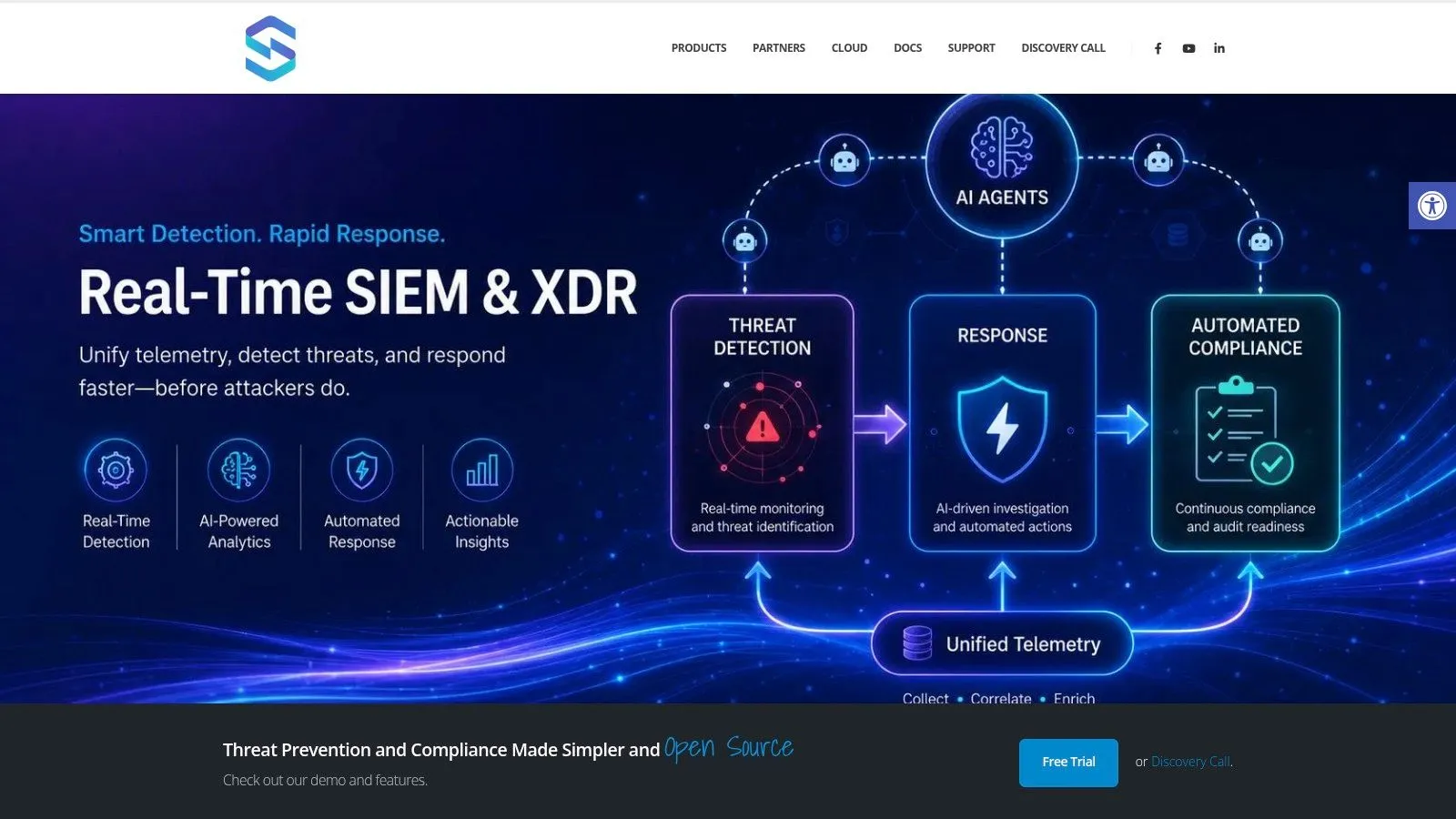
As automation scales, handoffs between separate SIEM, SOAR, XDR, ticketing, and compliance tools become a design problem, not just a tooling inconvenience. Data models drift. Case context gets lost. Control evidence lives in one place while response actions live in another.
A unified platform such as UTMStack reduces that fragmentation by bringing telemetry ingestion, correlation, playbook execution, and evidence retention into one operating model. In practice, that means the team can trigger a response, preserve the source artifacts, record approvals, and map the activity to frameworks such as HIPAA, CMMC, SOC 2, ISO 27001, PCI, GDPR, and GLBA without stitching those steps together by hand.
That matters for scale. Security leaders need more than scripts that save a few minutes per alert. They need an architecture that produces consistent actions, consistent records, and lower operating cost as alert volume grows.
The implementation lesson is straightforward. Treat automation as a control system with three defined flows: event flow, action flow, and evidence flow. If those flows are explicit, the program can move faster, contain risk earlier, and generate compliance-ready output as part of normal response work.
Security automation delivers the strongest return when it cuts analyst workload and produces a clean audit trail from the same workflow. If you’re evaluating a unified way to handle detection, response, and compliance workflows, UTMStack is worth reviewing as part of that architecture shortlist.