
Your SIEM is firing, your EDR is blocking known malware, and your team is still asking the uncomfortable question that matters most. What did we miss? That question is why mature security programs invest in threat hunting instead of relying only on alerts, signatures, and canned detections.
Threat hunting works best when it’s treated as an operational discipline, not a heroic exercise run by one senior analyst on a Friday afternoon. The strongest teams start with a hypothesis, pull the right telemetry, test that hypothesis with focused queries, then convert what they learn into durable detections and response playbooks. That matters even more now because living off the land has become the most prevalent technique used by nation-state threats, with 76% of organizations observing those behaviors in nation-state attacks during 2025, according to the Intel 471 summary of the SANS 2025 Threat Hunting Survey.
The market momentum around hunting reflects that operational shift. Fortune Business Insights projects the global threat hunting market to reach USD 14.16 billion by 2034, expanding at a CAGR of 15.14% from 2026 to 2034, after a 2025 value of USD 3.98 billion and projected growth to USD 4.58 billion in 2026, as noted in its threat hunting market forecast. But budget growth alone won’t make hunts effective. Good hunts come from repeatable methods, clean telemetry, disciplined tuning, and fast translation from hypothesis to action.
This guide focuses on threat hunting techniques that SOC teams can run. Each one includes a practical hypothesis, the telemetry you need, example queries, automation ideas, and tuning advice for SIEM, XDR, and SOAR workflows in hybrid environments.
1. Behavioral Analytics and User Entity Behavior Analytics (UEBA)
UEBA is where many teams finally start seeing the attacks that signature logic misses. Instead of asking whether a file hash is known-bad, you ask whether a user, service account, host, or admin session is acting outside its normal pattern. That’s how you catch compromised identities, insider misuse, and low-noise lateral movement.
A practical hunting hypothesis looks like this: a privileged user or service account is accessing systems, data, or admin tools in a way that doesn’t fit its established role. In real environments, that often surfaces as an administrator touching file shares they never use, a service account suddenly authenticating interactively, or an employee downloading sensitive data at an unusual time from a new device.

Build the Hunt Around Risky Behavior
Pull identity provider logs, Active Directory events, VPN activity, cloud IAM telemetry, endpoint process data, and file access events. If you’re using a platform with behavior anomaly detection, build profiles by role first. That’s usually more stable than building one baseline per individual because people change projects, schedules, and devices constantly.
Example queries should focus on first-time or rare activity:
- Rare admin access: Find privileged accounts connecting to servers or shares they haven’t touched in the established baseline period.
- Service account misuse: Search for service accounts with interactive logons, remote desktop use, or command-shell execution.
- Lateral movement clues: Identify one account authenticating across multiple hosts in a short sequence, especially when that account normally stays scoped to one application or server tier.
Practical rule: UEBA works when analysts tune for context, not novelty alone. Rare activity isn’t automatically malicious.
For SOAR, create playbooks that enrich the user with manager, department, asset criticality, prior alerts, MFA status, and recent password changes. If the risk is high, trigger step-up authentication, disable the session token, or isolate the endpoint tied to the anomaly. Tuning matters more than model complexity. Start conservative, separate human users from service accounts, and suppress known maintenance windows so your hunters don’t waste time on scheduled admin work.
2. Threat Intelligence Integration and IOC Correlation
IOC correlation is still valuable, but only when teams treat it as a fast filtering method instead of a full hunting strategy. Good hunters use indicators to validate suspicion, sweep the environment, and uncover related activity around the match. They don’t stop at “hash matched, case closed.”
The working hypothesis here is simple. A known malicious indicator has touched your environment, and there may be adjacent hosts, identities, or communications that your automated detections didn’t fully connect. This is especially useful for phishing infrastructure, malware staging domains, suspicious URLs in email logs, and retrospective hunts after a vendor or internal team flags new indicators.
Use IOCs as a Starting Point, Not the End State
Required telemetry includes DNS, proxy, firewall, email gateway, EDR, web server, and endpoint file execution logs. UTMStack’s platform description states that it maintains more than 30 billion IOC elements, which is useful for rapid enrichment and broad matching across ingested data. The operational challenge isn’t finding indicators. It’s deciding which ones deserve analyst time.
Try a hunt sequence like this:
- Inbound phishing pivot: Match domains or URLs from recent phishing reports against email gateway logs, then pivot to endpoint browser history and identity events from users who clicked.
- Malware retrohunt: Search historical EDR and file telemetry for a new hash or domain, then review parent process, user context, and subsequent network calls.
- Infrastructure correlation: Match one suspicious IP in firewall logs, then identify all internal assets that communicated with it and whether those assets share a user, subnet, business unit, or software stack.
SOAR should enrich every hit with prevalence, first-seen, last-seen, asset criticality, and whether the indicator appears in email, DNS, proxy, and endpoint logs together. Tuning tip: down-rank low-confidence feed matches unless they align with hostile behavior in your own data. IOC-only hunts tend to generate noise. IOC-plus-context hunts produce cases worth escalating.
3. Anomaly Detection via Log Pattern Analysis
At 02:13, a payment application starts returning a new class of authentication errors. Ten minutes later, the same host makes outbound DNS requests it has never made before. No IOC matches. No signature fires. That is the kind of gap log pattern analysis is built to close.
This hunt works when the team treats logs as evidence, not just retention. The hypothesis should be explicit: a compromised user, host, or application will produce a sequence, frequency, or combination of events that breaks its normal operating pattern before controls label it as malicious. That makes telemetry quality part of the hunt itself. If timestamps drift, parsers flatten useful fields, or a key source is missing, analysts can end up chasing ingestion faults instead of attacker behavior.
The required telemetry is broader than many teams expect. Pull in authentication logs, application logs, Windows and Linux system events, DNS, proxy, NetFlow, cloud audit trails, EDR metadata, and security device logs. Centralize them in a platform built for centralized log management before building baselines, or the hunt will be skewed by coverage gaps and field inconsistencies.
Build the Hunt Around a Baseline and a Testable Hypothesis
A practical starting hypothesis is simple: systems and users have repeatable patterns by role, time window, peer group, and business cycle. Adversaries disturb those patterns. The signal is often a rare sequence rather than a single noisy event.
Examples that produce good results in production SOCs:
- Authentication spike hunt: A password spray or scripted abuse attempt will create a short-lived rise in failures across many accounts, subnets, or hosts, often outside normal work hours.
- Rare destination hunt: A server or user endpoint will contact a domain, ASN, or geography that is unusual for its role, especially when paired with new processes or service accounts.
- Application drift hunt: A line-of-business system will emit new error codes, new log source pairings, or privilege-related events that do not fit recent change activity.
A baseline that ignores patch windows, quarter-end finance processing, backups, and developer release cycles will generate noise fast.
Example Queries and What to Look For
In Splunk, a failed-logon spike hunt can start with a time-bucketed comparison by host and user:
index=auth sourcetype=wineventlog EventCode=4625
| bin _time span=15m
| stats count dc(user) as unique_users by _time, host, src_ip
| eventstats avg(count) as avg_failures stdev(count) as stdev_failures by host
| where count > avg_failures + (3*stdev_failures)
| sort - count
What matters is not the query alone. Review whether the spike is concentrated on one account set, spread across many hosts, or tied to a single source IP range. That distinction separates a mistyped password burst from broad password spraying.
In Microsoft Sentinel, KQL is useful for finding rare outbound destinations from assets that normally stay quiet:
CommonSecurityLog
| where DeviceAction == "allow"
| summarize conn_count=count() by DeviceName, DestinationHostName, bin(TimeGenerated, 1d)
| join kind=leftouter (
    CommonSecurityLog
    | where TimeGenerated between (ago(30d) .. ago(1d))
    | summarize baseline_days=dcount(bin(TimeGenerated, 1d)) by DeviceName, DestinationHostName
) on DeviceName, DestinationHostName
| where baseline_days < 3 and conn_count > 20
| sort by conn_count desc
For Elastic, rare process and command combinations often expose hands-on-keyboard activity:
FROM logs-endpoint.events.process-*
| STATS executions = COUNT(*) BY host.name, process.name, process.command_line
| WHERE executions < 3
| SORT executions ASC
These queries are starting points. Production hunts usually need allowlists for management servers, vulnerability scanners, backup infrastructure, software deployment tools, and known admin jump boxes.
SOAR Actions and SIEM/XDR Tuning
SOAR should do the first triage pass automatically. For an anomaly hit, enrich the alert with asset role, owner, criticality, change-ticket context, recent vulnerability scan activity, recent software deployment events, and whether the same entity also triggered DNS, proxy, or EDR anomalies in the last 24 hours. If the anomaly crosses multiple telemetry types, open a case. If it maps cleanly to a planned change or batch process, close it with the evidence attached.
Tuning is where this technique succeeds or fails:
- Split baselines by asset role, department, and day type.
- Compare entities against peer groups, not global averages.
- Suppress known maintenance windows and recurring batch jobs.
- Score multi-signal anomalies higher than single-event outliers.
- Keep a review loop with engineering teams so new applications and service accounts are baselined quickly.
The trade-off is straightforward. Tight thresholds catch early abuse but create analyst drag. Loose thresholds reduce queue volume but miss low-and-slow activity. The right balance usually comes from tuning for sequences and context, not just counts. A quiet database server with new external DNS behavior and failed privileged logons deserves attention even if each event stream looks minor on its own.
4. Hunt via MITRE ATT&CK Framework and Tactic Mapping
ATT&CK-based hunting is useful because it stops teams from chasing artifacts in isolation. Instead of saying, “find suspicious PowerShell,” you ask, “which techniques tied to execution, persistence, credential access, or exfiltration are realistic in our environment, and what telemetry would prove or disprove them?” That produces much better hunts.
A practical hypothesis might be that an adversary already has initial access and is moving into discovery or lateral movement using common techniques. Rather than enumerate every possible sub-technique, pick one tactic path that matches your environment. In a Windows-heavy estate, remote service use, abuse of elevation controls, and credential access often provide better hunting value than obscure malware families.
Start with the Technique, Then Trace the Chain
Hunt evidence across endpoint telemetry, Windows security events, PowerShell logs, DNS, firewall logs, cloud control plane logs, and identity data. Then map confirmed findings to ATT&CK IDs in your SIEM or case management flow. That discipline matters because the 2024 SANS Threat Hunting Survey, as summarized by Hunt.io, found that 63% of organizations observed measurable improvements in security posture after implementing threat hunting, and it highlights approaches such as hypothesis-driven, indicator-based, and custom situational hunting mapped to ATT&CK in the overview of threat hunting techniques.
Good ATT&CK hunts usually follow a chain like this:
- Technique hypothesis: Search for remote service session initiation, suspicious privilege changes, or exfiltration over unexpected channels.
- Corroboration step: Check whether the same host also shows discovery commands, unusual authentication paths, or archive creation.
- Containment logic: If multiple techniques align on one asset or identity, escalate immediately rather than waiting for malware confirmation.
“Hunt by behavior, not by family name” is still the advice that scales best.
For SOAR, attach ATT&CK tags to detections and let playbooks branch by tactic. Credential access should trigger account safeguards and memory-collection options. Exfiltration should trigger DLP validation and network containment. Tuning tip: don’t map everything at once. Start with the techniques your team can observe with confidence.
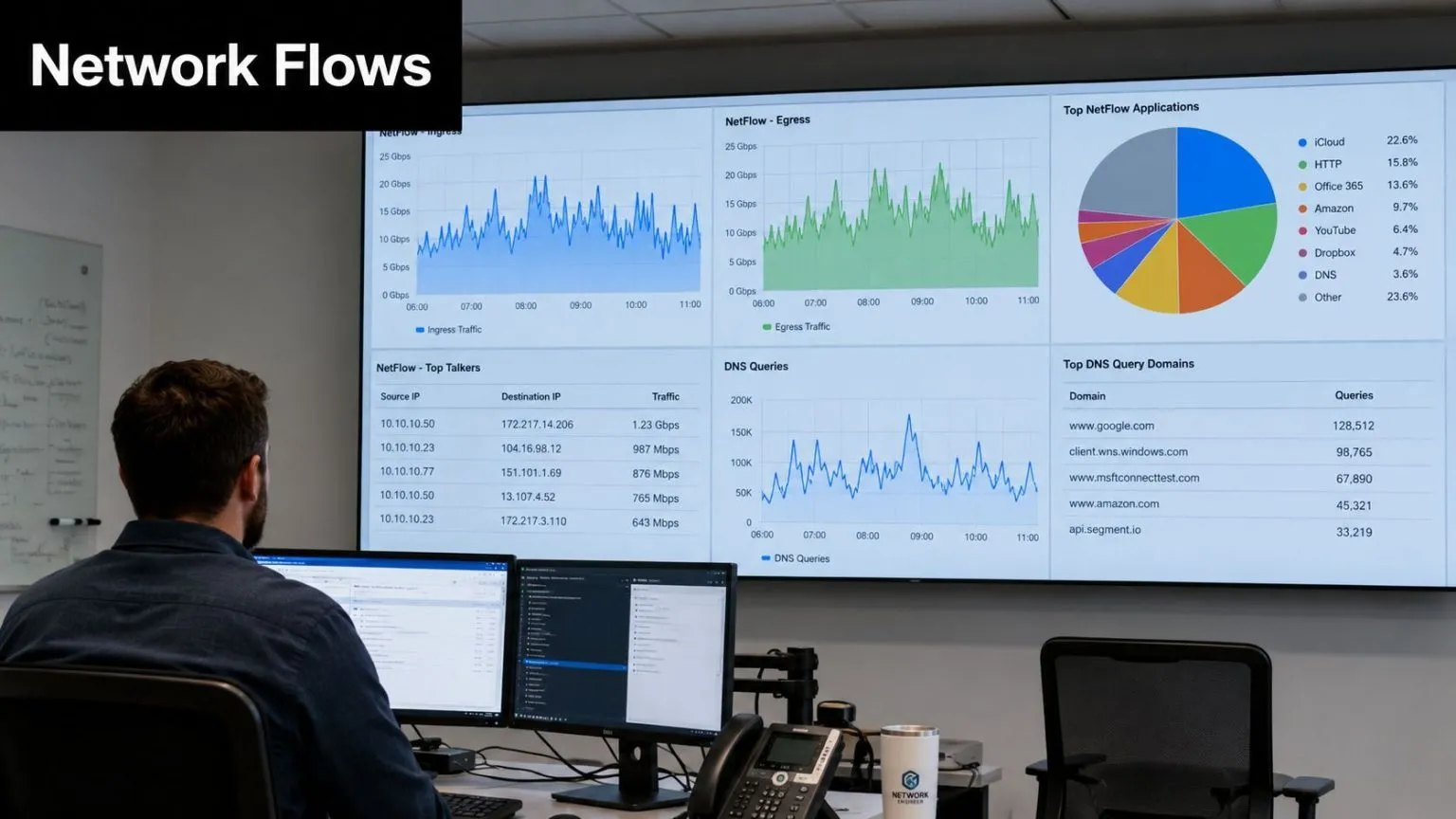
5. Network Traffic Analysis (NTA) and DNS NetFlow Hunting
When endpoint visibility is weak, encrypted, or partially bypassed, the network often tells the story anyway. Beaconing, DNS tunneling, odd east-west traffic, long-lived outbound sessions, and strange TLS relationships regularly surface in NetFlow and DNS before an analyst sees the full compromise on the host.
The hunting hypothesis is that an infected or misused system is communicating in a way that breaks its expected network profile. That may be command-and-control traffic, staging for exfiltration, peer-to-peer lateral movement, or cloud workload drift that doesn’t fit the application design.
Watch the Network When Endpoints Go Quiet
Collect NetFlow or IPFIX, firewall logs, DNS query logs, proxy logs, SSL or TLS metadata, and endpoint process-to-connection telemetry where available. If your stack supports network device monitoring, correlate flows with device role and owner before raising cases. A backup appliance and an HR laptop should never share the same egress expectations.
Use hunt queries that emphasize repetition and rarity:
- Beaconing pattern: Find regular outbound connections with similar byte counts and intervals from one host to one destination.
- DNS abuse: Hunt for unusually long query names, high-frequency TXT requests, or bursts of requests to rare domains.
- Lateral movement: Identify peer-to-peer communication between workstations or cross-segment traffic that bypasses expected admin jump paths.
SOAR can enrich a suspicious destination with passive DNS, prior internal contacts, whois context, and whether any endpoint processes initiated the connection. Then it can block the domain, isolate the host, or trigger packet capture on the affected segment. Tuning tip: maintain allowlists for content delivery networks, software updaters, and sanctioned remote management platforms. If you don’t, beacon hunts become a list of normal SaaS behavior.
6. File Integrity Monitoring (FIM) and Registry Monitoring
FIM is one of the clearest ways to spot persistence and tampering, but only if you focus it narrowly. Teams that monitor every file change on every server usually bury themselves in noise. Teams that target startup locations, admin tools, sensitive configuration files, and privileged execution paths get useful results.
The hypothesis is that an attacker has changed a protected file, registry key, startup item, or permission set to establish persistence, weaken controls, or prepare for privilege escalation. On Linux, that often means changes under /etc, cron locations, SSH configuration, or privileged binaries. On Windows, it usually means registry autoruns, services, scheduled tasks, system binaries, or security-relevant configuration.
Focus on High-Value Change, Not Every Change
Required telemetry includes file change events, hash changes, permission changes, registry modifications, software inventory, and identity or process context for who made the change. The most important correlation isn’t the file event itself. It’s the change plus the parent process, user, host criticality, and timing.
Strong hunts often include:
- Persistence checks: Find modifications to startup folders, autorun keys, scheduled tasks, service definitions, or shell extensions.
- Privilege paths: Search for changes to
sudoers, PAM configuration, local group membership artifacts, or Windows security settings tied to elevation. - Binary trust drift: Flag executable replacements in protected directories where the new hash, signer, or modification path is suspicious.
SOAR should pull the before-and-after values, the initiating process, the signed status of the file, and the change ticket if one exists. If the change is unauthorized, restore the prior state where safe, isolate the host, and open an incident with the artifact preserved. Tuning tip: whitelist your patching tools, package managers, and approved admin scripts. Without that, routine maintenance will look hostile every day.
7. Process Execution and Command-Line Analysis
If I had to choose one hunting view for Windows-heavy environments, it would be process trees with command-line arguments. In this view, living-off-the-land activity, script abuse, defense evasion, and hands-on-keyboard tradecraft show up with enough context to matter.
The hypothesis is that a process chain or command line reflects attacker behavior even when the binary itself is legitimate. A signed copy of powershell.exe, wmic.exe, rundll32.exe, mshta.exe, certutil.exe, or bitsadmin.exe isn’t suspicious on its own. The parent process, arguments, execution directory, network follow-on, and user context are what turn it into a real lead.
Process Chains Expose What Static Signatures Miss
Collect Sysmon or Windows Event ID 4688, PowerShell logs, script block logs, endpoint network telemetry, file creation events, and module loads. Then hunt for parent-child relationships that don’t make operational sense, such as Office spawning command interpreters, browser processes launching script engines, or remote admin tools started by low-privilege users.
Useful hunts include:
- Encoded script execution: Search for command lines containing encoded content, unusual argument lengths, or obfuscation patterns.
- LOLBin misuse: Find trusted utilities launched from temp directories, user profile paths, or strange parents.
- Attack framework traces: Hunt for process injection side-effects, credential dumping utilities, or remote execution tools like PsExec and Impacket components.
Attackers rely on the fact that many defenders still alert on filenames instead of execution context.
SOAR can enrich the process with signer info, parent lineage, recent network connections, loaded modules, and whether the same command appeared on multiple hosts. Tuning tip: build suppression around your software deployment tools, remote support agents, and admin automation platforms. Then make your detections stricter everywhere else. That split catches a lot of abuse without drowning the SOC.
8. Credential Access and Authentication Anomaly Hunting
Identity telemetry usually gives you earlier warning than malware telemetry. Attackers can swap tools quickly, but they still need to authenticate, escalate privileges, pivot, and maintain access. That leaves traces in Active Directory, cloud IAM, VPN, SSO, application logs, and federation services.
The working hypothesis is that stolen, guessed, reused, or over-privileged credentials are being used in ways that differ from the account’s expected pattern. In enterprise environments, that often shows up as password spraying, impossible travel, first-time authentication sources, MFA fatigue behavior, unusual service account use, or sudden privilege changes.
Identity Telemetry Usually Reveals the Breach Early
The most practical datasets are domain controller logs, IdP logs, VPN records, cloud audit logs, MFA events, Kerberos events, and privileged access management records. Segment your hunts by account type. Human users, service accounts, break-glass admins, and workload identities should never share one baseline because their behavior is fundamentally different.
Try hypotheses such as:
- Password spray or stuffing: Look for many failed attempts across many accounts from one source or a tight source cluster.
- Privilege misuse: Identify users who authenticate successfully and then reach systems, admin portals, or roles outside their historical pattern.
- Cloud-native identity drift: Hunt for short-lived role assumptions, unusual token use, or transient privilege escalation in cloud environments where hosts may disappear before endpoint telemetry is preserved.
This last point matters because cloud-first teams can’t rely on the same artifact-heavy approach they use on laptops and servers. Focus on access paths, role changes, API calls, and identity context in real time.
SOAR should validate whether the authentication came from a managed device, known ASN, expected geography, and approved access policy. For high-risk results, revoke tokens, require password reset, block source IPs where appropriate, and open a review of group membership or role assignments. Tuning tip: maintain separate logic for service accounts. Their quiet misuse is common, and generic impossible-travel logic often misses them.
9. Data Exfiltration Detection and DLP-Based Hunting
Exfiltration hunts fail when teams look only for giant transfers. Real exfiltration is often staged. Data gets collected, compressed, renamed, moved, synchronized to cloud storage, or sent out in smaller bursts. If you only alert on one huge outbound event, you’ll miss a lot of theft.
The hypothesis is that a user, host, or workload is preparing or executing unauthorized movement of sensitive information. That can involve databases, file shares, object storage, personal cloud drives, email forwarding, removable media, or command-line archive tools paired with outbound sessions.
Treat Exfiltration as a Sequence, Not a Single Event
Pull DLP alerts, file access logs, endpoint telemetry, proxy logs, email logs, cloud audit trails, database query logs, and removable media events. Then correlate user role, data sensitivity, and destination type. A finance analyst exporting reports isn’t the same as a developer downloading HR records or a service account pushing archives to an unsanctioned destination.
Good hunts usually chain events:
- Collection stage: Sensitive files are enumerated, copied, archived, or queried in unusual volume.
- Staging stage: Data moves to temp directories, user profile folders, cloud sync paths, or compressed archives.
- Exit stage: The same host or user initiates outbound uploads, personal email sends, cloud sync, or USB writes.
SOAR playbooks should classify the data involved, notify data owners, suspend the transfer where possible, and isolate the device if the movement appears deliberate and unauthorized. Tuning tip: baseline by user role and business process. Executives, legal teams, developers, and support staff all move data differently. Without that context, DLP hunting produces either silence or chaos.
10. Vulnerability Assessment, Patch Gap, and Malware EDR Hunting
Exposure management and active threat hunting converge. A vulnerability scan tells you where you’re weak. EDR tells you whether anyone is trying to exploit that weakness or has already landed on the box. The primary value comes from correlating the two, not treating them as separate programs.
The hunt hypothesis is that a vulnerable or poorly maintained asset is either showing signs of exploitation or presenting the shortest path for an adversary already inside the environment. That applies equally to unpatched operating systems, outdated middleware, unsupported web applications, vulnerable plugins, and weakly monitored legacy systems.
Correlate Exposure with Active Behavior
The underserved operational problem here is turning hunts into durable detections without creating unmanageable noise. In many mid-sized SOCs, manual hunts lead to new rules that later get disabled because tuning is weak. Existing guidance rarely helps teams validate those rules before deployment, especially in open-source SIEM environments where analysts carry more of the tuning burden.
Use vulnerability scan results, asset inventory, EDR process telemetry, memory and behavioral detections, firewall logs, web logs, and threat intel enrichment together. Then ask better questions than “is it vulnerable?” Ask whether the vulnerable asset is internet-facing, whether exploit-like behavior appears in logs, and whether that host also shows suspicious process chains, new persistence, or unusual outbound communication.
Strong hunts include:
- Exploit path correlation: Identify exposed or high-value systems with known weaknesses and then inspect web logs, authentication logs, and EDR telemetry for exploitation patterns.
- Malware plus weakness: Find hosts with suspicious memory behavior, injection indicators, archive creation, or ransomware-like file activity, then check whether they were behind on critical patches or running unsupported software.
- Compensating control validation: Review vulnerable assets that can’t be patched yet and confirm segmentation, application control, monitoring depth, and SOAR containment actions are in place.
SOAR should enrich cases with owner, patch status, business criticality, known controls, and the nearest response option, such as isolation, blocking, or emergency change creation. Tuning tip: prioritize detections around vulnerable assets that are externally reachable, hold sensitive data, or show attack-chain evidence in more than one telemetry source. That’s how you keep EDR and vulnerability hunting focused on risk instead of volume.
10-Point Threat Hunting Techniques Comparison
| Technique | Implementation Complexity 🔄 | Resource Requirements ⚡ | Expected Outcomes 📊⭐ | Ideal Use Cases 💡 | Key Advantages ⭐ |
|---|---|---|---|---|---|
| Behavioral Analytics and User Entity Behavior Analytics (UEBA) | High 🔄🔄🔄, ML baselines, integration effort | High ⚡⚡⚡, large historical data, compute, storage | Strong anomaly detection; reduced insider dwell time 📊⭐⭐⭐ | Hybrid infra, compromised accounts, insider threat detection 💡 | Detects novel attacks and credential abuse; continuous learning ⭐ |
| Threat Intelligence Integration and IOC Correlation | Medium 🔄🔄, feed ingestion and enrichment | Medium–High ⚡⚡, feed subscriptions, storage, curation | Rapid identification of known IOCs; faster MTTD 📊⭐⭐ | Known-malware detection, incident response, retrospective hunts 💡 | Fast, confident detection of known indicators; evidence for investigations ⭐ |
| Anomaly Detection via Log Pattern Analysis | Medium 🔄🔄, baselining and tuning | Medium ⚡⚡, log collection, parsing, retention | Detects novel attacks and misconfigurations; explainable alerts 📊⭐⭐ | Broad log sources, config drift detection, observability use cases 💡 | Low overhead; works across diverse log sources; seasonal adjustment possible ⭐ |
| Hunt via MITRE ATT&CK Framework and Tactic Mapping | High 🔄🔄🔄, expertise and mapping maintenance | Medium ⚡⚡, analyst time, mapping tools | Structured, repeatable hunts; improved detection coverage 📊⭐⭐⭐ | Threat hunting programs, gap analysis, SOC maturity building 💡 | Standardized methodology; visibility into attack chains and predictions ⭐ |
| Network Traffic Analysis (NTA) and DNS/NetFlow Hunting | Medium–High 🔄🔄🔄, network taps and flow tooling | Medium ⚡⚡, flow storage, sensors, aggregation | Detects C2, exfiltration, lateral movement missed by hosts 📊⭐⭐ | Encrypted traffic analysis, C2 detection, segmented networks 💡 | High detection value with lightweight collection; works without agents ⭐ |
| File Integrity Monitoring (FIM) and Registry Monitoring | Medium 🔄🔄, agent rollout and tuning | Medium ⚡⚡, agents, storage for change history | Early tamper detection and forensic evidence generation 📊⭐⭐ | Critical servers, configuration tracking, compliance audits 💡 | Early persistence/rootkit detection; low FP rate when tuned ⭐ |
| Process Execution and Command-Line Analysis | Medium 🔄🔄, endpoint agents and rule creation | Low–Medium ⚡⚡, endpoint telemetry (Sysmon/EDR) | Detects suspicious process chains and LOLBin abuse 📊⭐⭐ | Endpoint-focused hunts, privilege escalation, malware behavior analysis 💡 | Effective against living‑off‑the‑land techniques; low runtime overhead ⭐ |
| Credential Access and Authentication Anomaly Hunting | Medium 🔄🔄, centralizing diverse auth logs | Medium ⚡⚡, auth log collection, baselining | Early detection of compromised accounts; reduce lateral movement 📊⭐⭐⭐ | Identity protection, MFA validation, impossible‑travel detection 💡 | High-value early warning for account compromise; actionable lockdowns ⭐ |
| Data Exfiltration Detection and DLP-Based Hunting | High 🔄🔄🔄, content inspection and baselines | High ⚡⚡⚡, DLP tooling, content analysis, storage | Prevents data breaches; detects insider exfiltration attempts 📊⭐⭐ | Data protection (GDPR/HIPAA), insider threat, pre‑breach detection 💡 | Preventive containment and compliance support; content-aware detection ⭐ |
| Vulnerability Assessment, Patch Gap, and Malware/EDR Hunting | High 🔄🔄🔄, scanning + EDR integration | High ⚡⚡⚡, scanners, EDR agents, telemetry storage | Prioritized risk reduction; detection of active exploitation 📊⭐⭐⭐ | Patch management, incident response, reducing attack surface 💡 | Prevents exploitation; deep forensic and live‑response capabilities ⭐ |
Operationalize Your Threat Hunting Program with a Unified Platform
Monday, 08:15. The SOC is staring at three unrelated alerts. An impossible-travel sign-in, a PowerShell child process on an executive laptop, and a burst of DNS requests to low-reputation domains from a build server. In a fragmented stack, those stay as separate tickets. In an operational hunting program, they become a single hypothesis to test, a defined set of telemetry to query, and a response path the team can execute without losing half the shift to tool switching.
That is the difference between running hunts and operationalizing threat hunting. Mature teams treat each technique in this guide as a repeatable workflow. Start with a hypothesis tied to the threat model. Confirm the telemetry exists and is normalized. Run saved queries against the right data set. Add enrichment and triage steps in SOAR. If the pattern keeps paying off, convert it into a production detection with documented tuning notes for the SIEM or XDR.
The platform matters because correlation is the hard part. UEBA needs identity, endpoint, and cloud context in the same place. ATT&CK-based hunts need process trees, authentication logs, DNS, NetFlow, and control-plane activity mapped to common fields. Exfiltration hunts need DLP events lined up against user activity, asset criticality, and outbound network volume. If those data sources live in separate consoles with separate schemas, the hunt slows down and analyst confidence drops.
Coverage beats cleverness.
A weak process-creation feed will break command-line hunting no matter how good the query is. Missing DNS retention will cripple command-and-control hunts. Cloud audit logs without identity context will leave role abuse and API misuse half-explained. Build the ingestion layer first, normalize the fields that matter most, and suppress obvious noise before it floods the queue. In practice, I would rather give analysts fewer data sources with consistent timestamps, hostnames, user IDs, and asset tags than a larger pile of raw logs they cannot correlate quickly.
Automation should follow the hunt design, not the other way around. Good SOAR playbooks handle the repetitive work: enrich users with HR and IAM context, pull parent-child process lineage from EDR, check domains against threat intel, snapshot the host, open the case, and stage containment options. Keep approval gates for disruptive actions such as account suspension, host isolation on shared systems, or blocking business-critical domains. Automate fast, low-risk actions where the evidence threshold is clear, such as attaching enrichment, preserving volatile data, or revoking a single risky session token.
A unified platform helps because the handoff between hunt, detection, and response is where many programs stall. UTMStack combines SIEM, SOAR, and XDR functions with support for telemetry from cloud services, endpoints, network devices, APIs, Syslog, agents, and NetFlow. That matters operationally. A hunter can test an IOC correlation idea, pivot into endpoint evidence, validate exposed assets through vulnerability data, and attach a response playbook without rebuilding the workflow across separate tools. Features such as access rights auditing, file tracking, endpoint protection, dark web monitoring, and automated playbooks also help teams move from isolated findings to broader risk reduction.
The practical approach is simple. Pick one or two techniques from this article that match the environment and current attack paths. Write the hunting hypothesis before opening the console. Define required telemetry, the query logic, expected false positives, and the enrichment steps. Add a SOAR playbook for high-confidence outcomes. Then review the result one week later: what produced signal, what created noise, what telemetry was missing, and what should become a permanent rule in the SIEM or XDR.
That review loop is where programs improve. Analysts get faster. Detections get cleaner. Coverage gets wider without adding chaos.
If you need a unified way to run these hunts, correlate results, and automate response, UTMStack is built for exactly that job. It brings SIEM, SOAR, XDR, compliance workflows, IOC correlation, log management, vulnerability scanning, and endpoint visibility into one open-source platform so SOC teams can hunt faster, tune detections with less noise, and move from hypothesis to containment without stitching together a dozen separate tools.