A lot of security programs still treat data exfiltration as a downstream consequence of compromise. That framing is too narrow. The global average cost of a breach reached $4.44 million in 2025 according to Varonis’s summary of 2025 data breach statistics, and that cost lands on operations, legal, compliance, and executive credibility, not just the SOC.
In hybrid environments, the problem gets harder fast. Sensitive data moves between SaaS apps, cloud workloads, laptops, file shares, data centers, managed devices, unmanaged browsers, and now AI interfaces that can become unapproved outbound channels in a single paste. A useful prevention strategy has to work across all of them. It also has to stand up in an audit, where “we had a tool” is never enough. Teams need controls they can show, detections they can explain, and response actions they can prove.
The High Cost of Unchecked Data Flow
Data exfiltration prevention belongs in the same conversation as resilience, regulatory exposure, and board reporting. Security leaders sometimes separate breach prevention from financial planning, but attackers don’t. Once data leaves the environment, the incident becomes harder to contain, harder to explain, and harder to defend in front of customers, partners, auditors, and regulators.
The practical mistake is over-investing in inbound defenses while leaving outbound paths loosely governed. Many teams can tell you how malware got in. Fewer can tell you which sanctioned and unsanctioned channels allow data to leave, which users can move sensitive files to personal destinations, or which workflows rely on trust rather than technical enforcement. In a hybrid estate, that gap widens because business data sits in too many places at once.
Security failure becomes a business event
A CISO usually inherits this problem in fragments. Email controls may be mature. Endpoint controls may be uneven. Cloud logging may be partial. DLP may exist for a few systems but not for browsers, collaboration tools, or AI interfaces. None of that looks catastrophic in isolation. Together, it creates a very normal environment where data can drift out with little resistance.
Practical rule: If your team can’t identify the top outbound paths for sensitive data in cloud, on-prem, and browser sessions, you don’t yet have a prevention program. You have disconnected controls.
Prevention has to be integrated
What works is a joined-up model. Policy defines acceptable movement. Identity restricts who can access what. Network and endpoint controls constrain where data can go. DLP and behavioral analytics inspect what’s being moved and how. Detection platforms correlate weak signals across the stack. Response automation limits dwell time when someone bypasses policy or when an attacker uses legitimate tools to blend in.
That kind of architecture does more than stop theft. It gives compliance teams evidence that controls are operating as designed. It gives risk leaders a basis for prioritization. And it gives the SOC a way to distinguish a messy but legitimate business workflow from a real exfiltration attempt.
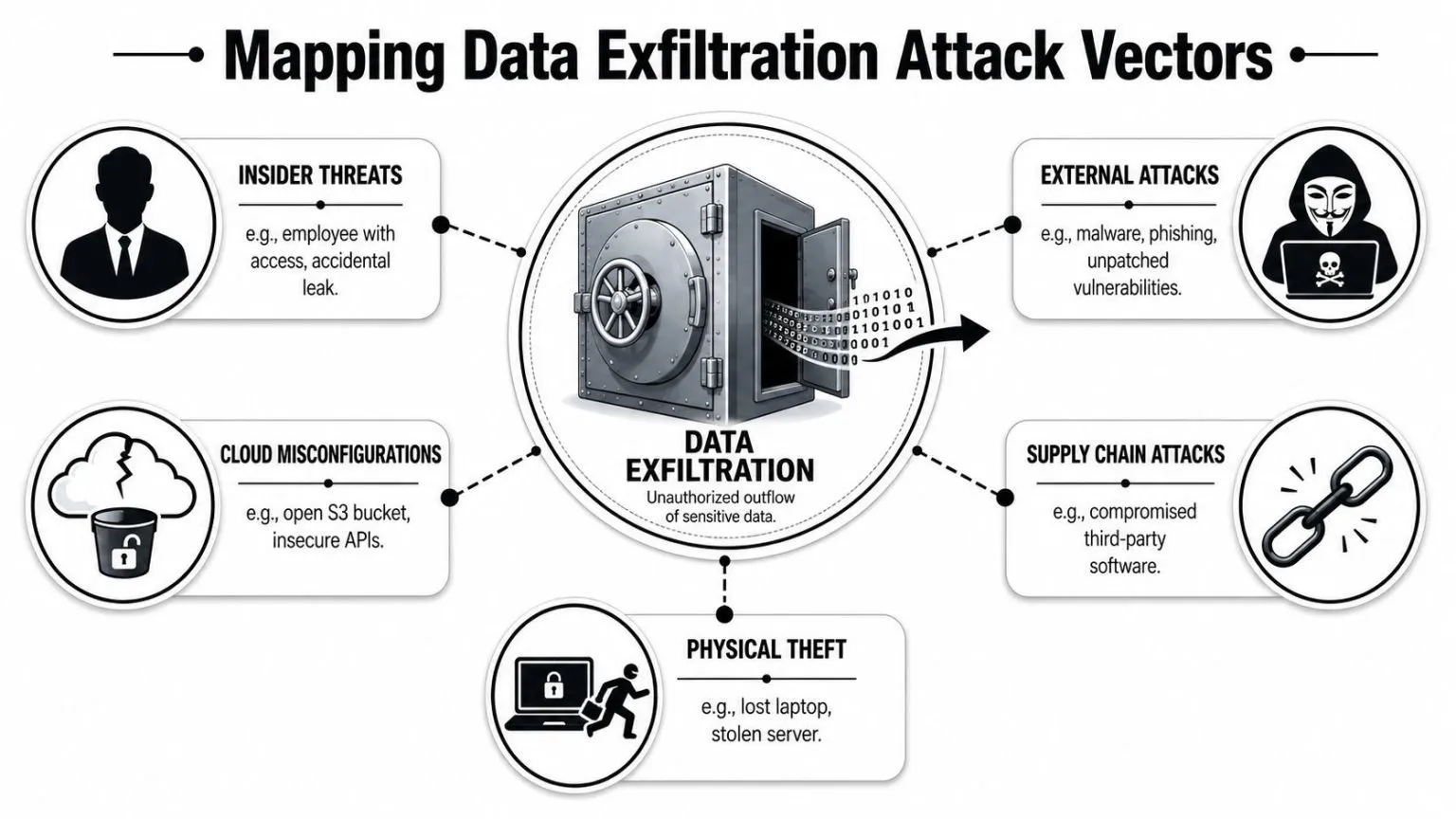
Mapping Data Exfiltration Attack Vectors
The simplest way to explain data exfiltration is this. You built a vault, but the back door opens into loading docks, cloud apps, browsers, contractor laptops, and AI prompts. Attackers don’t need to blow up the vault if they can use one of those exits unnoticed.
Why old threat models miss modern exits
Traditional models focus on email attachments, USB storage, and malware callbacks. Those still matter, but they no longer capture how data leaves modern environments. A sanctioned cloud platform can become an exfiltration channel if users sync sensitive files to personal tenants. A browser session can become an outbound path if employees upload reports into unsanctioned tools. A collaboration app can become a bridge between managed and unmanaged devices.
AI adds a new layer of difficulty. A lot of legacy controls rely on exact patterns, file fingerprints, or known labels. Those methods struggle when users paste fragments, summaries, code snippets, rewritten content, or derivative material into AI tools. Nightfall notes that a common unanswered question is how to prevent exfiltration through unsanctioned AI tools and shadow cloud services, and that emerging 2025 data shows AI-powered misclassification and shadow AI usage are growing vectors, with large language models increasingly used to bypass pattern-based detection, as described in Nightfall’s guidance on modern data exfiltration prevention practices.
Good threat models don’t just list channels. They identify trust failures. Who can move data, from where, to which destination, with what business justification, and under what level of monitoring.
The vectors that matter in hybrid estates
In practice, the main categories are broader than is often documented:
- Insider movement through approved tools: Users often exfiltrate through platforms the organization already trusts. File sync, collaboration spaces, and shared drives create less friction than malware and often generate less suspicion.
- External compromise using valid accounts: Once an attacker gets access, they rarely need exotic tooling. They use the same cloud exports, admin consoles, remote sessions, and data access methods that your staff use every day.
- Shadow cloud and unsanctioned SaaS: Security teams can govern what they know about. They struggle with browser-based services adopted outside procurement and outside IAM.
- AI prompt leakage: The risk isn’t only full documents. Fragments, derivatives, and reformatted data can carry material business value even when content inspection misses them.
- Cloud misconfigurations and overexposed services: Hybrid environments create handoff gaps. A workload may be hardened on-prem and loosely configured in cloud, or vice versa.
- Physical and endpoint loss: A laptop with cached files, local exports, saved tokens, or offline sync data can bypass strong central controls if endpoint posture is weak.
- Third-party workflows: Vendors, managed service providers, and business partners often have access paths that are functionally equivalent to insiders but governed by different contracts and review cycles.
A useful test is whether your program sees exfiltration as one event or as a chain. In real incidents, it’s a chain: access, staging, compression or transformation, destination selection, transfer, and cleanup. Each stage offers different opportunities to prevent, detect, or contain.
Building a Layered Prevention Framework
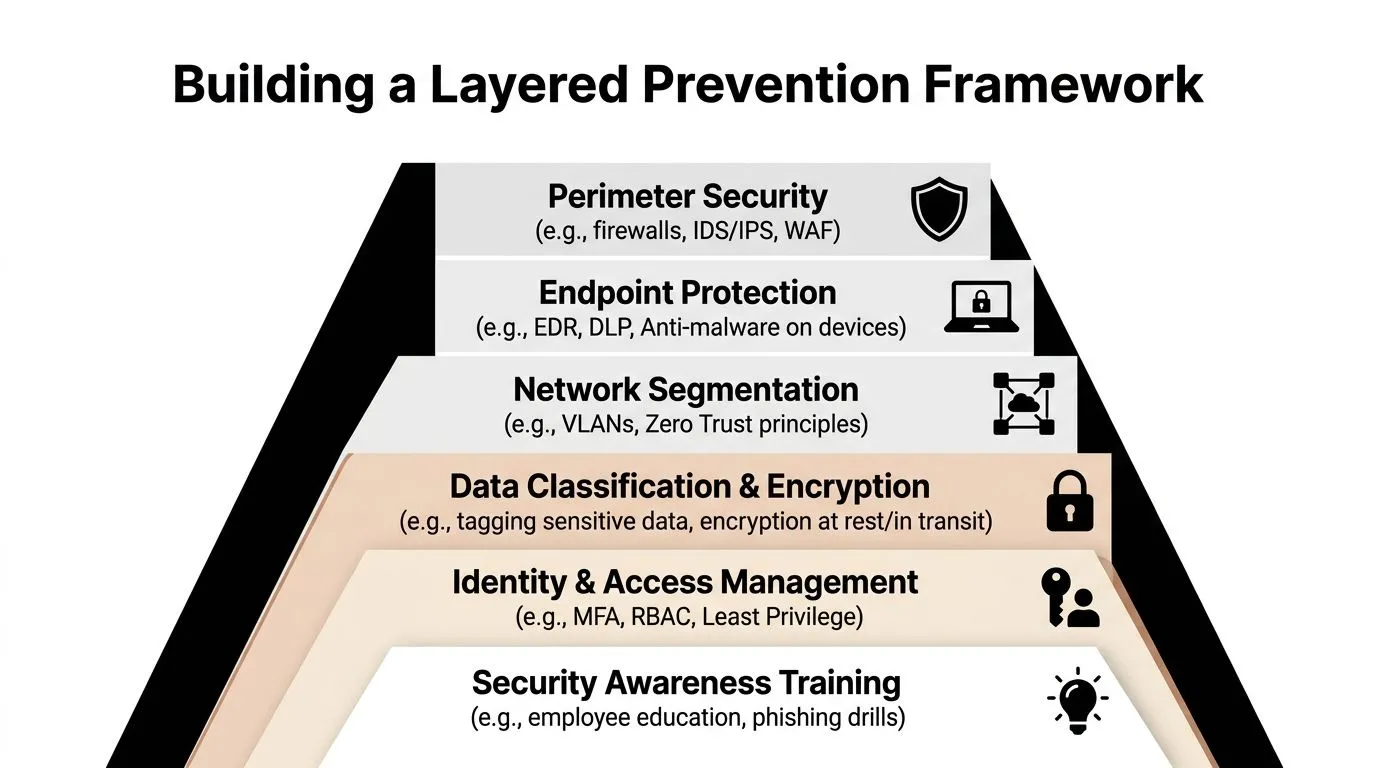
No single tool prevents data exfiltration. The workable model is defense in depth. Think of it as an onion with policy on the outside, enforcement in the middle, and identity and data governance at the core. If one layer misses, another should still make the transfer harder, louder, or impossible.
A visual model helps when you’re aligning teams around the same operating picture.
Start with policy that security tools can enforce
Most organizations already have policies. The problem is that they’re written for awareness, not for enforcement. “Handle sensitive data appropriately” won’t help your DLP team, your IAM team, or your SOC.
Write policy as decision logic:
- Define data classes: Keep the scheme simple enough that business owners will use it. If classification is too granular, users ignore it and tools inherit bad labels.
- Define approved destinations: List sanctioned cloud repositories, approved email paths, allowed transfer mechanisms, and prohibited categories such as personal file storage for corporate records.
- Define handling rules by role: Finance, legal, engineering, support, and executives don’t move the same data in the same ways. Policy should reflect that.
- Define exception handling: High-friction controls fail when there’s no approved way to request an exception with audit trail and business owner signoff.
Later media can reinforce the framework, but the architecture has to come first.

Control the paths data actually takes
Many programs either become realistic or remain theoretical at this point. Start with the routes your users and attackers both rely on.
| Layer | What it should do | Common failure mode |
|---|---|---|
| Network egress controls | Restrict outbound traffic to known business destinations and inspect risky patterns | Teams allow broad outbound access because application mapping is incomplete |
| Endpoint protection | Monitor file movement, browser uploads, removable media, and local staging | Controls focus on malware but ignore user-driven transfer behavior |
| DLP | Apply content and context-aware controls to data in motion, at rest, and in use | Rules are too brittle, too noisy, or too dependent on exact matches |
| Encryption | Reduce exposure if files are copied or devices are lost | Keys and access are too widely distributed |
| Browser and SaaS controls | Govern uploads, copy-paste behavior, session context, and unsanctioned app use | Browsers become a blind spot outside endpoint agents |
The strongest designs assume your users will find the easiest path. If the sanctioned route is painful, they’ll switch to consumer cloud storage, personal email, chat paste, screenshots, or AI prompts. Security architecture has to account for convenience. A control nobody can work with becomes shadow IT.
Operational advice: Block obvious high-risk destinations. Coach on medium-risk actions. Log low-risk but unusual behavior. That sequence produces better outcomes than trying to hard-block everything on day one.
Close the loop with access governance
Least privilege still matters, but not as a slogan. It matters because exfiltration is much easier when users accumulate access they no longer need. Access reviews should focus on data exposure, not just application entitlement. Ask which users can reach sensitive repositories, whether those privileges are still justified, and whether machine identities have broader export capability than intended.
Three controls deserve special attention in hybrid settings:
- Joiner, mover, leaver workflows need security involvement. Role changes, contractor offboarding, and project-based access often leave behind stale permissions.
- Privileged session controls should cover cloud consoles and on-prem admin paths together. Splitting them by infrastructure type creates gaps.
- Service account governance matters because automated exports, backup jobs, and integration accounts can move large volumes of data without the behavioral cues you’d expect from a human user.
A layered framework works when each layer narrows the blast radius. Policy states intent. Network and endpoint controls reduce available exits. DLP and browser controls inspect movement. Access governance shrinks who can touch sensitive data in the first place. That combination is what makes data exfiltration prevention credible in a hybrid environment.
Detecting Threats with SIEM and XDR
Even well-built prevention programs won’t catch every attempt. Detection is what tells you whether controls are working, which users are drifting toward risky behavior, and when an attacker is using legitimate access in illegitimate ways. In a hybrid environment, a SIEM and XDR stack earns its keep by stitching together signals that look harmless on their own.
That means cloud app logs, endpoint telemetry, identity events, file activity, firewall records, VPN sessions, browser events, and audit trails from collaboration platforms. Without correlation, analysts see fragments. With correlation, they can spot a user authenticating normally, accessing an unusual data set, compressing files locally, and then uploading them to a destination outside normal business patterns.
What good detection looks like
Detection use cases should be behavior-driven, not vendor-driven. Start with scenarios that represent real risk:
- Large outbound file transfers to personal cloud services: Correlate endpoint file access with browser upload events and egress logs.
- Role-inconsistent access: Flag when a user reaches repositories or file types outside their normal business function.
- Staging activity before transfer: Watch for compression, bulk copying, mass renaming, or unusual local accumulation of files.
- After-hours or location-inconsistent access: These signals aren’t enough on their own, but they become meaningful when tied to sensitive data movement.
- AI tool interaction involving sensitive workflows: Monitor copy-paste events, browser session context, and access to protected documents immediately before prompt submission where tooling supports that visibility.
A unified workflow matters here. If your team is evaluating platforms that combine telemetry, correlation, and response, this overview of threat detection and response solutions is useful for thinking through how those capabilities fit together in one operating model.
High-risk windows need different logic
One of the most overlooked detection gaps is timing. Cyberhaven points out that termination, layoffs, and mergers account for disproportionate exfiltration activity, and that effective detection during those periods requires graduated enforcement models in Cyberhaven’s discussion of data exfiltration prevention during high-risk windows.
That changes how mature teams tune detections. They don’t use a flat model all year.
During high-risk windows, strengthen monitoring around:
- Departing employees: Increase scrutiny on exports, archive creation, removable media activity, personal cloud uploads, and access to repositories outside recent working patterns.
- Teams under organizational change: Watch for spikes in collection behavior, especially from users who suddenly touch strategic documents, customer lists, code repositories, or pricing material.
- Merger and acquisition periods: Focus on cross-domain access, new data-sharing paths, and temporary identities or consultants with broad visibility.
A practical SOC doesn’t only alert. It adjusts severity, narrows approved destinations, and requires stronger justification for transfers during those windows. That’s often more effective than blanket lockdowns that disrupt legitimate work and generate workarounds.
Mature detection separates unusual from unacceptable. Analysts need context about role, data sensitivity, approved destinations, and timing before they can classify a transfer attempt correctly.
Threat hunting also becomes more useful when the environment is normalized. Hunt for combinations such as unusual repository access plus local staging plus outbound cloud activity. Hunt for users whose behavior changed after HR events or role announcements. Hunt for systems that suddenly become intermediaries for data movement between cloud and on-prem repositories. Those patterns catch what static alert logic often misses.
Automating Containment with SOAR Playbooks
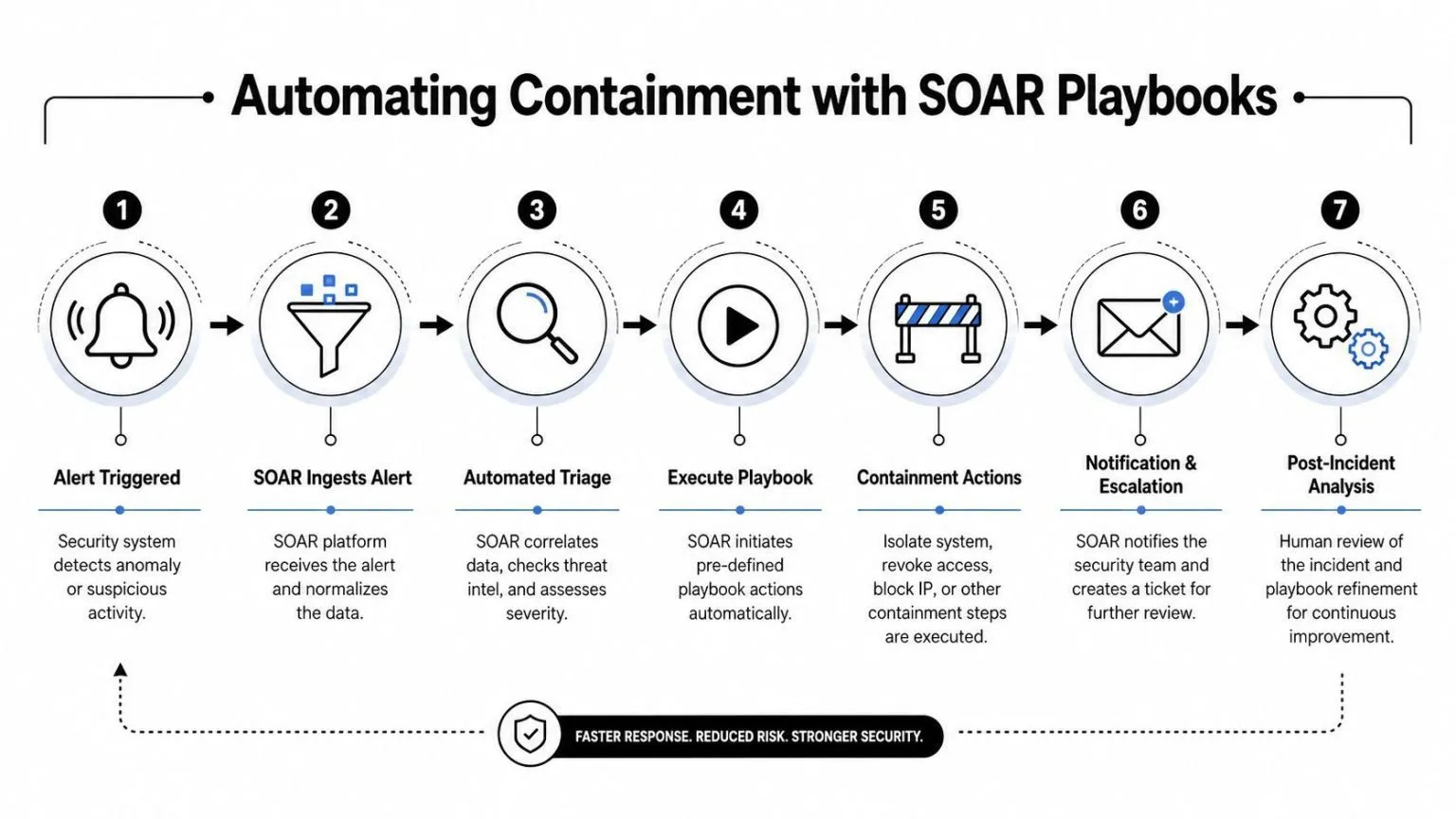
An alert without a response path is just a queue entry. Containment is where data exfiltration prevention becomes operational. In most environments, the first minutes matter because once files reach a personal tenant, external workspace, or unsanctioned service, your control diminishes.
A practical containment story
A detection fires on an engineer who accessed an unusual set of design documents, created an archive on the endpoint, and initiated an outbound upload to an unapproved destination. No single event proves intent. Together, they justify immediate triage.
A well-built SOAR playbook can do several things in sequence:
- Pull the alert context together. User identity, manager, endpoint, recent file activity, destination category, and any prior related alerts.
- Check whether the destination is sanctioned, recently approved by exception, or unknown to the organization.
- Query supporting systems. IAM for role and status, endpoint tooling for device posture, ticketing for known business projects, HR systems where integrated for active risk windows.
- Apply containment based on confidence. That may mean temporarily pausing the session, blocking the destination, revoking tokens, or isolating the endpoint from high-value systems.
- Open a case with all artifacts attached so the analyst isn’t rebuilding context manually.
- Notify the right people. Security first. HR or legal only when the incident reaches the threshold defined in policy.
- Record the outcome for tuning. False positive, policy violation, malicious intent, or legitimate exception.
The point of automation isn’t to remove humans. It’s to make sure humans spend their time on judgment instead of swivel-chair work. Teams exploring orchestration patterns can compare options through this overview of security orchestration tools.
Where automation helps and where it hurts
Some actions are safe to automate aggressively. Others need analyst approval.
Automate confidently when the action is reversible and low-disruption:
- Enriching alerts
- Checking destination reputation
- Creating tickets and case files
- Collecting endpoint and identity context
- Blocking clearly prohibited destinations
Use gated automation when the action can disrupt business operations:
- Suspending user accounts
- Isolating endpoints used in production workflows
- Revoking cloud sessions for privileged users
- Quarantining shared files that multiple teams need
Automation works best when each step answers one question: what can the system decide reliably, and what still requires a human to interpret business context?
The biggest failure pattern is over-automation early. Teams build playbooks that trigger hard containment on weak signals, then lose trust from the business. Start with enrichment and selective containment. Add stronger actions only after rule quality improves and exception handling is disciplined.
Measuring Success and Mapping to Compliance
Security controls that can’t be measured are hard to defend and easy to cut. That’s especially true for data exfiltration prevention because executives don’t buy “better visibility” forever. They want to know whether risk is going down, whether incidents are being contained faster, and whether the control stack can stand up to audit scrutiny.
Palo Alto Networks states that data exfiltration accounted for 94.6% of all confirmed security breaches in 2023, which is why organizations need measurable controls mapped to compliance obligations, as noted in Palo Alto Networks’ overview of data exfiltration.
What to measure at the executive level
The best metrics are tied to decisions, not vanity.
Use a compact dashboard that answers these questions:
- Are risky transfers decreasing: Track trends in unauthorized or policy-violating movement by channel, business unit, and data class.
- Are detections actionable: Monitor alert quality, analyst disposition patterns, and which rules generate recurring noise.
- How quickly do we contain: Measure time from alert creation to containment action for high-confidence exfiltration scenarios.
- Where are the gaps: Show unmanaged destinations, unclassified repositories, and systems not sending telemetry.
- Which business processes create exceptions: This exposes whether policy is unrealistic or whether certain functions need safer approved workflows.
A CISO doesn’t need dozens of charts. They need a short set of indicators that connect controls to operational risk and to the cost of failure.
How controls become audit evidence
Compliance mapping is where many programs either become repeatable or remain manual. Auditors usually want to see three things: the control exists, the control operates, and the organization reviews exceptions. A mature prevention program can show all three if logging, alerting, and evidence collection are centralized.
A useful approach is to map controls by function:
| Control area | Evidence you should be able to produce | Compliance value |
|---|---|---|
| Data handling policy | Approved policy versions, user acknowledgments, exception records | Shows governance intent and assigned accountability |
| Access governance | Access reviews, role definitions, revocation records, privileged approvals | Demonstrates least privilege and periodic review |
| Egress and DLP controls | Policy configurations, enforcement logs, block events, coaching prompts | Proves controls are operational |
| Detection and response | Alert records, analyst notes, playbook actions, case outcomes | Shows continuous monitoring and incident handling |
| Change management | Rule updates, tuning decisions, risk approvals | Demonstrates controls are maintained, not static |
The most effective programs don’t treat audits as separate projects. They generate evidence as part of normal operations. That reduces scramble, improves consistency, and makes it easier for security leaders to explain exactly how technical controls support frameworks such as CMMC, HIPAA, SOC 2, and PCI DSS.
A Hybrid Environment Implementation Checklist
Hybrid environments fail when security architecture assumes cloud and on-prem are separate problems. Attackers don’t care where a workload runs. They care whether they can access, stage, and move data across trust boundaries without being noticed. Implementation has to reflect that reality.
A practical roadmap starts with visibility, then enforcement, then tuned detection, then automation.
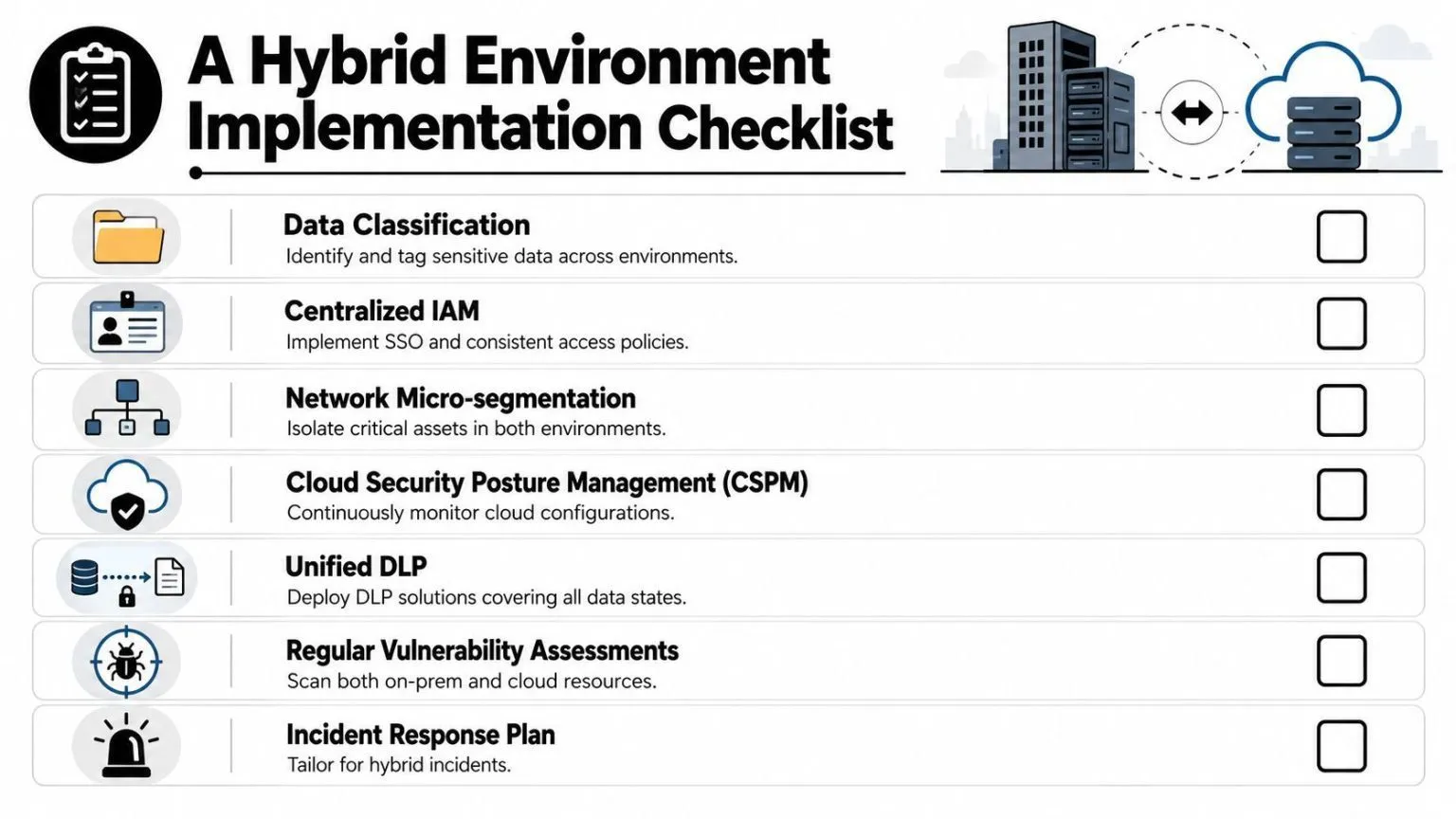
For teams that need consistent oversight across cloud services and legacy infrastructure, this guide to cloud security monitoring is a useful reference point when designing unified visibility.
Phase 1 visibility and trust boundaries
Start by answering basic questions with precision.
- Inventory sensitive data locations: Include file shares, SaaS repositories, cloud storage, endpoints, backup systems, and collaboration platforms.
- Document approved destinations: Don’t leave this implied. Define where sensitive data may go, under which conditions, and for which roles.
- Centralize telemetry: Bring cloud audit logs, endpoint events, firewall logs, identity activity, and file access records into one analysis workflow.
- Map trust boundaries: Managed device to unmanaged browser, corporate tenant to personal tenant, production to user workspace, cloud to on-prem, and third-party access paths.
Phase 2 control deployment
Once visibility exists, put guardrails on the highest-risk exits first.
- Apply egress restrictions for clearly non-business destinations.
- Deploy endpoint controls for removable media, browser uploads, and local staging behavior.
- Implement DLP for high-value repositories and high-risk movement paths.
- Add browser or SaaS session controls where the endpoint agent alone can’t see enough.
- Tighten IAM around sensitive stores, privileged roles, and service accounts.
Phase 3 detection and response maturity
Now tune the system for realistic operations.
- Write correlation rules around behavior chains: Sensitive access plus staging plus external transfer is stronger than any one event alone.
- Create high-risk window policies: Departures, layoffs, restructures, and strategic transactions need more scrutiny and tighter exceptions.
- Build response playbooks: Start with alert enrichment and reversible containment. Add stronger actions as confidence improves.
- Review exceptions monthly: If the same transfer path keeps needing exceptions, redesign the workflow instead of fighting the alert.
- Run tabletop exercises: Include cloud and on-prem teams together. Many response delays come from ownership confusion, not tooling gaps.
The strongest implementation plans reduce ambiguity. People know what data matters, where it may go, what the system will flag, and who can approve exceptions.
A data exfiltration prevention program becomes durable when it’s boring in the best way. Controls are consistent. Alerts are explainable. Exceptions are documented. Evidence is easy to retrieve. That’s what a CISO needs in a hybrid environment.
UTMStack brings SIEM, XDR, SOAR, and compliance management into one platform for hybrid environments, which makes it a strong fit for teams that need centralized visibility, automated response, and audit-ready evidence without stitching together a sprawling toolchain. If you want to evaluate a unified approach to data exfiltration prevention, explore UTMStack.