A high-fidelity alert lands in the queue. An endpoint looks compromised, a cloud workload is beaconing, and someone on the bridge says, “Isolate it now.” That’s the moment evidence preservation usually breaks. A rushed reboot kills volatile data. A containment script rotates logs. An analyst exports files without hashing them. The incident gets contained, but the proof of what happened is damaged before the investigation really starts.
That problem shows up in every mature SOC eventually. The theory is easy: preserve originals, document handling, verify integrity. The operational reality is harder. Teams work across endpoints, cloud services, SaaS apps, and chat platforms. They need speed for containment and discipline for admissibility. Those priorities can coexist, but only if the workflow is deliberate and automated where it matters.
For security teams using SIEM, XDR, and SOAR tooling, evidence preservation can’t stay as a legal afterthought. It has to become part of the incident pipeline itself. The practical path is to treat preservation as a control objective: capture volatile state first, create defensible copies, centralize logs, record every handoff, and enforce retention with integrity checks that survive audits and investigations.
Initial Containment and Volatile Data Capture
The first mistake in incident response is often irreversible. If a host is still running, don’t power it off just because it feels safer.
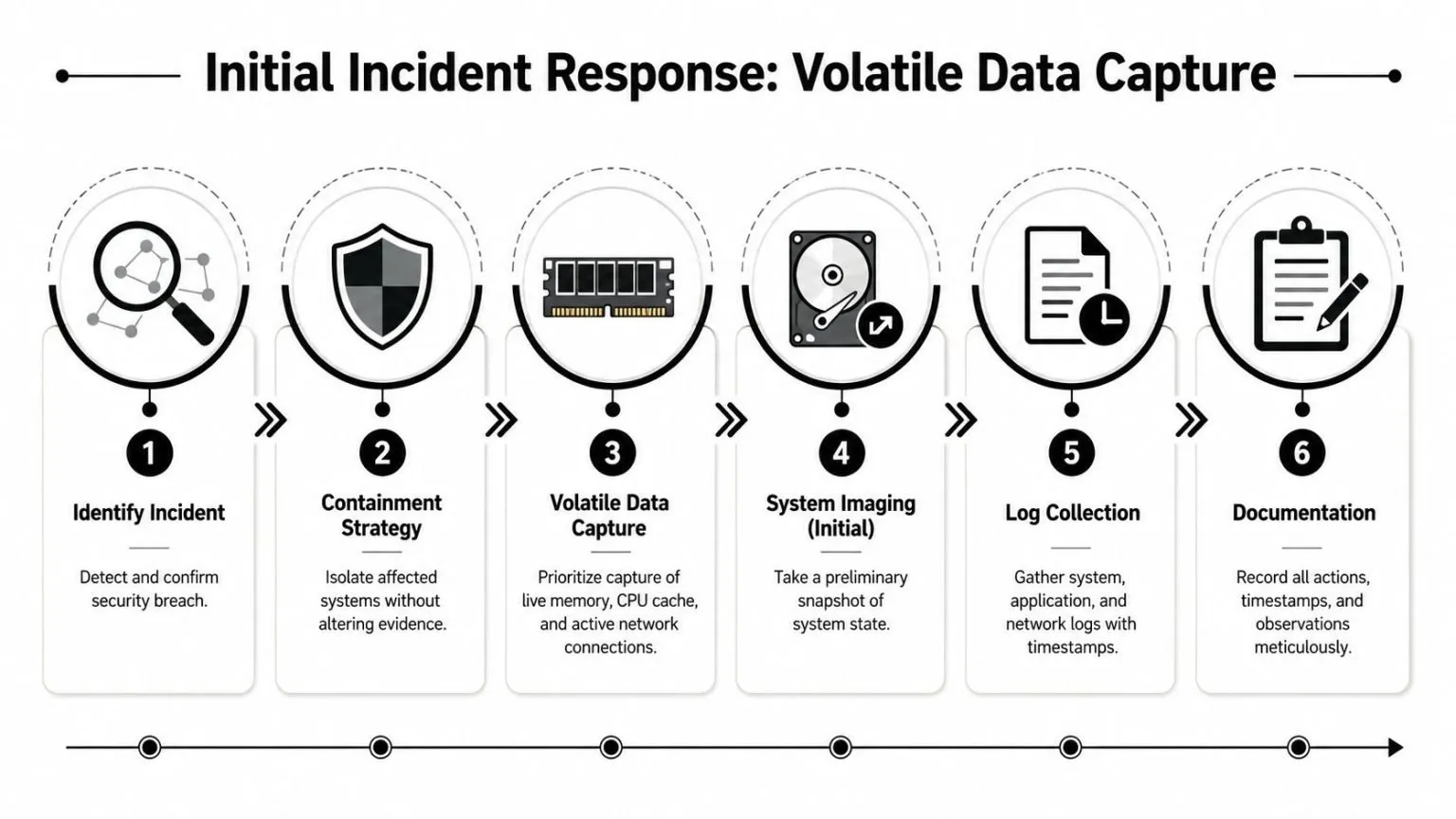
What to do in the first hour
Containment has to protect the environment without rewriting the scene. That usually means logical isolation before destructive action. On an endpoint, prefer network isolation through EDR or switch controls over a shutdown. On a mobile device, isolate radios. On a cloud workload, freeze risky automation first so snapshot or log retention data doesn’t disappear while responders debate next steps.
A practical sequence works better than improvisation:
- Confirm the signal. Validate that the alert reflects a real security event and note the detection time in UTC.
- Pause destructive routines. Stop auto-delete, log rotation, backup overwrite, and short-retention cleanup jobs tied to the affected asset.
- Isolate carefully. Block external communications without wiping the running state.
- Capture volatile data. Prioritize memory, running processes, open network connections, active sessions, and temporary artifacts.
- Record every action. Write down who touched the asset, when, and why.
Practical rule: If a system is live and you haven’t captured memory yet, every power decision is an evidence decision.
Volatile data is where the attacker’s working context lives. Memory can reveal injected code, decrypted payloads, command execution traces, network sockets, and keys that won’t exist once the machine is restarted. For ransomware, live memory can be the difference between understanding execution flow and staring at encrypted disks with no runtime context. For credential theft, active sessions and process trees often tell you more than the file system alone.
What breaks evidence fastest
Teams usually damage evidence in two ways. The first is panic. Someone unplugs the host or reboots it to “stop the spread.” The second is automation that wasn’t designed for forensics. Retention jobs continue running, temp stores roll over, and endpoint tools clean up artifacts before anyone has preserved them.
Use a short no-go list during the golden hour:
- Don’t reboot first. You’ll lose memory-resident evidence and possibly malware context.
- Don’t run cleanup scripts. Anything that deletes binaries, temp folders, or scheduled tasks alters the record.
- Don’t trust screenshots alone. They’re useful, but they aren’t a substitute for memory capture, exported logs, and proper documentation.
- Don’t collect without timestamps. If your notes aren’t in UTC and tied to an operator, timeline work gets messy fast.
A disciplined responder thinks in layers: preserve what disappears first, then stabilize the asset, then expand collection around it. That order holds up under pressure because it matches how evidence decays in modern incidents.
Forensic Imaging and Secure Log Collection
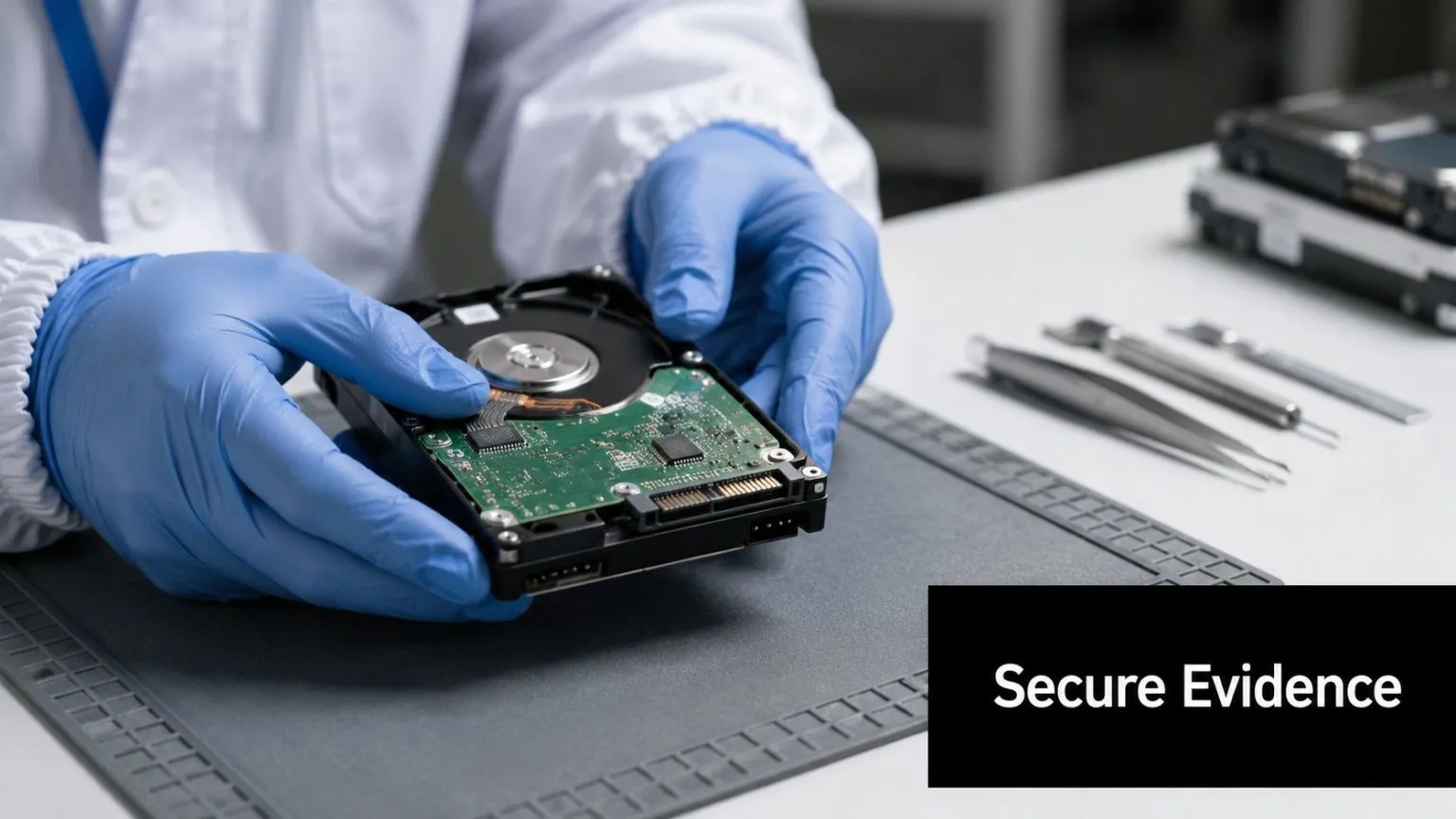
Once volatile state is captured, stop treating the rest of the system like a backup problem. It isn’t. You need a forensic copy that preserves slack space, deleted artifacts, metadata, and file system structure without changing the original media.
A forensic image is not a backup
A normal backup is built for recovery. A forensic image is built for proof. That distinction matters in every breach review, internal investigation, and legal dispute.
A forensic bit-by-bit imaging workflow that uses hardware write blockers can achieve 99.8% data integrity success, and the process requires cryptographic hash verification such as SHA-256 at creation and periodically during storage according to the documentary evidence preservation guidance. In practice, that means the original drive stays untouched while you create a verified working copy for analysis.
The operational standard is straightforward:
- Use a hardware write blocker so the source media can’t be modified by the forensic workstation.
- Create a bit-for-bit image rather than copying selected folders.
- Calculate a cryptographic hash immediately and store it in the case record.
- Work from the copy only. Analysts should never examine the original image in a way that risks alteration.
- Re-verify hashes during storage so long-running cases don’t drift into integrity disputes.
The contexts differ, but the principle is the same: collection methods determine how much confidence survives review.
Centralize logs before the timeline fragments
Disk imaging alone won’t tell you how the incident moved. You also need a coherent event trail across cloud control planes, firewalls, identity systems, endpoints, and collaboration tools. The challenge in hybrid estates is that each source uses different timestamps, field names, and retention defaults.
A centralized pipeline solves the correlation problem only if collection happens early. Pulling logs days later usually means you’re already missing cloud activity, ephemeral compute events, or security tool telemetry. Use APIs where you can, Syslog where it fits, and endpoint or workload agents where the source is too fragmented for one-shot exports.
A mature workflow should preserve at least these categories:
| Evidence Type | Why It Matters | Common Failure Mode |
|---|---|---|
| Endpoint logs | Process launches, persistence, user actions | Local retention too short |
| Network logs | Lateral movement and egress | Device rotation overwrites events |
| Cloud audit logs | Control plane actions and IAM changes | Incomplete export scope |
| Authentication records | Account abuse and session history | Time skew across systems |
For teams building that pipeline, centralized log management matters because it pulls those records into one searchable place before analysts start chasing fragments across consoles. The image proves the state of a system. The logs explain how it got there.
Establishing an Unbreakable Chain of Custody
Strong technical collection still fails if no one can prove who handled the evidence and when. That sounds bureaucratic until a challenge lands on a timeline gap, an unexplained file rename, or a hash that wasn’t recorded at transfer. At that point, documentation is no longer support material. It becomes the issue.
Between 2018 and 2021, failures in evidence preservation led to the collapse of 20,838 criminal cases in the UK, including 42 homicide cases, as detailed in this analysis of evidence loss and legal outcomes. The lesson for cybersecurity teams is direct: when evidence handling breaks, the entire case can collapse even if the underlying facts were real.
Documentation decides whether evidence survives challenge
A chain of custody is an answer to four questions, repeated every time something changes hands: what is it, who handled it, when did that happen, and what changed. If your process can’t answer those four cleanly, the evidence is vulnerable.
That applies to physical devices and digital artifacts equally. A seized laptop needs a recorded intake. So does a memory dump, exported audit log bundle, screenshot archive, disk image, or packet capture. Analysts often document collection well but get sloppy during transfers, review copies, and later exports to legal or compliance teams. That’s where doubt creeps in.
The evidence itself isn’t enough. You have to preserve the story of the evidence.
Modern security teams should also treat platform actions as custody events. Query exports, case file attachments, analyst comments, and hash calculations all form part of the handling history.
A simple custody record that works
Keep the record plain enough that responders will maintain it during an active incident. The log doesn’t need legal theater. It needs precision.
Sample Chain of Custody Log Entry
| Case ID | Evidence Item # | Description | Collected By | Date/Time (UTC) | Action Taken | SHA-256 Hash |
|---|---|---|---|---|---|---|
| IR-2026-017 | E-003 | Disk image from finance-laptop-07 | A. Patel | 2026-07-18 14:22 UTC | Created forensic image via write blocker and transferred to evidence vault | [record hash value] |
Use this model consistently:
- Case ID first so every artifact ties back to a single incident record.
- Evidence item numbering to distinguish source media from working copies and exports.
- UTC timestamps only because cross-region investigations fall apart when local time sneaks into notes.
- Action language that states facts. “Transferred to encrypted evidence store” is better than “processed.”
- Hash values at each critical stage for files that can be verified digitally.
A custody log should also capture storage location and access approvals, even if those fields live in the case platform rather than the table above. The key is continuity. If someone else has to explain your handling six months later, they shouldn’t need your memory to do it.
Meeting Compliance Demands for Digital Evidence
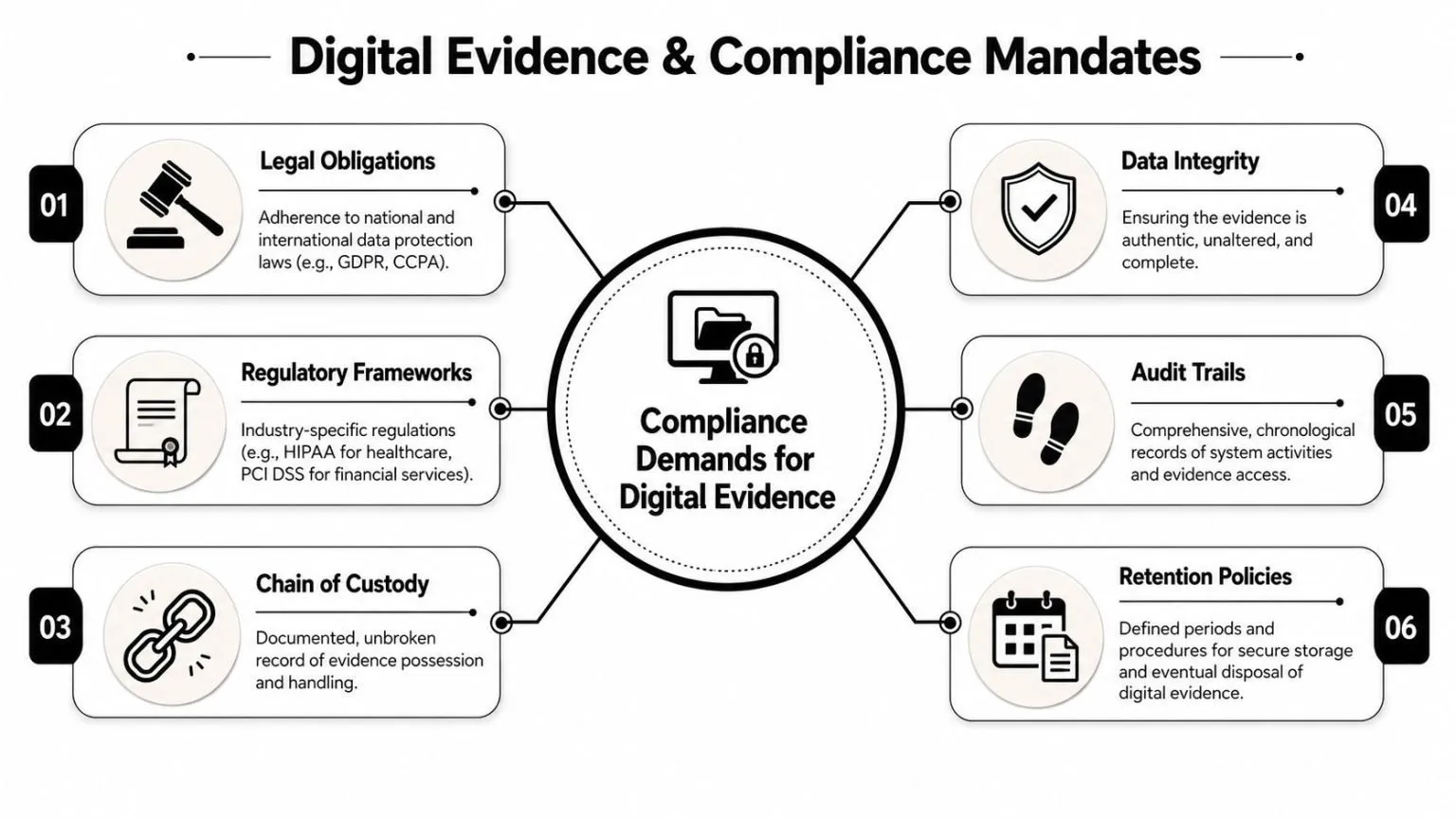
Most organizations don’t preserve evidence just for the possibility of litigation. They preserve it because regulated operations demand records that are reviewable, attributable, and retained long enough to support audits, investigations, and breach response. That changes the conversation from “Did we collect enough?” to “Can we prove control operation with defensible evidence?”
How preservation maps to regulated environments
Healthcare is a good example because the operational expectations are explicit. For HIPAA compliance, a seven-step operational workflow is mandated, including inventorying all systems with ePHI, integrating their data sources into a monitoring platform like a SIEM, and enabling rules to detect and alert on compliance violations and anomalous access patterns, according to the HIPAA monitoring workflow guidance.
That workflow has direct preservation implications. If you haven’t inventoried systems that hold ePHI, you won’t know what evidence sources exist during an incident. If those systems aren’t integrated into monitoring, your audit trail is partial before the breach starts. If alerting rules aren’t enabled, investigators may never collect the records that show unauthorized access patterns in time.
The same logic applies beyond HIPAA:
- CMMC expects disciplined incident handling and asset awareness. Evidence preservation supports both.
- PCI-aligned investigations depend on retained logs, attributable access, and timely retrieval of records for review.
- SOC 2 and ISO-oriented audits reward teams that collect evidence during normal operations instead of rebuilding it under deadline.
Audit reality: Auditors rarely accept promises that a control “would have” produced evidence. They ask for the record that already exists.
What auditors actually need to review
Auditors and compliance assessors usually look for four things in digital evidence: completeness, time alignment, attribution, and retention that supports review. That means your logs need normalized identities, consistent timestamps, preserved case notes, and a retrieval path that doesn’t depend on a specific analyst remembering where the export went.
A workable compliance evidence package often includes:
- The triggering event such as the alert, detection rule, or audit exception.
- The underlying records including relevant logs, snapshots, and investigator notes.
- Proof of integrity through hashes or immutable storage controls.
- A disposition trail showing what responders did and why.
Teams that design preservation into routine monitoring have a much easier time during assessments. Teams that improvise during an audit usually produce screenshots, partial exports, and explanations instead of evidence.
Automating Preservation with a SIEM and SOAR Playbook
Manual evidence preservation doesn’t scale in a busy SOC. It depends on the right person remembering the right sequence under pressure. That’s not a process. That’s luck with a runbook attached.
Why automated response often destroys the record
SOAR teams optimize for response speed. Forensics teams optimize for integrity. If those workflows are separated, the automation often wins by deleting the very evidence investigators needed.
While 74% of security teams prioritize mean-time-to-respond, 42% of compliance audits fail because automated containment playbooks overwrite logs or terminate VMs before forensic snapshots are captured, according to this review of SOAR and compliance gaps. That’s the core trade-off. Fast containment can be the wrong first action when the host, workload, or account still contains unrecovered evidence.
The fix is not “slow down.” The fix is sequence. Automate preservation before destructive containment. In a modern stack, that means the alert should trigger data capture steps before isolation, suspension, or rollback.
One option is to build this flow into a platform that combines detection, incident handling, and orchestration. For example, security orchestration tools can be used to codify preservation-first playbooks so the case record, evidence capture, and response actions stay tied together in one workflow.
A usable preservation-first playbook
The playbook below is practical for endpoint, server, and cloud incidents where evidence could disappear quickly.
Trigger condition
High-confidence malware execution, suspicious lateral movement, impossible-travel identity alert tied to privileged access, or an analyst-approved escalation from triage.
Playbook sequence
-
Create the incident record
- Stamp the opening time in UTC.
- Attach the triggering alert and source system identifiers.
-
Pause destructive retention actions
- Suspend auto-delete routines where possible.
- Freeze log rotation or short-term overwrite behavior for impacted sources.
-
Capture volatile and near-volatile evidence
- Request endpoint memory capture if the host is live.
- Pull running process details, active connections, and session context.
- For cloud workloads, create a forensic snapshot before termination.
-
Collect surrounding logs
- Export a narrow time window around the alert from identity, endpoint, network, and cloud sources.
- Include the systems immediately upstream and downstream of the affected asset.
-
Hash and register artifacts
- Calculate SHA-256 for each collected file.
- Write the hash, collector identity, and timestamp into the incident record.
-
Proceed to containment
- Isolate the host.
- Disable or suspend accounts if that action won’t destroy remaining evidence sources.
- Block malicious communications and preserve the policy change in the case notes.
-
Promote to investigator review
- Hand off originals and validated copies separately.
- Restrict write permissions on preserved artifacts.
Here’s the operating idea in plain terms: capture first, contain second, investigate from copies.
What to automate and what to keep manual
Not every step belongs in automation. Some do.
Automate these aggressively:
- Evidence ticket creation with timestamps and source identifiers.
- Snapshot and memory collection requests where agents or cloud APIs support them.
- Hashing and artifact registration because manual entry is error-prone.
- Short-window log pulls from the core systems around the alert.
Keep these under analyst control:
- Scope expansion when the incident crosses business-critical systems.
- Privilege-impacting actions such as account suspension for executive or shared service identities.
- Interpretation of ambiguous evidence including whether a process tree reflects malware, admin work, or software deployment.
A walkthrough helps teams visualize how this should look inside the SOC workflow:

The strongest automation doesn’t replace forensic judgment. It removes the fragile steps analysts forget when the queue is full and the pressure is high.
Long-Term Storage and Integrity Verification Strategies
A collection workflow is only as good as its storage discipline. If the evidence sits in an analyst share, gets renamed three times, or lives in a bucket without access controls, the integrity story decays long before the case closes. Long-term evidence preservation needs a repository designed for review, not convenience.
Store for investigation first and archive second
Active evidence and archived evidence have different jobs. Active evidence needs quick retrieval for analysts, legal review, and follow-up collection. Archived evidence needs durability, restricted access, and immutability. Don’t collapse those into the same storage tier unless you’re comfortable trading either speed or control.
A defensible repository should include:
- Role-based access controls so only authorized responders, investigators, or auditors can access case artifacts.
- Immutable or append-only storage for final evidence packages and closed-case exports.
- Separate working copies from originals so analysis never contaminates preserved material.
- Attached case context including collector identity, timestamps, hashes, and notes.
For digital artifacts that stay online for longer periods, teams should also watch for unauthorized changes to the repository itself. That’s where file integrity monitoring fits. It gives you another control layer around evidence stores, exported reports, and case-related files that should remain stable once preserved.
Preserve evidence in the same way you expect to defend it: restricted, verifiable, and easy to retrieve without rewriting history.
Physical media still matters in some cases. If you’re storing original drives, removable media, or hardware from an incident, environmental controls matter too. The documented guidance for evidence handling calls for storage environments maintaining 18–22°C temperature, 40–50% relative humidity, and anti-static shielding to reduce degradation risk, as described in the earlier preservation guidance.
Retention and recurring integrity checks
Retention should match legal, investigative, and regulatory obligations. If your policy says logs are retained for one period but case evidence needs longer handling, the preservation workflow must override normal lifecycle deletion when an incident opens. That’s one of the easiest places to lose material inadvertently.
The same evidence handling guidance referenced earlier also notes retention examples used in justice settings, including 30 years for major and serious crimes, 6 years for volume crimes, and 3 years for less serious crimes. Cybersecurity teams won’t mirror those exact categories, but the lesson is clear: retention periods have to be explicit, enforced, and aligned to the kind of case and obligation involved.
Build recurring verification into storage operations:
- Record the original SHA-256 at ingestion.
- Schedule periodic re-hashing of retained artifacts.
- Alert on mismatch immediately and preserve the mismatch event as part of the chain of custody.
- Test restore and retrieval paths so archived evidence is still usable when someone needs it.
- Document disposal events when retention expires and legal hold no longer applies.
Long-term evidence preservation fails unnoticed. No one notices until a regulator, outside counsel, or executive asks for a specific artifact and the answer becomes “we had it once.” Good storage strategy prevents that sentence from ever being true.
If your team wants to operationalize evidence preservation inside day-to-day detection and incident response, UTMStack is worth evaluating as one option. It combines SIEM, SOAR, XDR, incident handling, and compliance workflows in a single platform, which helps teams preserve originals, tie artifacts to cases, and keep response actions and audit evidence in the same operational record.