Enterprises are already spending an average of nearly US$2.5 million annually on logging solutions, and those tools consume 45% of observability budgets while teams juggle an average of seven different tools to manage logs and telemetry. That’s the reason log management tools have moved from back-office utilities into security architecture decisions. If the pipeline is expensive, fragmented, or weak on evidence, investigations slow down and audits get harder, not easier.
The market reflects that shift. More than 122,903 companies now use log management tools, with Datadog estimated at 89,359 customers and a 72.71% share of the category, followed by Splunk at 9,947 customers and 8.09% (6sense log management category data). In other words, this isn’t a niche admin category anymore, it’s part of the core control plane for modern security and compliance.
Why Log Management Has Become a Strategic Security Priority
Log growth is forcing security teams into a direct trade-off. Keep more evidence for investigations and audits, or cut retention and accept gaps you may not be able to defend later. Dynatrace reports that log and telemetry volume increased 93% on average over the previous 12 months, and 1 in 5 organizations saw growth above 150% (Dynatrace 2026 log management research). At that pace, log storage stops looking like a background IT expense and starts shaping security architecture.
Security teams are paying for visibility twice
First, they pay to ingest and index the data. Then they pay again in analyst time when the platform cannot connect activity across systems. New Relic’s 2022 State of Logs report found a 35% year-over-year increase in logging data, while 56% of customers used infrastructure monitoring together with logs and about 14% used logs with APM monitoring (New Relic State of Logs summary in Strategic Market Research context). That pattern explains why log tools now belong inside observability, not beside it.
The market forecasts point in the same direction. One major forecast places global log management at USD 2.9 billion in 2024 and USD 5.85 billion by 2030, at a 12.4% CAGR, while another puts the market at USD 4.35 billion in 2026 and USD 8.99 billion by 2031 with a 15.64% CAGR (market forecast summary, Mordor Intelligence market report). Those figures matter because they show buyers are treating logs as a long-term control surface, not a throwaway utility.
Practical rule: if your team cannot explain what log data it keeps, what it discards, and how long it can search it, the platform is not really under control.
Adoption is broad, but operational maturity still varies
6sense shows the United States accounts for 80,938 customers, or 74.23% of observed usage, while the United Kingdom has 5,676 customers and Canada 5,286 (6sense log management category data). That concentration matches what security architects see in practice. Mature enterprise markets treat log management as normal operating discipline, especially in software-heavy industries.
The hard part is not adoption. It is building a pipeline that keeps up with cloud services, endpoints, containers, and audit demands without becoming a cost sink.
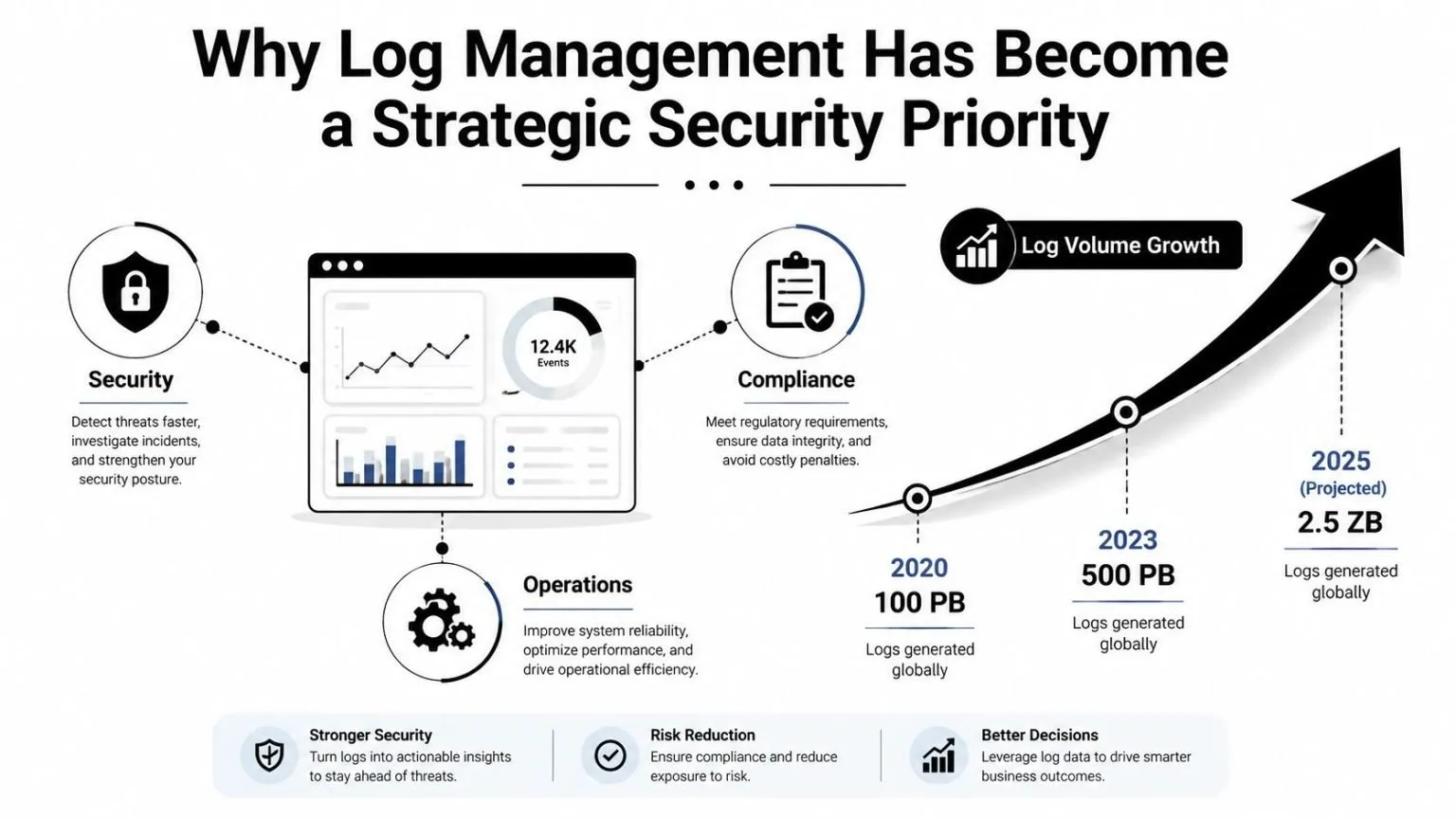
A tool choice today can shape mean time to respond, audit quality, and retention cost for years. In regulated environments, the question is whether the architecture can preserve evidence chains, control storage growth, and keep investigators from chasing missing context when an audit or incident arrives.
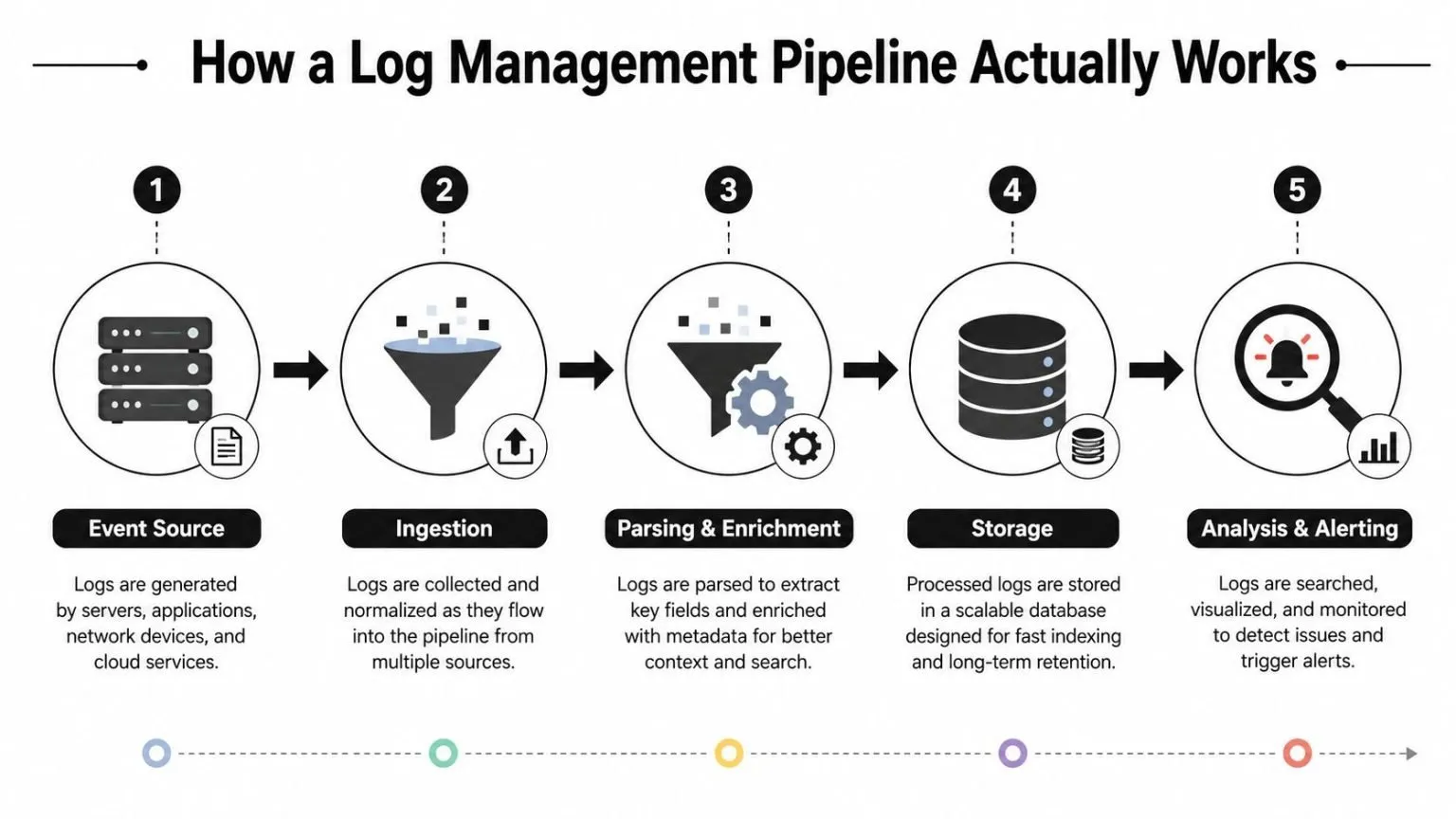
How a Log Management Pipeline Actually Works
A log pipeline has one job, turn raw event noise into a searchable record an analyst can trust. That sounds simple until you try to do it across syslog, agents, APIs, containers, and cloud services, all emitting different formats and field names (Exabeam log management overview). The architecture matters because every weak link shows up later as a missed alert or a slow investigation.
From raw event to usable field
Take a failed login attempt. It can arrive as syslog from a server, through an agent on an endpoint, or by API from a cloud service. The first job is ingestion, the second is parsing, and the third is normalization, which is basically translating different dialects into one common language so the rest of the platform can compare them reliably.
That normalization step is easy to underestimate. If one system names the user field account, another uses principal, and a third uses nested JSON, your search queries and correlation rules drift over time. A mature pipeline reduces that schema drift before the data gets indexed, so investigations don’t depend on tribal knowledge.
Why indexing and correlation are not the same thing
Indexing makes the event searchable fast. Correlation asks whether that event matters in context, maybe the same username failed from three geographies, or the failure lines up with an unusual process launch. Modern evaluations focus on whether a platform can handle full-text and structured search across real retention windows and still correlate logs with metrics or traces without making the analyst change tools (Middleware log management tools evaluation).
Practical rule: if your team has to bounce between dashboards to connect a log event to a trace or metric, the pipeline is making the investigation harder than it needs to be.
If you’re looking at network telemetry as part of the same workflow, UTMStack’s guide to VPC flow logs is a relevant companion because flow data often lands in the same search path as security logs.

A good pipeline doesn’t just store more data. It cuts the time between an event and a decision, which is the point of the whole exercise.
Choosing the Right Architecture for Your Environment
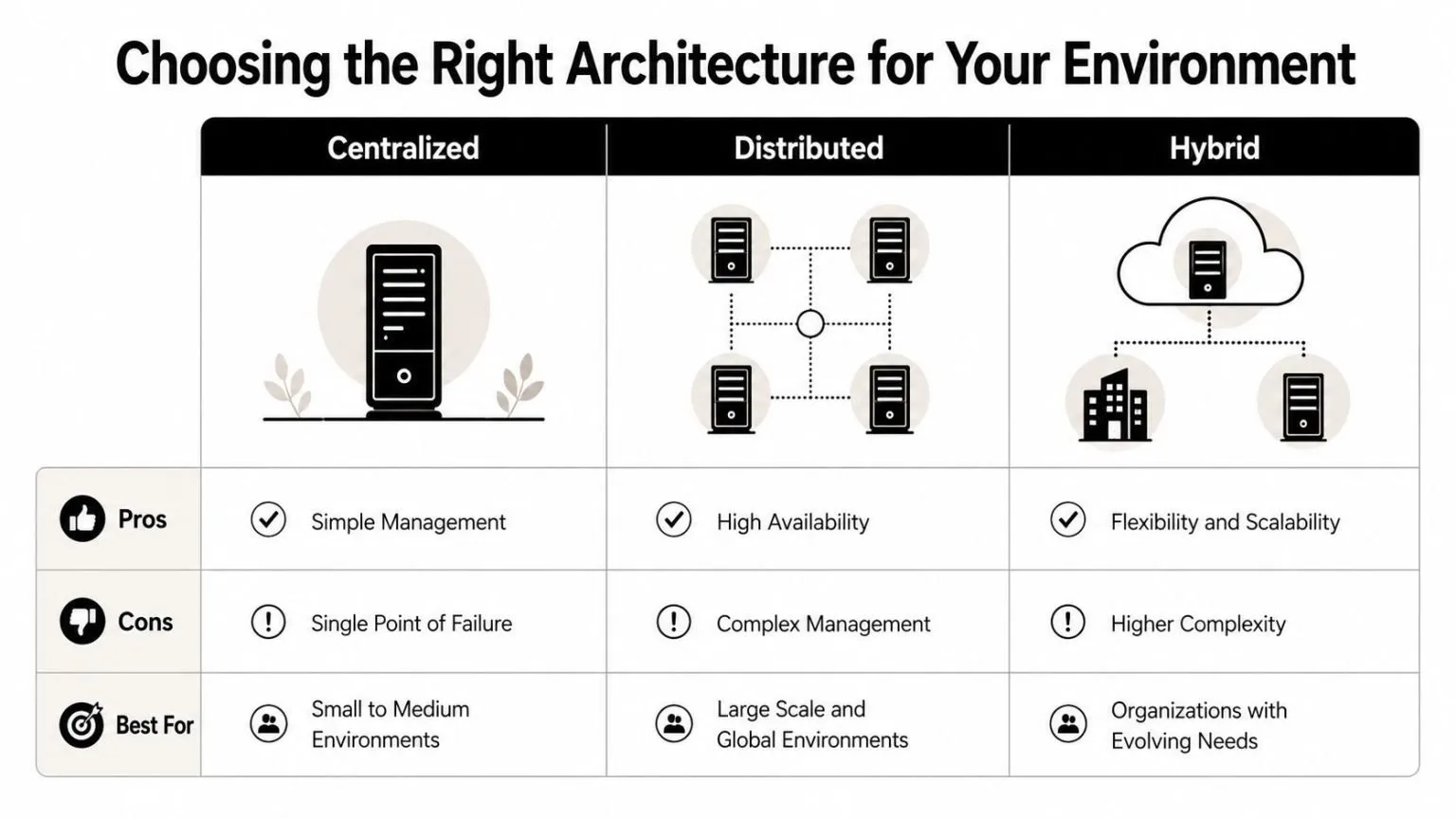
A log architecture can look clean in a demo and still fail in production. Retention pressure, cross-cloud routing, and compliance boundaries expose the weak points fast. Centralized, distributed, and hybrid each solve a different operational problem, and the right choice depends on where your systems run, how much data you retain, and how tightly you need to control the path evidence takes through the pipeline.
Centralized works until the environment stops being simple
A centralized stack gives you one search surface, one retention policy set, and one administrative model. That fits smaller environments, or teams that mostly operate in a single cloud. It also keeps audit review simpler, because investigators do not have to chase records across multiple stores.
The trade-off shows up as ingestion grows. Storage, indexing, and search all start competing for the same resources, and the platform can become expensive to scale. In regulated environments, centralized design can also push too much evidence into one place, which raises access control concerns if the role model is too broad.
Distributed helps with volume, but coordination gets harder
Distributed designs push collection, and sometimes indexing, closer to the source. That works better when teams spread across multiple regions, need data residency controls, or generate heavy telemetry from cloud workloads and infrastructure layers. It also reduces the pressure on any single search plane.
The cost is coordination. More collectors, more forwarding paths, and more local settings mean more chances for a parsing rule, certificate, or forwarder to drift out of sync. Retention also becomes harder to govern, because local storage choices can create uneven evidence chains unless policy and review workflows are kept tight. For teams comparing deployment models, the centralized log management pattern is still a useful reference point because it makes the trade-offs around access, storage, and control easier to see against a single operating model.
Hybrid is typically the most effective enterprise answer
Hybrid gives you a centralized view while keeping some data local for performance, residency, or security reasons. That is the pattern I have seen work best in regulated healthcare, finance, and MSP environments, because it can absorb different source types without forcing every team into the same storage model. It also lets you keep high-value evidence close to the systems that generate it while still feeding a common analytics layer.
The catch is discipline. If correlation rules, retention policies, and role boundaries are not aligned, hybrid becomes two separate problems instead of one coherent system. That is where the framework from Kagool for SAP is a useful reminder, because compliance architectures fail when evidence handling and control ownership are split across too many layers.
Practical rule: choose the architecture that keeps search and retention affordable at your expected log volume, not the one that looks cleanest in a diagram.
A single architecture rarely stays ideal as the environment grows. Volume changes, audit scope expands, and retention costs rise faster than teams expect. That is why regulated deployments keep returning to hybrid patterns, especially when they need to preserve evidence without making every search and every review expensive to operate.
Meeting Compliance Requirements with Log Management
Compliance teams don’t audit “logs” in the abstract. They audit evidence, who accessed what, when it was reviewed, what decision was made, and whether the record is intact enough to trust. That’s why the strongest log management setups pair event capture with workflow evidence, not just a search box.
Matching log controls to framework expectations
A practical compliance stack usually starts with retention, access auditing, integrity, and review evidence. HIPAA, PCI DSS, SOC 2, ISO 27001, CMMC, GDPR, and GLBA all push on those themes in different ways, even when the wording differs. The tool has to preserve the log, protect who can see it, and make review actions traceable.
| Framework | Retention Requirement | Key Log Controls | Audit Evidence Needed |
|---|---|---|---|
| HIPAA | Keep records long enough to support investigation and review | Access logging, integrity controls, incident traceability | Who reviewed the event, what action was taken, when it closed |
| PCI DSS | Preserve evidence for cardholder-data environment oversight | Authentication logs, admin activity, change tracking | Investigation trail and closure record |
| SOC 2 | Maintain evidence for security and operational controls | Access logs, alert history, review records | Reviewer identity and decision history |
| ISO 27001 | Support control verification and incident handling | Audit trails, retention policies, tamper resistance | Control evidence and remediation proof |
| CMMC | Show security process discipline and response tracking | Event logging, access auditing, workflow records | Chain of review and corrective action |
| GDPR | Support accountability and breach handling | Access records, incident evidence, retention governance | Decision trail and closure evidence |
| GLBA | Support safeguarding and review processes | Sensitive-access logging, monitoring, escalation records | Proof of monitoring and remediation |
The gap most tool roundups miss is that logs alone don’t prove compliance. Process Street explicitly notes that regulated teams also need evidence of who reviewed an event, what decision was made, what corrective action was approved, and when the issue closed. That’s the part auditors care about once they move past raw event data.
Workflow matters as much as search
A tool that indexes the event but can’t track the investigation is only half useful in regulated environments. That’s why modern platforms increasingly combine log analysis with incident workflows, and why compliance mapping matters when you’re comparing options.
If the platform can’t show who looked at the log, what they concluded, and whether the action was approved, you’re still collecting evidence manually. That creates the same pain every audit cycle.
Understanding the True Cost of Log Management at Scale
Feature checklists are a poor way to buy log tools. In practice, cost governance decides whether the platform survives its second budget review, especially once retention gets long and ingestion gets noisy. The first bill is rarely the one that matters. Storage growth, index bloat, query load, archive retrieval, and analyst time often shape the budget more than the headline subscription rate.
OpenObserve notes that under 10 GB/day nearly any tool can work, while above 100 GB/day the main question becomes cost per GB (OpenObserve log management tools guidance). That shift matters because volume growth changes the buying criteria. A platform that looks affordable in a small pilot can become expensive once search, retention, and export requirements meet production reality.
The hidden bill is retention, not just ingestion
A platform can look cheap until you keep real logs for real timeframes. Storage, indexing, rehydration, archive retrieval, and analyst time all add up differently depending on whether the tool is SaaS, self-hosted, or hybrid. Teams that only compare ingest pricing usually miss the larger expense of keeping evidence queryable when an incident or audit lands months later.
Retention also affects compliance gaps. If the platform cannot preserve enough history to reconstruct an investigation chain, the security team ends up stitching together evidence from backups, ticketing systems, and manual exports. That work is slow, and it weakens the record auditors expect to see.
Cost model should follow use case
SaaS tends to work well when the team values speed and does not want to run storage or index infrastructure. Self-hosted makes more sense when data residency or control matters more than convenience. Hybrid often wins in the middle, especially when regulated logs need longer retention than operational logs.
Cribl’s guidance is useful because it pushes buyers to evaluate security/compliance, deployment environment, cost model, scalability, and integration requirements together, instead of treating the cheapest feature list as the whole decision. That is the right frame for three to five year planning, because the wrong architecture usually fails under retention pressure before it fails on raw ingestion.
Practical rule: if your team is deleting huge chunks of logs to stay within budget, the architecture is already failing the investigation and compliance use cases.
Aggregation strategy changes the economics too. A log aggregation tools design that filters, routes, and normalizes data before long-term storage can keep searchable evidence affordable as volume climbs. The question is not which tool has the most checkboxes, it is which one still gives you defensible retention, usable search, and audit evidence without forcing you to throw away the logs you may need later.
Deployment Best Practices and Common Pitfalls to Avoid
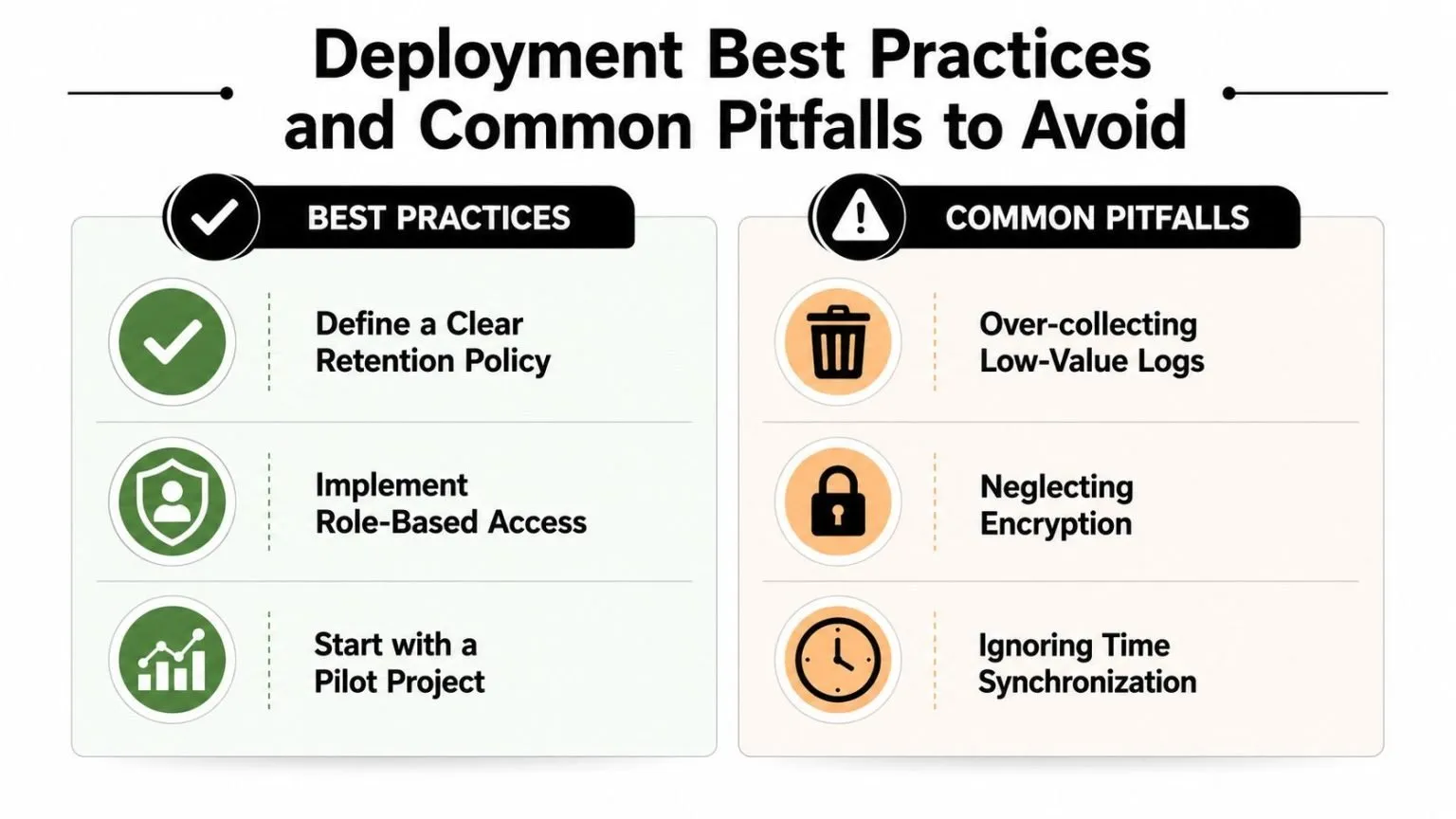
The first mistake is usually over-collection. Teams turn on every source, every debug stream, and every verbose audit setting, then discover that the platform spends its life ingesting low-value noise. The second mistake is under-documenting the pipeline, which makes onboarding painful when the original engineer is gone.
Start with the sources that answer real questions
Pick a short list of log sources that directly support detection, investigation, and compliance. Authentication, privilege changes, critical application events, cloud control plane actions, and security tooling usually belong near the top. Everything else should earn its place.
Tune for signal, not volume
Correlation rules that are too loose create alert fatigue. Rules that are too strict miss the low-and-slow patterns attackers use. Search performance should also be tested with realistic data volumes, because a query that feels instant in a demo can become unusable once 30-day windows and active retention hit production scale, which is exactly the kind of condition modern evaluations emphasize (Middleware log management tools evaluation).
Keep the operational basics tight
- Define retention by data class: Keep security, compliance, and operational logs on separate retention rules so the expensive data is the only data paying for long-term storage.
- Lock down access: Use role-based access control so analysts, auditors, and admins don’t all see the same data by default.
- Validate source health: Check that every log source is still sending data, because silent failures are worse than loud ones.
- Document parsing rules: If a source changes field names or format, write it down immediately so the next analyst doesn’t have to reverse-engineer the fix.
A clean deployment isn’t the one with the most integrations. It’s the one where the team can explain why a source is collected, who can see it, and how quickly it can be searched when something breaks.
How Unified Platforms Reduce Complexity and Accelerate Response
Disconnected tools slow analysts down. Every time a security team jumps from a log platform to a SIEM, then to an XDR console, then to a compliance tracker, the investigation loses momentum and context. UTMStack is one concrete example of a unified stack that combines log management, SIEM, SOAR, and XDR so correlation and response live in the same workflow.
That matters because the platform can ingest from cloud services, network devices, and endpoints through agents, syslog, NetFlow, and APIs, then correlate events before indexing. The practical result is less manual stitching, fewer false leads, and a cleaner path from detection to action. Its compliance workflows also map evidence to frameworks such as CMMC, HIPAA, SOC 2, ISO 27001, PCI, GDPR, and GLBA, which removes a lot of spreadsheet work from audit prep.
Open-source licensing changes the economics too. Growth doesn’t have to trigger per-seat or per-gigabyte pain, and that’s a real advantage when log volume keeps rising. For teams that want one operational surface instead of a patchwork of tools, that combination is hard to ignore.
If you’re comparing log management tools for a regulated environment, UTMStack gives you centralized log collection, correlation, response playbooks, and compliance mapping in one stack. Visit UTMStack to review how it fits SIEM, SOAR, and log management requirements in hybrid environments, then decide whether its architecture matches your retention and audit workload.