A lot of teams think they have Active Directory covered because the domain controllers are sending some logs and the SIEM is receiving data. Then an investigation starts, someone asks for the failed logons before the first privileged change, and the answer is silence. The log exists on one controller, Kerberos events exist on another, cloud sign-in activity lives in a separate console, and the timeline breaks exactly where the attacker moved laterally.
That situation is common in real SOC work. Active Directory auditing rarely fails because security teams don’t care. It fails because identity telemetry is fragmented, policy settings are inconsistent across domain controllers, and cloud identity events sit outside the same detection and compliance pipeline. If you’re running a hybrid estate, that gap gets wider.
Introduction and Goals
The near-miss usually looks ordinary at first. A handful of authentication failures. A successful logon that didn’t trigger concern. A privileged group change noticed hours later by an admin who wasn’t even on shift when it happened. The fundamental problem isn’t only the attack path. It’s that the evidence chain across on-prem AD and Azure AD or Entra ID isn’t stitched together in real time.
That’s why active directory auditing sits in the middle of both detection engineering and compliance operations. Security teams need it to catch identity-based attacks before they become domain-wide incidents. Auditors need it because HIPAA, PCI DSS, CMMC, and ISO 27001 all depend on reliable account activity, privilege use, and change tracking. If your logs can’t answer who authenticated, what changed, and whether the audit trail itself was altered, you don’t have a usable control.
Recent industry data indicates that 68% of organizations now run hybrid AD, while frameworks such as SOC 2 and HIPAA still require unified audit trails across cloud and on-prem forests, which makes hybrid collection essential according to Huntress on Active Directory auditing. That lines up with what many security teams are seeing on the ground. The identity perimeter isn’t one directory anymore.
What this work needs to accomplish
A workable AD audit pipeline has to do six things well:
- Define scope clearly: Cover domain controllers, privileged groups, admin workstations, Azure AD or Entra ID activity, and the systems that consume identity decisions.
- Enable the right logs: Not every event matters equally. A small set of identity events carries most of the detection value.
- Collect from both sides of hybrid identity: On-prem and cloud need to land in the same analytical workflow.
- Normalize aggressively: Correlation fails fast when one source uses
TargetUserName, another usesuserPrincipalName, and a third stores only display names. - Detect sequences, not isolated events: A burst of failures means more when it is followed by a privileged logon or a directory change.
- Map evidence to controls: Security monitoring should produce compliance evidence, not run beside it as a separate project.
Security teams don’t lose investigations because they lack data everywhere. They lose them because the right data isn’t collected consistently at the identity layer.
The practical target is simple. Build an audit stream that lets the SOC detect abuse early, lets incident responders reconstruct what happened, and gives risk teams defensible reporting without manually assembling screenshots from different consoles.
Configure Audit Policies and Identify Core Events
Most weak AD audit programs fail at the first control point. The policy exists, but it isn’t linked correctly, the wrong subcategories are enabled, or the team assumes member servers will generate the same identity telemetry as domain controllers. They won’t.
What has to be enabled
The clean way to do this is through Advanced Audit Policy Configuration in a Group Policy Object linked to the Domain Controllers OU. That matters because Kerberos and directory-service events don’t show up universally across all hosts. If the GPO is linked elsewhere, or not applied consistently, your SIEM gets a partial identity story and your detections become guesswork.
The audit subcategories worth explicit attention are under these areas:
- Account Logon: Needed for Kerberos ticket activity and authentication flow.
- Logon and Logoff: Needed for successful and failed logons tied to host context.
- Account Management: Needed for account creation, modification, and group changes.
- DS Access: Needed for sensitive object access and DCSync-related visibility.
According to CyberDefenders’ Active Directory auditing overview, Active Directory auditing relies on a high-value working set of Windows Event IDs including 4624/4625, 4672, 4768/4769, 4720/4738, and 4662, and these require proper GPO linking and policy validation on domain controllers to ensure visibility.
Core Active Directory audit events
| Event ID | Category | Threat Technique |
|---|---|---|
| 4624 | Logon success | Suspicious interactive or network access confirmation |
| 4625 | Logon failure | Password spraying and brute-force patterns |
| 4672 | Privileged logon | Use of elevated rights and admin context |
| 4768 | Kerberos authentication service | TGT request tracking and authentication flow |
| 4769 | Kerberos service ticket | Kerberoasting visibility and service ticket anomalies |
| 4720 | Account management | Unauthorized account creation |
| 4738 | Account management | Risky account changes and identity tampering |
| 4662 | DS Access | DCSync-related object access monitoring |
A separate access review process also helps here. If you need a practical complement to event logging, UTMStack Access Rights Auditor is one example of a tool focused on tracking assigned permissions and suspicious Active Directory access changes.
How to validate at the source
Don’t stop at policy deployment. Test it.
Create a small validation routine on a lab or controlled production window:
- Trigger expected activity: Perform a password reset, create a test account, and change group membership in a controlled scope.
- Check the domain controller directly: Confirm the event exists in the local security log before blaming the SIEM.
- Verify metadata quality: Make sure usernames, target objects, and timestamps are populated consistently.
- Look for gaps across controllers: If one domain controller logs the event and another doesn’t, you’re dealing with policy drift or forwarding issues.
Practical rule: If you haven’t validated events with test actions, you don’t know whether the policy is working. You only know that a GPO exists.
This is also where teams discover a trade-off. Turning on everything creates a noisy security log and higher storage cost. Turning on too little blinds the SOC to the exact identity techniques attackers use. The right answer isn’t maximal logging. It’s targeted logging of the event families that matter, followed by validation and disciplined forwarding.
Implement Log Collection Methods
At 2:00 a.m., the hard part is rarely finding a log source. The hard part is proving why a privileged group change on a domain controller, an Azure AD sign-in, and a VPN event belong to the same investigation. Collection design decides whether that story exists at all.
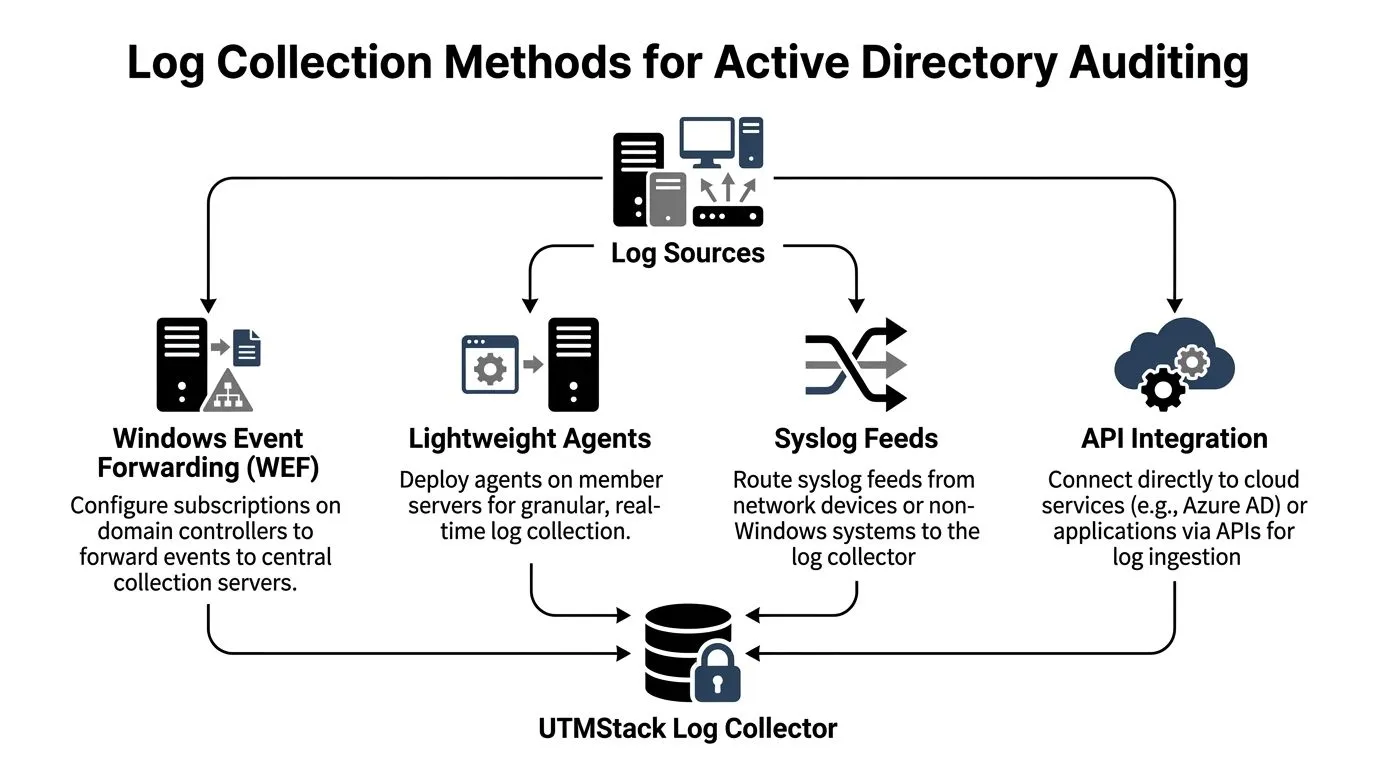
A workable hybrid model uses different collection paths for different sources, then pushes them into one place for search, correlation, and reporting. For Active Directory, that usually means native Windows collection for domain controllers, selective agents where delivery guarantees matter, syslog for surrounding infrastructure, and API pulls for Entra ID and Microsoft 365 identity activity. Teams that want one operational view often tie those feeds into centralized log management in UTMStack so Windows, network, and cloud identity records arrive in the same analysis layer.
Choose collection by source type
Collection method should follow source behavior, not tool preference.
- Windows Event Forwarding for domain controllers: WEF is still a practical choice for Security logs when teams want low overhead and native Windows transport. It works best with tightly scoped subscriptions and collector health monitoring. Broad subscriptions create backlogs fast.
- Lightweight agents for high-value or unstable endpoints: Agents fit admin workstations, jump servers, and systems that sit outside reliable WEF coverage. The trade-off is operational overhead. Agents need lifecycle management, version control, and tamper monitoring.
- Syslog for firewalls, VPNs, NAC, and Unix-like systems: These events add the access path around identity activity. That context matters when an account looks suspicious but the first signal came from a remote access gateway or network device.
- API connectors for Azure AD or Entra ID: Cloud identity logs need direct collection from Microsoft APIs. Export jobs and portal-only review are too slow for active investigations and leave cloud identity detached from on-prem account changes.
Hybrid failure points that break the timeline
Time drift causes more damage than many teams expect. If domain controllers, collectors, and cloud sources are not aligned to the same time standard, sequence-based detections degrade fast. Analysts can still search the logs. They just cannot trust event order during password spray, token abuse, or privilege escalation reviews.
Ownership gaps create the next problem. Microsoft 365 data often sits with one team, domain controller logging with another, and network telemetry with a third. The result is fragmented coverage and inconsistent retention. Microsoft’s guidance on monitoring Azure AD activity logs and audit logs makes the cloud side clear enough, but many deployments still fail to connect those records to on-prem AD events in a shared SIEM workflow.
That gap matters for compliance too. Auditors usually do not care which team owns which connector. They care whether you can show who changed access, where it happened, when it happened, and whether the record was retained.
What holds up in production
Stable collection pipelines usually share a few traits:
- Separate high-value identity streams from bulk endpoint noise: Domain controller Security logs and cloud identity audit feeds should have dedicated collection paths and queue capacity.
- Monitor collector health and forwarding latency: A silent collector failure looks exactly like a quiet environment until an incident forces the check.
- Protect the transport path: Use authenticated channels, restrict collector access, and alert on service stoppage or subscription failures.
- Verify DS Access events arrive where expected: Event 4662 is often missing even after teams believe directory auditing is enabled.
- Keep identity naming consistent across sources:
user@company.com,COMPANYuser, object SID, and display name all need to reconcile later. Collection is the first chance to preserve enough context to do that well.
I start narrow in production. Domain controller Security logs, Azure AD audit and sign-in logs, VPN, and privileged admin systems come first. After those flows are stable, tested, and retained correctly, expanding coverage is easy. Starting wide usually gives you the opposite result: more data, less confidence, and longer investigations.
Ingest and Normalize Logs in UTMStack
Collection gets data into the building. Normalization makes it usable. Raw Windows Event XML is rich, but it isn’t analyst-friendly and it doesn’t correlate cleanly with cloud identity data until the field names, object identities, and timestamps are shaped into a common schema.
Normalize identity fields first
The useful baseline is straightforward. Pull out the values analysts and correlation rules will query constantly:
- User identity: username, user principal name, target account, initiating account
- Host identity: computer name, domain controller, source workstation, target system
- Event identity: event ID, event provider, log channel, action category
- Time identity: event time, ingestion time, normalized timezone
- Object identity: group name, directory object, service name, distinguished name where relevant
The first win is consistency. A privileged logon from a Windows event and an Azure sign-in event shouldn’t require two different mental models. The parser should turn both into a common identity story with shared fields for actor, source, target, and time.
A practical implementation in UTMStack starts with defining the Windows and cloud identity sources, parsing the native event structure, and mapping the result into one schema before indexing. That’s the part many teams skip. They ingest first, promise to normalize later, and later never comes.
Reduce noise without hiding signal
Too much filtering at ingestion is a mistake because it removes data before you understand its value. Too little filtering hurts query speed and creates alert fatigue. The middle ground is selective suppression of known-benign repetition while retaining security-relevant identity actions.
A useful way to think about it is by event behavior:
| Log pattern | Keep, filter, or down-rank | Reason |
|---|---|---|
| Repeated successful service logons from known systems | Down-rank | Useful for hunting, rarely urgent by itself |
| Failed logon bursts across many accounts | Keep and highlight | High detection value |
| Routine account management from approved admin workflows | Keep with context tags | Needed for audit trail and change validation |
| Sensitive directory object access | Keep | Often rare and high-signal |
Parse for investigation first, optimize for storage second. Once a field is dropped or flattened poorly, recovering context later is painful.
Index tuning matters too. Identity data ages differently from endpoint telemetry. Analysts usually need fast access to recent authentication and change events, while compliance teams need longer retention for evidence and review. That doesn’t mean one giant index. It means planning partitions and retention by use case, then checking whether the query patterns still perform under load.
Another practical point: preserve the original event when possible. Normalized fields are what analysts search first. Raw event payloads are what investigators reach for when the normalized version isn’t enough.
Develop Correlation Rules and Response Playbooks
A SIEM doesn’t become useful for active directory auditing when it stores the right logs. It becomes useful when it recognizes a sequence that a human would otherwise miss at speed.

Detections that hold up in production
Strong identity detections usually correlate multiple signals instead of firing on one event in isolation.
Password spraying pattern
rule "ad_password_spraying_candidate"
when
  failed_logons where event_id = 4625
  grouped by source_host, source_ip
  with distinct target_user count high
  over short_window
then
  alert severity = high
  tag = "identity_bruteforce"
This works better than a plain failed-logon threshold because it looks for breadth across accounts from a common origin. That reduces noise from one user mistyping a password repeatedly.
Privileged logon after suspicious failures
rule "privileged_logon_after_failures"
when
  failures where event_id = 4625
  followed by privileged where event_id = 4672
  matched on user or source_host
  within investigation_window
then
  alert severity = critical
  tag = "privilege_escalation_path"
That sequence catches the kind of transition responders care about. It asks whether failed access attempts were followed by success with privileged rights.
Kerberoasting candidate activity
rule "kerberos_ticket_spike"
when
  kerberos_tickets where event_id = 4769
  grouped by requesting_user
  with service_ticket_volume anomalous
  over short_window
then
  alert severity = high
  tag = "kerberoasting_suspected"
You don’t need a flashy model to make this useful. You need a baseline that reflects your own service-account behavior and enough discipline to whitelist expected bursts carefully.
After the initial detections are in place, operational teams usually benefit from a formal runbook system such as incident response playbooks in UTMStack or an equivalent SOAR workflow layer that can tie identity alerts to containment actions and ticketing.
Response playbooks that don’t create new problems
The biggest mistake in automated identity response is overreacting. If every suspicious logon disables an executive account or isolates a domain-connected server instantly, the SOC creates its own outage.
A safer playbook structure looks like this:
- Enrich first: Pull recent authentication history, recent group changes, and host context.
- Decide by confidence: A single anomaly may justify analyst review. A chained sequence may justify immediate action.
- Contain with least disruption: Reset a suspicious account, revoke sessions, or isolate a host only when the evidence supports it.
- Preserve evidence: Store the triggering events and related context before remediation changes the state.
A good playbook helps responders move faster. A bad one just moves the blast radius from the attacker to the SOC.
This is also where tuning matters more than theory. Thresholds that look sensible in a lab often create noise in production because service accounts, legacy apps, and maintenance windows generate identity patterns that resemble abuse. Expect to revisit your rules, especially around privileged logons and ticket-request spikes.
For teams that want a walkthrough before building their own workflows, this video is a useful reference point for thinking about automation and security operations in practice.

Generate Compliance Reports and Adopt Best Practices
The fastest way to make AD reporting useless is to build it only for auditors. The reports look polished, but they don’t reflect actual security operations. Then the first real incident exposes the gap between compliance language and operational visibility.
Build compliance views from operational telemetry
A stronger model starts with the monitored events and the detections built on top of them. Then you map those outcomes to framework controls.
That approach works well because the same identity data supports multiple reporting views:
- PCI DSS: Authentication events, privileged access use, and change tracking around sensitive systems
- HIPAA: Access accountability, user activity history, and evidence of monitoring around protected environments
- CMMC: Auditability of identity activity, review processes, and incident evidence tied to access events
- ISO 27001: Control evidence for access management, monitoring, logging, and response procedures
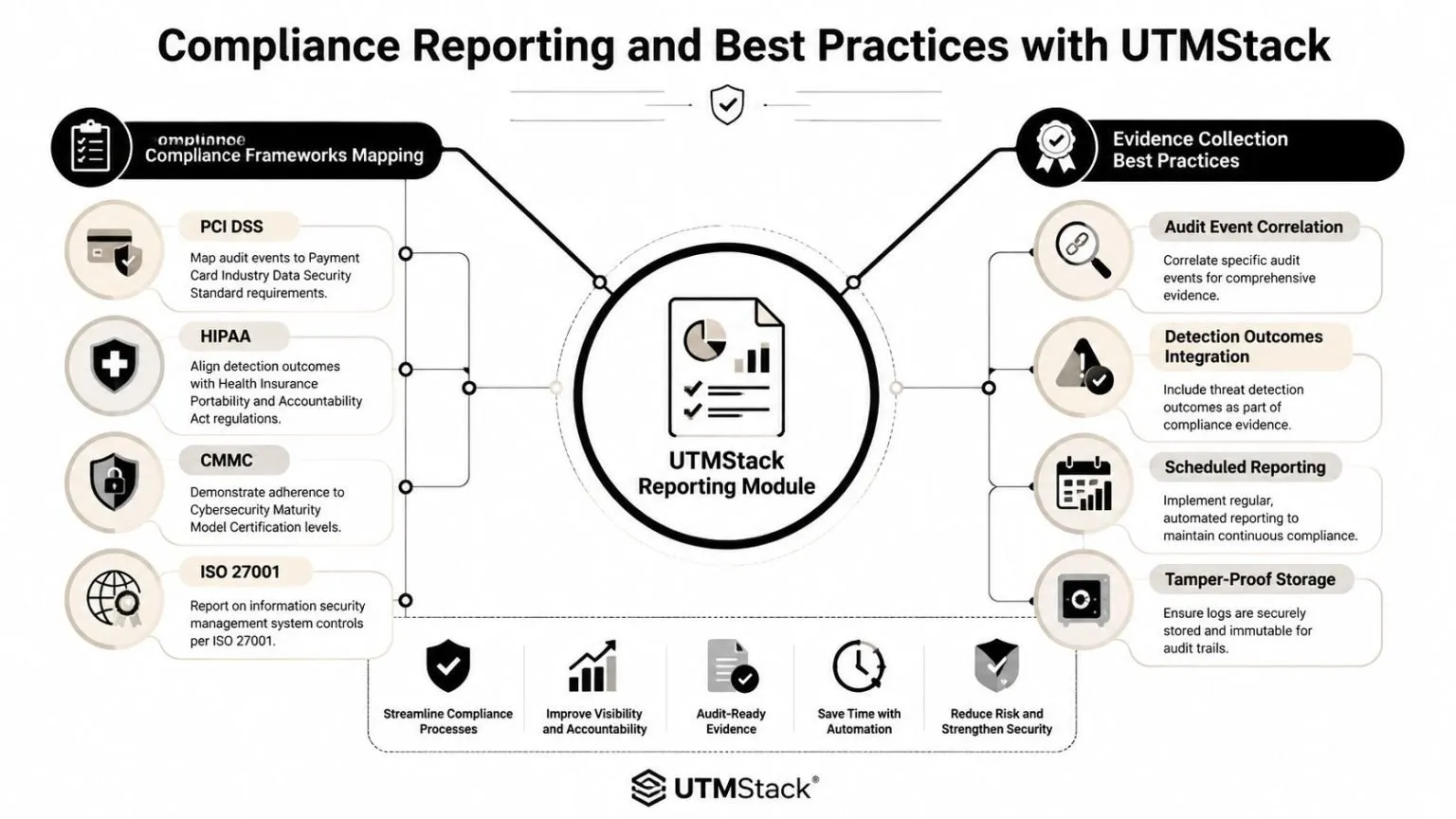
The best reporting modules don’t just count events. They preserve evidence chains. That means the original event, the normalized record, the related alert, the analyst notes, and the response outcome should stay tied together so a reviewer can trace one identity incident from activity to action.
Governance checks that keep the audit program trustworthy
Industry best practices call for quarterly reviews of audit policies and privileged accounts, with special attention to dormant privileged identities that have been inactive for 90+ days, and continuous monitoring for tampering events such as 4719 and 1102, according to Lepide’s Active Directory auditing guidance.
That guidance is practical, not ceremonial. Audit settings drift. Privileged accounts outlive their owners. Logging controls get changed during troubleshooting and never restored.
A durable governance loop includes:
- Quarterly policy review: Confirm the intended audit subcategories are still enabled on domain controllers and that expected test actions still generate logs.
- Privileged account hygiene: Review admin groups and remove or justify dormant identities, especially those no one has touched in a long period.
- Tamper monitoring: Alert on audit policy changes and security log clearing events because an attacker who disables logging is attacking your evidence first.
- Evidence validation: Sample completed reports and confirm that linked underlying events still exist and are searchable.
Compliance reporting should be the byproduct of real monitoring. If the reporting pipeline can’t answer an investigator’s questions, it won’t satisfy a serious auditor either.
Executive dashboards matter too, but they should stay honest. Show coverage status, unresolved tamper alerts, privileged-account review state, and notable identity detections. Avoid vanity visuals that imply healthy control operation merely because lots of logs are arriving.
Conclusion and Next Steps
Active directory auditing works when the identity pipeline is treated as one system. Policy configuration, collection, normalization, correlation, response, and reporting all depend on each other. If one part is weak, the whole program becomes harder to trust.
Hybrid identity raised the stakes. On-prem domain controller events and cloud identity activity have to meet in the same workflow or investigations will keep breaking at the worst moment. Teams that validate logging at the source, normalize fields early, and automate the right response steps end up with something much more useful than a checkbox audit trail. They get a control they can operate.
Start with a proof of concept on a limited set of domain controllers and cloud identity sources. Validate the core event stream, build a small set of production-safe detections, and put quarterly reviews on the calendar before drift sets in.
Once auditing is on, our list of 22 Active Directory SIEM use cases shows which detections to run on these events.
If you’re building a unified path for threat detection, response, and compliance evidence, UTMStack is worth evaluating as an open-source platform that brings SIEM, SOAR, XDR, identity auditing, and reporting into the same operational workflow.