The alert hits after hours. A suspicious sign-in turns into endpoint detections, then someone in leadership asks whether customer data is involved, and within minutes the team is juggling Slack threads, ticket updates, legal questions, and a half-dozen console tabs. Most organizations don’t fail here because people don’t care. They fail because the response lives in people’s heads, scattered docs, and outdated runbooks.
That’s where incident response playbooks stop being administrative overhead and start acting like operational control. A good playbook doesn’t just tell analysts to contain and eradicate. It tells them what telemetry must already exist, which account has permission to isolate a host, who approves external communication, when legal joins, and what evidence must be preserved for audit. Under pressure, that clarity matters more than elegant documentation.
From Chaos to Control Your Playbook Starting Point
Most incident response starts as improvisation. One analyst checks the SIEM, another messages the endpoint team, someone opens a ticket, and leadership asks for an update before anyone has validated scope. Every minute adds friction because each responder is making small decisions that should’ve been made in advance.
A playbook changes that by becoming the single source of truth for a specific incident type. It isn’t just a checklist. It’s an operating model that tells the team what triggers the process, who owns each action, what communication path to use, which steps are mandatory, and what end state means the incident can move forward or close.
Practical rule: If responders still have to debate ownership, escalation, or tooling access during the incident, the playbook isn’t finished.
The useful mental shift is this. Your incident response plan defines broad policy. Your incident response playbooks define execution. That’s why mature teams don’t write one giant document for every possible event. They create focused playbooks that bridge detection, technical action, governance, and evidence handling.
A strong starting point usually includes these building blocks:
- Incident trigger: The alert, report, or condition that starts the workflow.
- Scope boundary: What systems, business units, or data types the playbook covers.
- Named roles: The analyst, engineer, manager, legal contact, and communications owner tied to specific actions.
- Required actions: The steps that must happen before containment, recovery, or closure.
- Decision points: The moments where severity, impact, or regulatory exposure change the path.
- End state: The condition that marks containment, eradication, recovery, or escalation.
The teams that get value fastest don’t try to document the entire universe of cyber events. They start with a small number of repeatable, high-consequence scenarios and make those executable. That’s the first real step from chaos to control.
Designing Your First High-Impact Playbooks
Industry guidance increasingly treats incident response playbooks as a structured operating model, not just a checklist. NIST’s lifecycle is commonly organized into four phases. Preparation, Detection and Analysis, Containment/Eradication/Recovery, and Post-Incident Activity. Practitioner guidance also recommends starting with only 3 to 5 high-value scenarios rather than trying to document everything at once (Swimlane guidance on incident response playbooks).
Why small beats comprehensive
That recommendation sounds modest, but it’s one of the biggest a-ha moments in playbook design. Teams often try to be complete and end up producing a binder nobody can execute. A narrower set of playbooks forces precision.
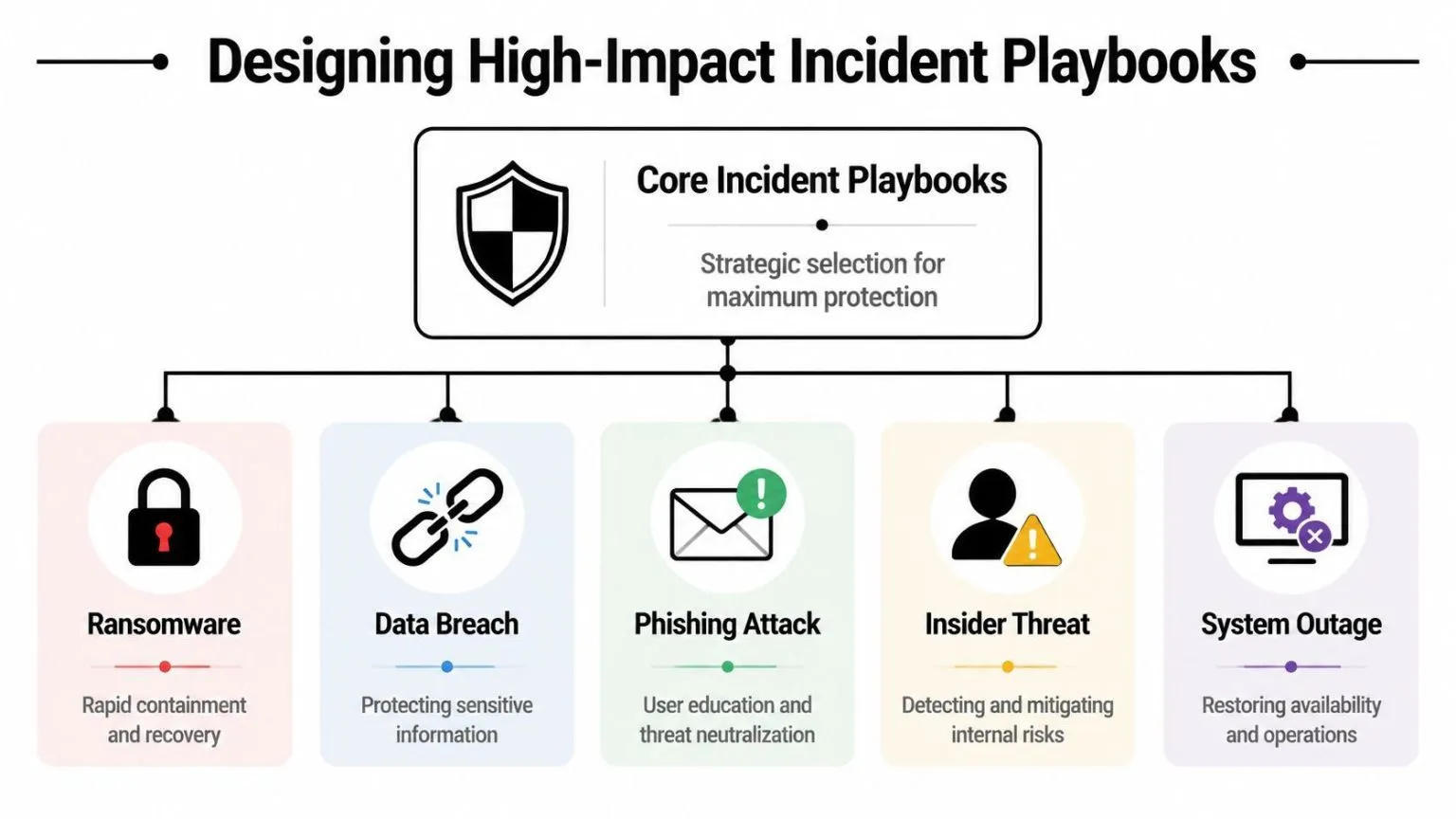
Start with the scenarios where your team already sees repeat activity, operational pain, or compliance exposure. In many environments that means things like phishing, ransomware, data breach, cloud misconfiguration, or malware on managed endpoints. The exact list matters less than choosing incidents where a defined trigger can reliably launch a repeatable response.
This is the logic behind building a playbook program, not a document library:
If you’re formalizing this inside a SOC workflow, a platform that connects detection and response matters. UTMStack’s incident response workflow overview is one example of how teams tie alerts, case handling, and response actions into a single operating flow instead of splitting them across disconnected tools.
What a usable playbook actually contains
The difference between a useful playbook and a decorative one is specificity. A usable playbook answers what the responder needs at the moment of pressure.
Include these elements:
- Objective and end state
Define what success means. “Contain infected endpoint and preserve evidence” is usable. “Respond to malware incident” is not. - Initiating conditions
Be explicit about the trigger. A high-confidence detection, a user report with attachment evidence, impossible travel plus token abuse, or a DLP event tied to regulated data are all valid starting points. - Scope and exclusions
State whether the playbook applies to corporate endpoints only, cloud workloads, contractors, production systems, or regulated datasets. Also note what falls outside the playbook and requires escalation. - Roles and approvals
Assign ownership for every action. Technical tasks need owners, but so do decisions such as who can approve host isolation, disable an executive account, or notify a customer. - Communication matrix
Many playbooks often remain too generic in this area. Define internal updates, legal review points, executive escalation, customer-facing ownership, and vendor coordination. If multiple teams can speak externally, conflicting messages are almost guaranteed. - Required versus optional actions
Separate actions that must happen from actions that may happen depending on evidence. That reduces hesitation when the team is trying to contain active impact.
A playbook should reduce decision fatigue, not create another document to interpret.
One design habit consistently pays off. Build the playbook backwards from dependencies. If the workflow says “quarantine host,” identify the exact EDR integration, approval path, and service permission required to make that step real. If it says “review account activity,” specify where those identity logs come from and who can access them. That’s how a playbook becomes executable instead of aspirational.
Mapping Detections to Automated Playbook Actions
A playbook only becomes operational when a detection can trigger it cleanly. Many programs stall at this stage. The document exists, the flowchart looks good, but nobody has mapped the alert logic, required telemetry, or tool permissions that let the response begin without manual scrambling.
Microsoft’s playbook format explicitly calls out required logging and roles/permissions as prerequisites. That matters because automation depends on the right telemetry from cloud services, endpoints, and network devices being available when the incident starts, not later when someone realizes evidence is missing (Microsoft incident response playbook prerequisites).
A practical way to think about this is: every automated action has a dependency chain.
Teams implementing this in a SOAR workflow usually connect detections, enrichment, and response in one place. UTMStack’s SOAR automation approach shows the model clearly: correlate events, trigger predefined actions, and preserve response evidence in the same operational path.
The prerequisite map most teams skip
When a playbook says “disable account,” “revoke token,” or “isolate endpoint,” that line should map to three prerequisite categories.
- Telemetry: The logs or signals that validate the condition. Identity logs, endpoint telemetry, cloud audit activity, firewall events, email security signals, or DLP alerts.
- Authority: The permissions, roles, and approvals needed to act. Service accounts, delegated admin roles, or named human approvers.
- Workflow linkage: The ticketing, notification, and evidence steps that prove the action happened and hand the case to the next owner.
Without that map, automation fails in familiar ways. The alert fires, but the identity platform isn’t sending enough detail. The SOAR can open a case, but it can’t isolate the host. The analyst can see the incident, but legal never gets looped in when the data classification changes.
Four scenarios that show the handoff problem
A phishing alert is a good first example. The email gateway flags a suspicious message. The playbook can only do something useful if mail logs identify recipients, the investigation workflow can search for message spread, and the response path can remove similar emails or disable accounts if compromise is confirmed. If those links aren’t built, the team ends up forwarding screenshots and manually piecing together exposure.
A compromised endpoint follows a different sequence. EDR detection identifies suspicious process behavior. The automated path might enrich the alert with host owner, business criticality, and recent authentication activity, then isolate the endpoint if severity crosses a defined threshold. That only works if the EDR integration supports isolation and the service account has authority to execute it.
A cloud misconfiguration incident exposes another gap. The detection may come from configuration monitoring or cloud audit activity, but the response often requires a different owner such as cloud engineering. A good playbook doesn’t just create a case. It defines the handoff, required evidence, rollback owner, and validation step before the issue is marked contained.
Third-party incidents are often the messiest. A vendor notifies you of suspicious access, or your own detections show abnormal partner activity. Technical containment may be limited because the affected system isn’t fully under your control. Here the playbook needs explicit vendor coordination, leadership notification, and legal review triggers. Without that, responders waste time deciding who owns the external conversation.
Missing logs don’t just slow investigation. They block containment because the team can’t prove what happened, where it spread, or whether the action is safe to take.
The best automated incident response playbooks don’t automate everything. They automate the repeatable parts and reserve human judgment for impact assessment, legal risk, customer communication, and exception handling. That’s the balance that keeps the workflow fast without making it reckless.
Example Playbooks for Common Cyber Threats
Many incident response explainers stop at technical verbs. Contain. Eradicate. Recover. In real incidents, that isn’t enough. For customer-impacting events or regulated environments, the harder question is who says what, when, and to whom. That’s why scenario-specific communication and handoff design matters so much, especially when support, engineering, leadership, or regulators may all need coordinated updates.
Ransomware and phishing need different control points
A ransomware playbook should start with confidence scoring and blast-radius control. If multiple hosts show encryption behavior, the response path usually prioritizes host isolation, account review, segmentation checks, and backup validation. The communication branch needs a clear trigger for leadership involvement because business interruption often matters before full root-cause certainty.
What doesn’t work is waiting for complete forensic confidence before acting. In ransomware, hesitation expands impact. The playbook should define the threshold for immediate containment and separate that from the later investigation track.
A phishing playbook needs tighter identity and user coordination. The trigger might be a user report, a secure email gateway alert, or a suspicious sign-in linked to the reported message. Initial actions usually include message analysis, recipient search, account review, and token or password response if compromise is suspected.
The communication side is different from ransomware. Here the message to affected users must be fast, specific, and owned by one function. If support, security, and management all send separate notices, users get confused and remediation slows.
Data exfiltration and lateral movement expose coordination gaps
A data exfiltration playbook should begin with evidence preservation. Before anyone rushes to shut off access, the team needs enough logging to understand what data moved, from where, by whom, and through which channel. That may involve cloud audit records, endpoint telemetry, DLP alerts, and identity activity.
In the playbook, legal and compliance often need an early branch. If the incident may involve regulated data, the communication owner can’t be chosen ad hoc.
A lateral movement playbook is more about containment sequencing than a single visible event. The trigger might be suspicious authentication patterns, administrative tool misuse, or internal system access that doesn’t fit the expected path. The first mistake teams make is treating each alert independently. The playbook should force a broader hunt scope once indicators suggest movement between systems.
Communication here often stays internal at first, but ownership still matters. Infrastructure, identity, and security teams need one incident lead and one update cadence. Otherwise one team resets credentials while another is still collecting evidence from the same accounts.
Sample Incident Response Playbook Comparison
| Threat Type | Primary Trigger(s) | Key Containment Actions | Primary Communication Need |
|---|---|---|---|
| Ransomware | Endpoint encryption behavior, multiple affected hosts, abnormal process activity | Isolate hosts, review account activity, validate backup path, segment affected systems | Leadership updates tied to operational impact |
| Phishing | User-reported email, email security alert, suspicious sign-in after message delivery | Search and remove similar emails, review impacted accounts, revoke sessions if needed | Clear user instructions from a single owner |
| Data Exfiltration | DLP alert, unusual data movement, cloud audit anomaly, suspicious outbound transfer | Preserve evidence, restrict access, validate scope, coordinate with data owners | Early legal and compliance alignment |
| Lateral Movement | Abnormal authentication chain, privileged access misuse, internal pivot indicators | Limit privileged access, contain affected systems, expand investigation scope | Tight coordination between identity, infra, and security teams |
A useful playbook for any of these threats has two clocks running at once. One is the technical response clock. The other is the communication clock. If your document only covers the first one, it won’t hold up in a real incident.
Testing Validation and Measuring Playbook Effectiveness
A playbook that hasn’t been exercised is still theory. The document may read well, but until people test the trigger logic, the approvals, the data access, and the communication handoffs, nobody knows whether it works under stress.
Practitioner guidance is consistent on the lifecycle that playbooks should standardize. Detection, analysis, containment, eradication, recovery, and post-incident review. It also recommends reviewing them on a 4 to 6 month cycle and after every incident so ownership and communication paths don’t go stale (Atlassian guidance on maintaining incident response playbooks).
Test the decisions not just the tooling
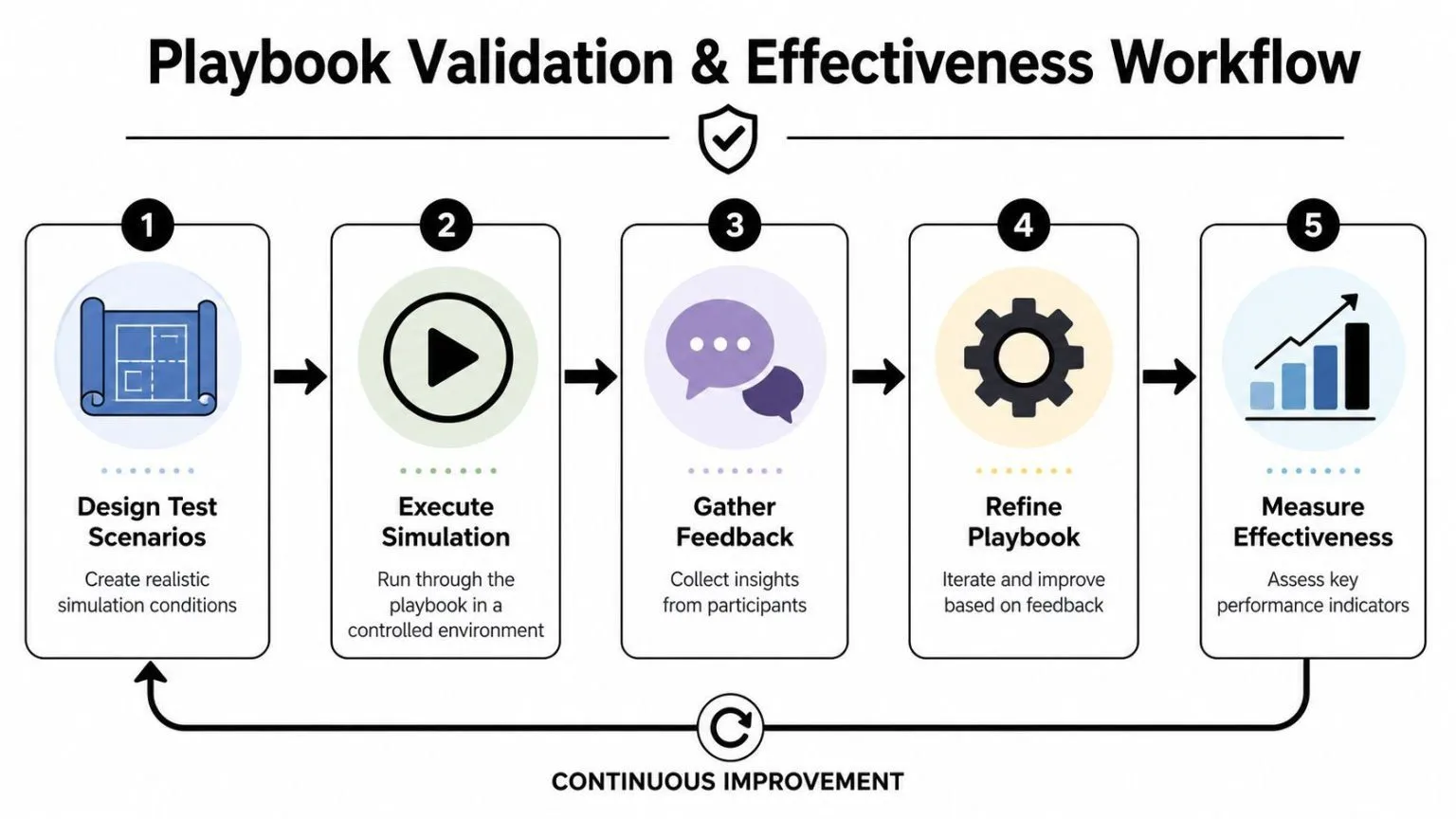
The most useful tests aren’t always the most technical ones. Start by validating decision quality.
- Tabletop exercises: Use these to test escalation logic, legal involvement, customer messaging, and leadership reporting. A tabletop quickly reveals whether people know who owns each branch.
- Control validation drills: Test specific actions such as account disablement, host isolation, or ticket creation. Missing permissions and API failures become apparent.
- Evidence checks: Confirm that the logs and artifacts named in the playbook are retained, accessible, and tied to the case record.
- Post-incident reviews: After a real event, compare what happened against the documented flow. The goal isn’t blame. It’s whether the playbook matched reality.
The strongest lesson from testing is usually not “the team forgot a step.” It’s “the environment couldn’t support the step the playbook assumed.”
That’s an important distinction. A stale contact list is a documentation problem. An isolation action that no system account can execute is an architecture problem.
Use reviews as operational evidence
Mature programs treat testing as more than readiness work. They treat it as evidence of control operation. A reviewed playbook, a logged simulation, and a documented postmortem show that the organization isn’t relying on policy statements alone. It has a functioning response process with feedback loops.
Measure effectiveness with a mix of operational and governance signals. Time-based metrics can help internally, but in many organizations the most revealing questions are qualitative:
- Did the right playbook trigger at the right time?
- Were required logs present at first review?
- Did every action have a clear owner?
- Did communication stay consistent across technical and non-technical teams?
- Did the post-incident review produce specific updates instead of general observations?
That review discipline is what keeps incident response playbooks alive. Without it, ownership drifts, integrations break unnoticed, and the next incident exposes the decay all at once.
Mapping Playbooks to Your Compliance Requirements
Security leaders often separate response operations from compliance work. In practice, they should reinforce each other. A well-executed playbook produces the records auditors and assessors ask for: what triggered the incident, who approved containment, what evidence was collected, when stakeholders were notified, and how the organization validated recovery.
Turn response activity into audit evidence

This is where centralized evidence handling matters. If detections, case notes, escalation records, and response logs sit across separate systems, proving control execution becomes slow and fragile. Teams using a unified logging approach can tie alerts and response artifacts together more cleanly. Centralized log management is a practical foundation because it preserves the telemetry and case context that make a playbook auditable.
The mapping to frameworks is usually straightforward in concept even if execution is messy:
- CMMC and SOC 2: Show that incidents are detected, escalated, investigated, and documented consistently.
- HIPAA security incident procedures: Show who handled the incident, what evidence was preserved, and how the organization managed response and follow-up.
- PCI DSS incident response expectations: Show that response actions were defined, executed, and reviewed.
- ISO 27001 programs: Show that incident handling is documented, repeatable, and improved over time.
Build once and report many times
This is also why documentation quality matters. The same playbook can serve responders, auditors, legal reviewers, and risk owners if it clearly connects operational steps to governance outcomes.
One caution is worth stating plainly. Compliance language should never replace operational clarity. A playbook that sounds audit-friendly but doesn’t specify logs, permissions, and handoffs will fail the people using it during an incident. The strongest programs build the playbook for operators first, then map its artifacts to compliance requirements afterward.
If you’re trying to move from scattered runbooks to executable incident response playbooks, UTMStack is one platform to evaluate. It combines SIEM, SOAR, XDR, log management, and compliance workflows so teams can connect detections, automated actions, and audit evidence in the same operating path.