More than 40,000 new vulnerabilities are disclosed annually, and that volume is one reason the global security and vulnerability management market reached USD 16.51 billion in 2024 and is projected to hit USD 24.47 billion by 2030 according to Grand View Research on the security and vulnerability management market. That should change how you think about what vulnerability scanning is.
It isn’t a quarterly housekeeping task. It isn’t a PDF report that sits in a ticket queue. In a functioning SOC, vulnerability scanning is a continuous detection input that helps teams understand where they are exposed, which systems matter most, and where compliance gaps are turning into operational risk.
If someone asks what is vulnerability scanning, the practical answer is simple. It’s the automated process of checking systems, applications, and infrastructure for known weaknesses and misconfigurations so defenders can fix them before attackers use them. The deeper answer is more useful. Vulnerability scanning only works when it’s tied to asset inventory, prioritization, remediation, SIEM or XDR correlation, and audit evidence.
The Unwinnable Race Against Digital Risk
Hundreds of new CVEs can land in a single week. For security teams, the hard part is not understanding that risk exists. The hard part is keeping asset visibility, prioritization, and response aligned while the environment keeps changing underneath them.
That is why vulnerability scanning matters. It gives defenders a repeatable way to find exposed systems, missing patches, weak configurations, and software that has drifted out of policy before an incident forces the issue.
Risk starts with exposure and context
In many environments, the first problem is not patching. It is knowing what is there, what is reachable, and what changed since the last review. A forgotten VM, an untracked cloud workload, or a remote endpoint that missed several update cycles can sit outside normal operational oversight for weeks.
Scanning turns that blind spot into usable data. Done well, it helps teams answer four operational questions:
- What exists: Which assets are active across on-prem, cloud, remote, and ephemeral environments
- What is exposed: Which services, applications, and systems map to known weaknesses or unsafe configurations
- What changed: Which new hosts, images, or software versions introduced fresh risk
- What needs action first: Which findings belong in immediate remediation based on exposure, criticality, and active threat activity
Practical rule: If scan results do not improve asset visibility and remediation order, the program is producing reports, not reducing risk.
Periodic scans miss how modern environments behave
A monthly scan cycle made sense when infrastructure changed slowly and most systems lived in one data center. That model breaks down in hybrid estates, cloud-native environments, and MSSP operations where tenants, workloads, and internet exposure can shift daily.
A scanner by itself does not tell a SOC what matters right now. A critical finding on an isolated lab host is different from the same finding on an internet-facing application, a domain controller, or a payment system. The priority changes again if the SIEM is already seeing suspicious authentication, exploit attempts, or endpoint alerts tied to that asset.
That is the operational shift many teams miss. Vulnerability scanning is not just a scheduled hygiene task. It is a continuous input to detection, triage, remediation, and audit readiness. SOC teams use it to add technical exposure data to live investigations. MSSPs use it to separate noisy findings from tenant issues that need fast action. Security leaders use it to prove that remediation work follows risk and policy, not just patch cadence.
Teams that treat scanning as a static report usually drown in backlog. Teams that feed scan data into SIEM, XDR, ticketing, and compliance workflows can make better decisions under pressure and show why those decisions were made.
How Vulnerability Scanning Actually Works
A vulnerability scanner doesn’t think like a human assessor. It runs structured checks. It compares observed conditions against known weakness data. It looks for missing patches, exposed services, insecure configurations, and software versions associated with documented flaws.
According to Red Canary’s explanation of vulnerability scanning tools, vulnerability scanning works by executing deterministic if-then scenarios against services and configurations and comparing the results to known flaw databases such as the CISA Known Exploited Vulnerabilities catalog. The same source notes that the process is non-intrusive, which means it detects and alerts on likely weaknesses without actively exploiting them the way penetration testing does.
What the scanner is really doing
The easiest way to explain it to a new analyst is to compare it to a building inspection. The scanner checks doors, locks, wiring, and safety systems against a known set of code violations. It doesn’t burn the building down to prove the fire alarm fails.
That distinction matters because people often confuse scanning with offensive validation. A scanner is designed to detect likely issues at scale. A penetration test is designed to prove exploitability through controlled attack activity. Both matter, but they answer different questions.
A practical scan workflow usually looks like this:
- Identify reachable assets across network ranges, hosts, applications, images, or cloud resources.
- Interrogate services and configurations using known checks for versions, settings, and exposed interfaces.
- Match findings to vulnerability intelligence and assign severity using frameworks such as CVSS.
- Generate remediation guidance for patching, reconfiguration, or compensating controls.
- Hand results to analysts for validation, false-positive review, and prioritization.
Credentialed and uncredentialed scans serve different jobs
A lot of weak programs rely too heavily on uncredentialed scans because they’re easier to deploy. That gives you an attacker-style external view, but it misses a large amount of internal risk.
A credentialed scan authenticates to the target and inspects the system from the inside. That usually produces better visibility into installed software, patch state, local configuration, and host-level weaknesses that a network probe can’t infer cleanly.
| Aspect | Uncredentialed Scan (External View) | Credentialed Scan (Internal View) |
|---|---|---|
| Perspective | Sees the target like an outside observer | Sees the target with authenticated access |
| Best for | Internet exposure, open ports, exposed services | Missing patches, insecure local settings, installed software issues |
| Visibility | Limited to what responds externally | Deeper host and configuration insight |
| Typical blind spots | Internal misconfigurations, local package state, weak endpoint settings | Depends on reliable credentials and permissions |
| Operational trade-off | Easier to start, less invasive to credential handling | More complete data, more setup discipline required |
An uncredentialed scan tells you what the street can see. A credentialed scan tells you what’s broken in the server room.
Neither method is enough on its own. Mature teams use both. External scans show what attackers can hit from outside. Credentialed scans show what your internal attack surface and administrative hygiene really look like.
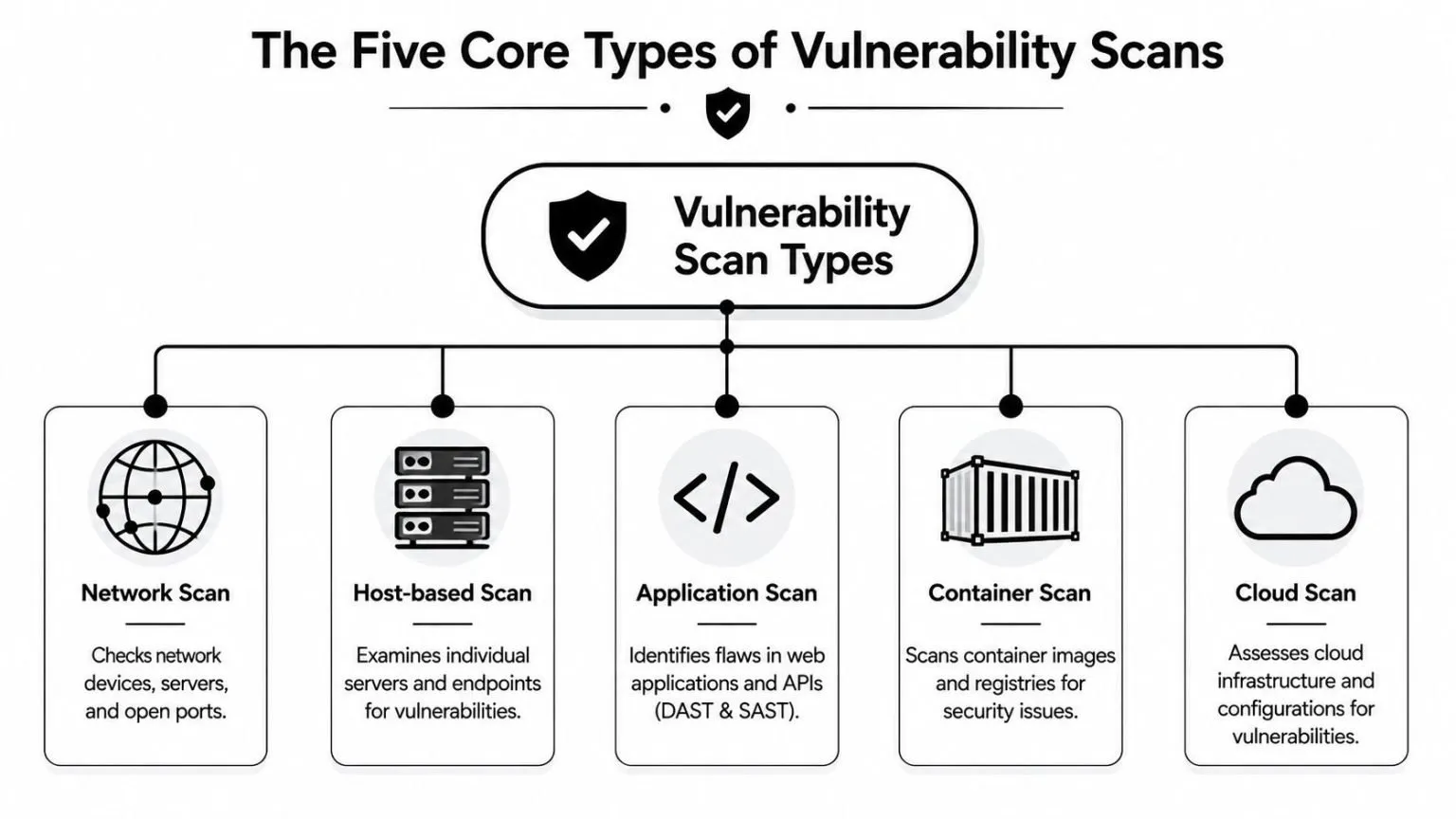
The Five Core Types of Vulnerability Scans
A single scanner won’t cover every layer of modern infrastructure well. Networks, endpoints, web applications, containers, and cloud control planes all fail in different ways. Good programs select scan types based on asset class and operating model, not just tool licensing.
Network scans
Network vulnerability scanners focus on infrastructure. They inspect reachable devices, exposed services, open ports, and common misconfigurations across routers, firewalls, switches, servers, and perimeter systems.
These are often the fastest way to find obvious exposure problems. They’re also useful for validating segmentation assumptions. If a scanner can reach a service from a place it shouldn’t, that’s a meaningful finding even before you look at patch levels.
Host-based scans
Host-based scanning goes deeper into the endpoint or server itself. This can happen through agents or authenticated remote checks. The goal is to inspect local operating system state, installed packages, patch status, and security-relevant settings.
Within this context, teams usually find the issues that network scans miss, such as outdated software components, weak local policy, or missing updates that don’t reveal themselves cleanly over the wire.
Application scans
Application scanning is where many teams discover that “running” doesn’t mean “safe.” Web applications and APIs fail differently than operating systems or network devices.
As explained in CoreWin’s breakdown of DAST and SAST vulnerability scanners, application scanners are commonly split into DAST and SAST:
- DAST: Tests a live running application from the outside and simulates attack behavior against exposed functionality.
- SAST: Analyzes source code without executing it and helps developers find flaws earlier in the software lifecycle.
Those methods complement each other. DAST is useful for seeing exploitable behavior in a deployed app. SAST is useful for catching risky coding patterns before release.
Container scans
Container scanning focuses on images and registries. Teams use it to identify vulnerable packages, outdated base images, and embedded software components before workloads reach production.
Given that containers move fast and get replicated widely, if a bad image makes it into a pipeline, the same weakness can spread across many workloads quickly. Container scanning is strongest when it’s tied to CI/CD controls and registry governance, not just occasional manual review.
Cloud scans
Cloud scanning usually targets infrastructure configuration and platform-level exposure. In practical terms, this often means checking how resources are configured, what permissions exist, and whether cloud services are aligned with policy.
For security architects, vulnerability scanning starts overlapping with posture management. A cloud workload may be technically patched but still exposed because a storage policy, identity permission, or security group is wrong.
A balanced program often combines all five types. The goal isn’t tool sprawl. The goal is coverage across the places where attackers gain footholds.
Beyond the Scan The Full Vulnerability Management Lifecycle
A scanner produces findings. A vulnerability management program reduces risk. Those aren’t the same thing.
Too many teams stop at detection. They run scans, export CSVs, and open a mountain of tickets with little business context. Then everyone wonders why the backlog grows faster than it shrinks. The answer is simple. Scanning without a lifecycle creates administrative activity, not measurable security improvement.
The workflow that actually reduces risk
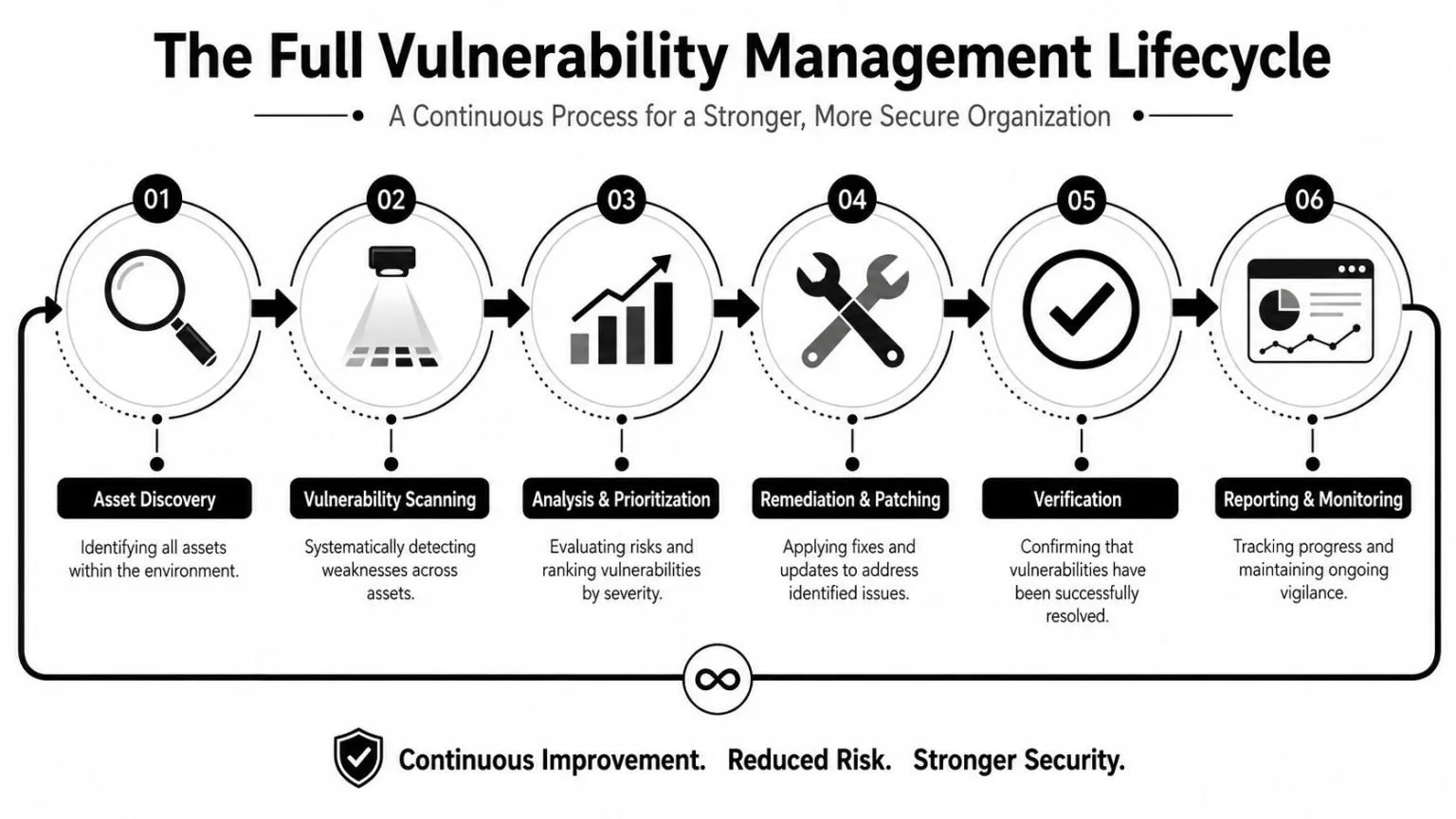
The formal sequence is well established. Meegle’s summary of vulnerability management and SIEM workflows describes the process as Asset Discovery, Vulnerability Scanning, Risk Assessment, Prioritization based on business impact, Remediation, and Continuous Monitoring. That’s the right structure because each stage depends on the one before it.
In practice, each step answers a different operational question:
- Asset discovery asks what you own and what’s in scope.
- Vulnerability scanning asks what known weaknesses are present.
- Risk assessment asks how severe those findings are in context.
- Prioritization asks what should be fixed first.
- Remediation asks which team can patch, reconfigure, isolate, or mitigate the issue.
- Continuous monitoring asks whether the exposure is gone and whether it returns.
A lot of failed programs break at the asset stage. If discovery is weak, the rest of the pipeline is built on bad assumptions. You can’t protect assets you don’t know exist.
Why prioritization fails in many programs
The next failure point is severity-only thinking. Teams sort by CVSS, attack the top of the list, and still miss the issues most likely to hurt them. CVSS is useful. It is not enough.
A scanner can tell you that a vulnerability is severe. It usually can’t tell you, by itself, whether that system is internet-facing, tied to sensitive data, reachable by attackers from current footholds, or already showing suspicious activity in your SIEM. That’s where exploitability context matters.
Wiz’s discussion of vulnerability scanning notes that 60% of organizations overwhelmed by scanner noise cannot distinguish between assets that are exploitable and assets that are only theoretically vulnerable or otherwise mitigated. That problem is familiar in almost every SOC. The queue gets noisy. Analysts chase findings with high scores but low operational relevance, while dangerous combinations of exposure and active threat activity wait too long.
Field note: Prioritization gets better when the finding is tied to asset criticality, reachability, identity exposure, and live security telemetry. It gets worse when the ticket only contains a CVE and a due date.
Unified security platforms change the workflow. Products that combine scanning with log correlation, endpoint context, and response automation can help teams move from “we found a vulnerability” to “this vulnerable asset is exposed, important, and behaving suspiciously right now.” That is a much more defensible basis for remediation order.
Verification matters too. If teams patch but never rescan, they don’t know whether the exposure is closed, partially mitigated, or still present due to failed deployment, stale images, or rollback. Strong programs treat rescanning as proof, not as an optional cleanup task.
Integrating Scan Data into Your SIEM and XDR
A SOC loses time every time an analyst has to leave the alert queue to verify whether the affected asset is vulnerable, exposed, or already under active attack. That delay is why scanner data belongs inside daily detection and response workflows, not in a separate dashboard that only the vulnerability team checks.
When scan results stay isolated, triage slows down fast. An analyst sees suspicious PowerShell on an endpoint, then checks the SIEM for related authentication events, then hunts for the latest scan result, then tries to confirm who owns the system and whether it is internet-facing. By the time that picture comes together, the queue has grown and prioritization has already suffered.
Static findings need live context
A raw CVE record rarely answers the question the SOC cares about. Analysts need to know whether the vulnerable asset is generating suspicious telemetry, whether it has a path to sensitive systems, and whether the finding affects a business-critical service.
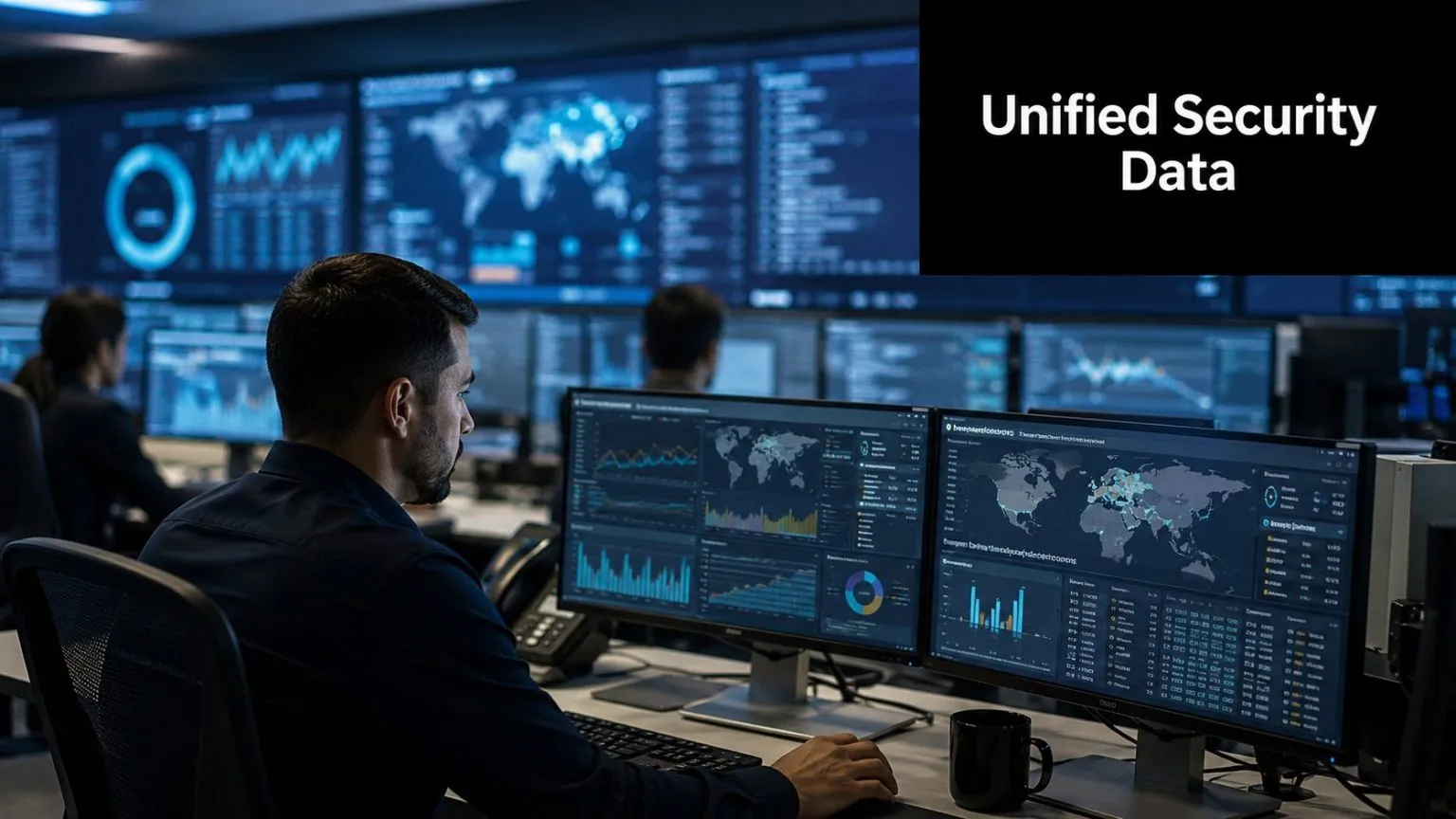
SIEM and XDR correlation gives the scanner output that missing context. Useful enrichment usually includes:
- Endpoint events: Process execution, privilege escalation, persistence activity, or malware detections
- Network telemetry: Inbound exploit attempts, unusual east-west traffic, or unexpected outbound connections
- Identity signals: Administrative logons, lateral movement patterns, or risky service account behavior
- Threat intelligence: Known exploitation activity, KEV alignment, or indicators tied to current campaigns
That combined view changes decisions. A vulnerable lab workstation with no sensitive access does not get handled the same way as a vulnerable domain controller showing anomalous authentication failures and suspicious remote execution.
What good integration changes for the SOC
Integrated scanning improves operations because it turns findings into usable detection context. A SIEM can raise the priority of an alert when the affected host has a severe unpatched vulnerability. An XDR platform can attach exposure data to an investigation so the analyst sees exploitability and host behavior in one case. SOAR playbooks can open tickets, notify owners, trigger rescans, or isolate systems when risk crosses a defined threshold.
That matters even more for MSSPs. Multi-tenant teams need consistent triage rules, shared asset context, and evidence they can hand to customers without rebuilding every case by hand. Scan data that feeds detections, case management, and remediation workflows is far more useful than a PDF report sent once a month.
UTMStack is one example of a platform that brings SIEM, SOAR, XDR, compliance workflows, and vulnerability scanning into the same operating view. For internal SOCs and MSSPs, that model reduces context switching and makes it easier to correlate scan findings with logs, endpoint telemetry, and response actions.
Correlation also improves analyst discipline. It does not remove the need to validate findings, but it helps teams separate theoretical exposure from issues that are tied to active risk. That leads to better tickets, faster escalation, and cleaner reporting to leadership and auditors.
Mapping Vulnerability Scans to Compliance Frameworks
In regulated environments, vulnerability scanning isn’t optional. It’s evidence. Auditors want proof that systems are being assessed on schedule, that findings are tracked, and that remediation follows documented process.
The most direct example is payment security. According to SecurityMetrics on vulnerability scanners and compliance, PCI DSS Requirement 11.2 requires organizations to perform internal and external network vulnerability scans at least quarterly and after any significant change. The same source notes that external scans must be run by a PCI-approved Approved Scanning Vendor, and that FedRAMP requires container images to be scanned before deployment and not remain in a registry for more than 30 days without screening.
Where scan frequency becomes an audit issue
Those requirements show why vulnerability scanning sits at the intersection of security operations and governance. Frequency, scope, and evidence quality all matter.
For PCI, the requirement isn’t satisfied by saying “we have a scanner.” Teams need to show that scans were run on schedule, covered the correct scope, and included the necessary external validation. If a major network change occurred, the timing matters again.
For cloud and containerized environments, FedRAMP pushes the same operational principle in a more modern form. If container images are deployed without timely scanning, organizations create a gap between release velocity and security assurance. That gap becomes both a risk issue and a compliance issue.
How security teams should present evidence
A good compliance-oriented scanning program produces records that are usable by both operators and auditors. That usually includes:
- Scope records: Which systems, segments, workloads, and registries were included
- Execution history: When scans ran and what triggered them
- Findings and status: Open, accepted, mitigated, or remediated vulnerabilities
- Verification records: Rescan results or other proof that fixes were applied
- Exception handling: Documented rationale for deferred remediation or compensating controls
This is relevant well beyond PCI and FedRAMP. Organizations working toward HIPAA, GLBA, CMMC, ISO 27001, and SOC 2 all benefit from showing that vulnerability scanning is part of an ongoing risk management process rather than an annual scramble.
For a CISO, the message to the board is straightforward. A scan program isn’t just reducing technical exposure. It’s generating defensible evidence that security controls are operating as required.
Best Practices and Avoiding Common Pitfalls
According to IBM’s 2024 Cost of a Data Breach Report, the average global cost of a breach reached $4.88 million. That number is useful here for one reason. Weak vulnerability scanning programs create preventable exposure, and the cost shows up later in incident response, downtime, audit findings, and remediation backlog.
Mature scanning programs are built as operating discipline, not as a quarterly task. The tool matters, but coverage, validation, workflow integration, and ownership matter more. In practice, the strongest programs treat scan results as live operational data that feeds ticketing, SIEM correlation, XDR context, and compliance evidence.
What mature programs do consistently
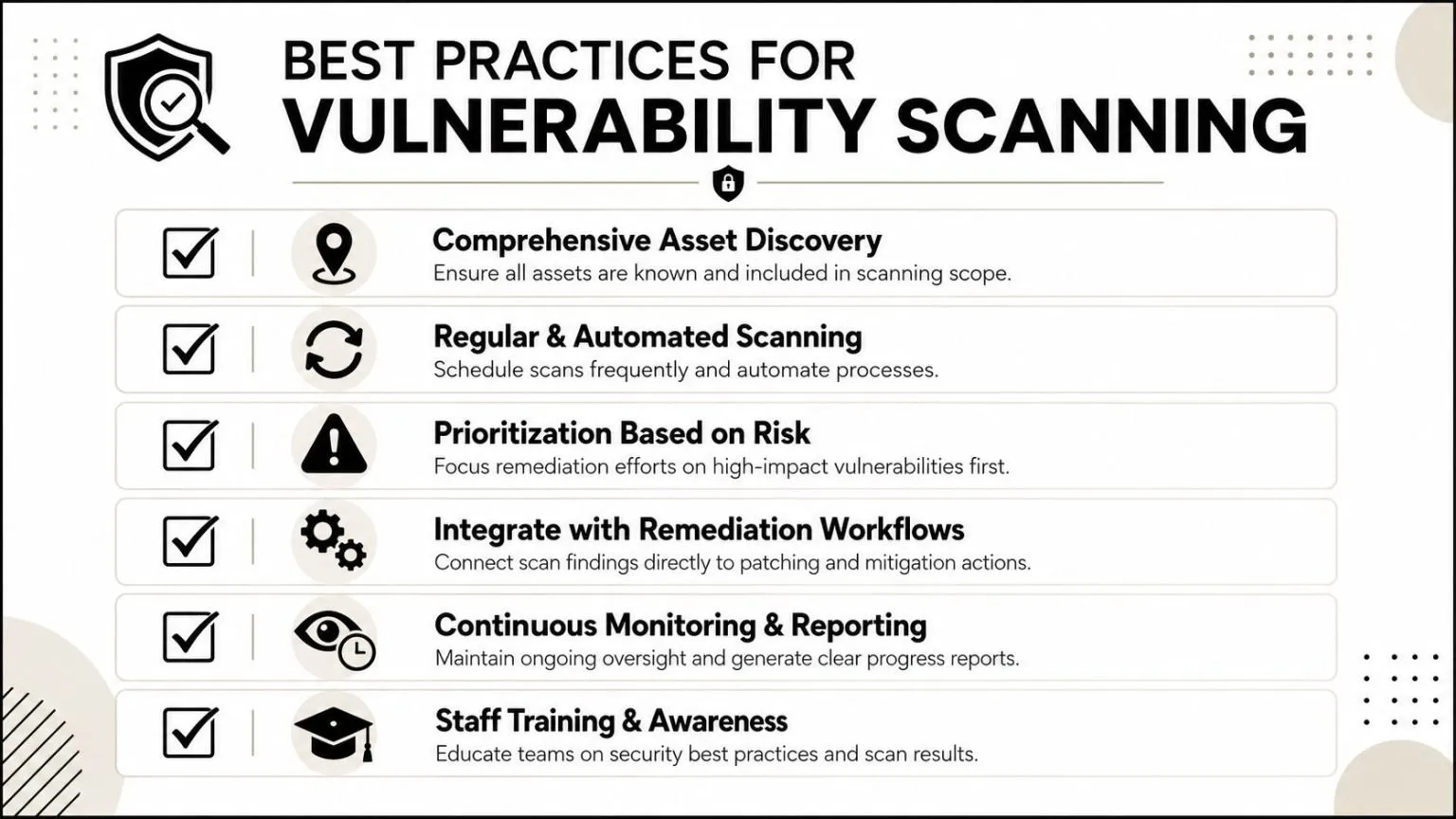
The teams that keep vulnerability scanning useful tend to do the same few things well:
- They start with asset coverage: If the inventory is wrong, scan data is incomplete before the first job runs.
- They use authenticated scans where they can: Better host-level visibility usually justifies the extra credential handling and access controls.
- They validate findings before sending work downstream: Tuning out false positives protects patch teams from wasted effort and keeps trust in the program high.
- They connect scan output to operations: Findings should feed tickets, change workflows, SIEM enrichment, and follow-up verification.
- They track risk reduction over time: A larger number of scans means little if internet-facing exposure, exploitable paths, and overdue remediation stay the same.
One pattern matters more than it gets credit for. Teams with good results rescan after fixes and confirm closure. Without that step, the organization measures effort, not progress.
Key takeaway: The goal is fewer meaningful exposures in production, not more scanner output.
Mistakes that keep teams stuck
The common failure modes are operational, not technical.
One is scan and forget. A scanner produces a long list, someone exports a report, and the backlog grows without ownership, SLA tracking, or proof that fixes held after deployment.
Another is poor routing of findings. Security teams send every issue to the same queue, regardless of asset criticality, exploitability, business owner, or maintenance window. That creates noise, slows patching on the systems that matter most, and burns out the teams expected to remediate everything at once.
A third is blind spot acceptance. Cloud assets, ephemeral workloads, remote endpoints, and unmanaged business systems often fall outside the scan scope because they are harder to inventory or scan consistently. For SOC teams and MSSPs, those gaps become even more serious because they break correlation. If a SIEM or XDR platform sees suspicious behavior on an asset that never made it into the scanning pipeline, analysts lose context they should have had from the start.
Three questions usually expose whether the program is working:
- Are high-value and high-exposure assets covered consistently?
- Do findings reach the right owner fast enough to support operational response?
- Can the team show that remediation reduced exposure, not just closed a ticket?
If any answer is no, the fix is usually broader than scanner configuration. Asset governance, workflow design, and validation are usually part of the problem.
UTMStack fits this problem space for teams that want vulnerability scanning tied directly to SIEM, SOAR, XDR, and compliance workflows in a single platform. If you need a way to turn scan findings into correlated detections, remediation actions, and audit-ready evidence across hybrid environments, take a look at UTMStack.