Most healthcare security teams don’t start thinking about HIPAA automation because they love compliance tooling. They start when another audit request lands, someone asks for six months of access reviews, policy attestations are out of date in three different folders, and the security team spends a week reconstructing evidence that should already exist. The problem isn’t that teams don’t understand HIPAA. It’s that too many programs still operate like a periodic paperwork exercise even though the environments they govern change every day.
That’s the gap hipaa compliance automation is meant to close. Done well, it doesn’t replace your compliance program. It changes the operating model from manual collection and retrospective explanation to continuous monitoring, structured evidence capture, and faster remediation. For CISOs, the important questions aren’t just which platform has the best dashboard. Key questions are architectural and governance-driven: where the automation runs, what data it touches, what decisions remain human, and how to avoid building a brittle machine that looks compliant while drifting underneath.
Navigating HIPAA Beyond the Annual Audit
The familiar failure mode looks the same in almost every organization. An audit, customer security review, or internal assessment approaches. Security asks IT for logs. Compliance asks HR for training records. Someone exports IAM data into spreadsheets. Policy documents get renamed, re-approved, and passed around by email. Then the team spends more time proving control execution than improving the controls themselves.
That operating model is expensive. It’s also fragile. Evidence gathered after the fact is harder to trust, harder to normalize, and harder to defend when an auditor asks how you know a control operated consistently between checkpoints.
A better approach is to treat HIPAA as an always-running operational discipline. Well-planned automation can deliver 300% to 500% ROI while cutting repetitive compliance workload by up to 70% through automating tasks such as access-log reviews, training tracking, and policy updates, according to ComplyJet’s HIPAA automation benchmark. Those numbers matter because they describe a shift in staff allocation, not just a tooling improvement.
The cost of reactive evidence gathering
When teams stay manual, they create avoidable risk patterns:
- Evidence gaps accumulate: Logs roll off, screenshots disappear, and control owners leave without documenting what they did.
- Review quality drops under deadline pressure: People approve access reviews and policy checks just to clear the queue.
- Security work gets displaced: Analysts spend time formatting artifacts instead of investigating drift, misconfigurations, or suspicious access paths.
Practical rule: If your compliance process depends on a recurring evidence scramble, you don’t have continuous assurance. You have periodic reconstruction.
Auditors and enterprise buyers increasingly expect a team to show how controls are monitored, not just how documents are stored.
The same principle applies to foundational telemetry. If logs aren’t centralized and retained in a way the compliance team can put to use, every later automation effort will be weaker. That’s why a mature program usually starts with disciplined log management in compliance operations, not with flashy workflow orchestration.
What changes when automation is done right
The win isn’t that audits disappear. The win is that audits stop dictating how the team works. Control evidence is collected as systems operate. Exceptions are visible earlier. Remediation becomes a tracked workflow instead of a post-audit promise.
This is the case for hipaa compliance automation. It replaces episodic validation with a standing control system that supports security, compliance, and audit readiness at the same time.
What Is HIPAA Compliance Automation
HIPAA automation is the use of connected systems to collect evidence, evaluate controls, and surface exceptions continuously instead of relying on periodic manual checks. The simplest analogy is physical security. Manual compliance is a guard walking the building every few hours with a checklist. Automated compliance is a monitored environment with sensors, logs, and alerts that report issues when they occur.
A visual model helps:
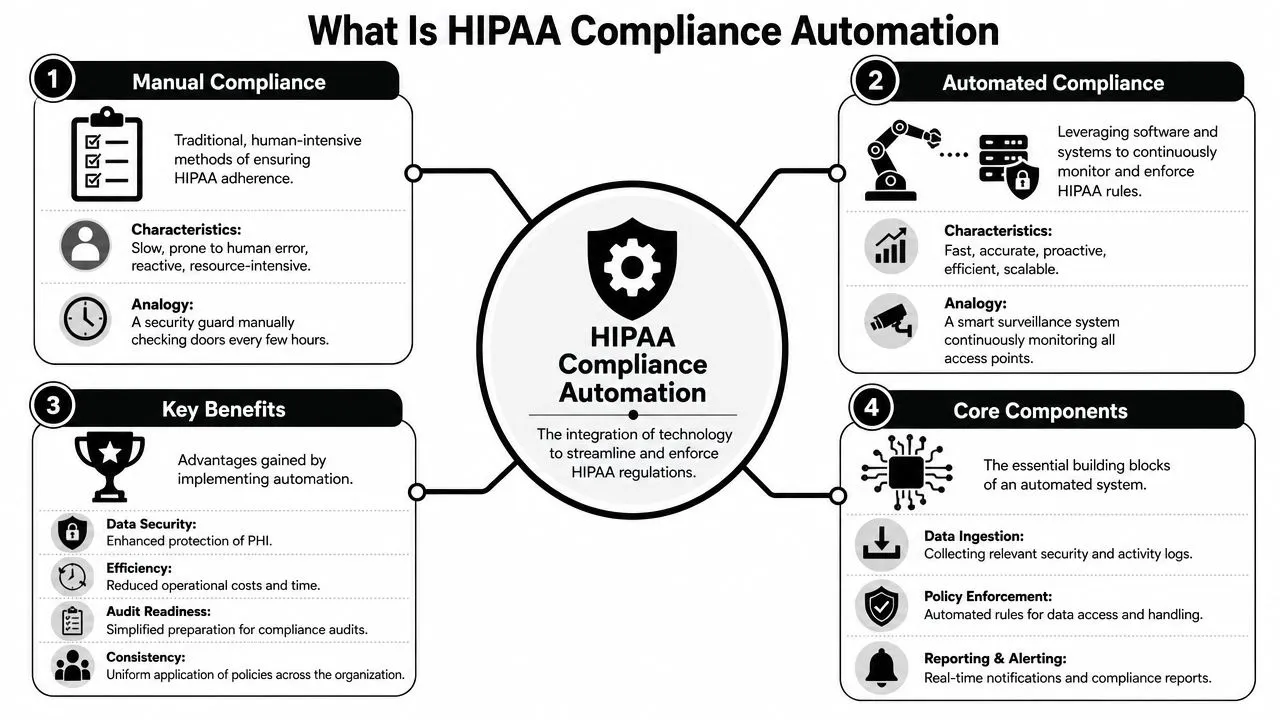
From snapshots to live controls
The most important change is the move to continuous control monitoring. Modern platforms describe this as monitoring controls 24/7, automatically collecting evidence, and flagging non-compliance as it appears. One platform’s dashboard illustrates the model with 91% evidence completion, showing how posture can become measurable in near real time rather than treated as an annual status exercise, as noted in Scytale’s discussion of automation in healthcare compliance.
That matters because HIPAA doesn’t behave like a once-a-year exam. Workforce access changes. Cloud settings drift. Vendors are added. Logging pipelines fail. Policies age. If the control environment changes every week, point-in-time validation can’t tell you much about current reality.
The same logic extends beyond security telemetry. Messaging workflows, intake processes, and operational communication channels often end up handling regulated data indirectly.
After the core concept, it helps to see the operating model in motion:
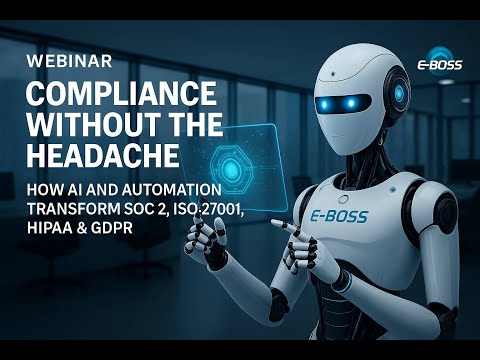
The three operating layers
In practice, hipaa compliance automation usually rests on three layers.
- Data ingestion
The system pulls logs, identity events, policy artifacts, training records, ticket states, and configuration data from the tools where those facts already exist. - Control evaluation
Mappings connect those facts to HIPAA safeguards. The platform checks whether expected conditions are present, missing, stale, or inconsistent. - Alerting and evidence generation
Exceptions trigger notifications, tickets, or response playbooks. At the same time, the system stores supporting evidence in a form the compliance team can present.
A control that can’t produce timely evidence is only partially implemented, even if the underlying security setting is correct.
This is why automation should be understood as a live control fabric, not a reporting layer. If all it does is generate nicer PDFs before an audit, the organization has digitized the old process instead of changing it.
Mapping HIPAA Safeguards to Automated Controls
The practical question isn’t whether HIPAA can be automated in the abstract. It’s which safeguards benefit most from automation and which ones still depend on judgment. The best candidates are controls that require repeatable evidence, frequent checking, or event-driven response.
Where automation fits best
Automation is strongest when the control has clear technical signals. Access changes, failed logins, privileged role assignments, retention status, training attestations, and ticket closure evidence are all easier to automate than narrative risk acceptance or executive policy review.
That doesn’t mean every safeguard becomes a machine rule. It means the machine handles the repetitive proof while humans handle interpretation, prioritization, and accountability.
A useful design principle is to separate control execution, control evidence, and control ownership:
- Execution can be automated: disable inactive accounts, collect logs, check encryption status, trigger review tasks.
- Evidence should be automated whenever possible: timestamps, approvals, log excerpts, configuration snapshots.
- Ownership stays assigned to people: privacy officer, IAM lead, security operations, infrastructure owner.
For teams standardizing evidence collection across the security stack, a SIEM-centered model is often the fastest way to anchor these mappings, making HIPAA compliance and SIEM integration useful. It gives the program one place to correlate events and preserve audit trails rather than distributing proof across disconnected consoles.
HIPAA Security Rule Automation Mapping
| HIPAA Security Rule Citation | Requirement | Automated Control Example |
|---|---|---|
| §164.308(a)(1) | Risk management | Create recurring workflows that collect exception data from cloud, endpoint, and identity systems, then open remediation tickets for control drift |
| §164.308(a)(3) | Workforce security | Trigger joiner, mover, leaver workflows from HR or IAM events to provision, modify, and remove access consistently |
| §164.308(a)(4) | Information access management | Detect privileged access changes, approval gaps, or role conflicts and route them for review |
| §164.308(a)(5) | Security awareness and training | Track training assignment, attestation status, overdue completion, and evidence retention automatically |
| §164.308(a)(6) | Security incident procedures | Correlate suspicious events, notify stakeholders, and preserve incident evidence as part of a response workflow |
| §164.308(a)(7) | Contingency planning | Validate backup-job status, restoration test records, and failure alerts through integrated monitoring |
| §164.310(d) | Device and media controls | Record asset state changes, decommissioning approvals, and media handling tickets in a centralized evidence trail |
| §164.312(a) | Access control | Continuously evaluate account status, MFA enforcement, privileged role use, and dormant identities |
| §164.312(b) | Audit controls | Aggregate system and access logs, alert on anomalies, and retain searchable evidence for reviews |
| §164.312(c) | Integrity | Monitor for unauthorized changes to configurations, policies, or sensitive repositories |
| §164.312(d) | Person or entity authentication | Validate authentication events and detect unusual login behavior or repeated failures |
| §164.312(e) | Transmission security | Check encryption-related control states and alert when protected channels or approved workflows aren’t being used |
The pattern is straightforward. The closer a requirement is to system state or recorded activity, the more value automation adds. The closer it is to executive judgment, the more the system should support the process rather than decide it.
Architecting Your Automated Compliance Engine
Most failed automation programs don’t fail because the control library is weak. They fail because the data path is incomplete. The system can’t prove what it can’t see, and in healthcare environments the blind spots are usually predictable: unmanaged SaaS, fragmented identity stores, missing endpoint telemetry, and policy artifacts that live outside any controlled repository.
The data path matters more than the dashboard
At the architecture level, the core pattern is straightforward. The system ingests logs, access-control data, and policy artifacts from IAM, SIEM, and cloud services so teams can detect drift early and maintain an audit-ready state year-round, as described in Secureframe’s comparison of manual and automated HIPAA workflows.
That sentence sounds simple. In implementation, it means making deliberate choices about collection method, normalization, and ownership.
- Agents work well for servers and endpoints where you need local visibility and reliable forwarding.
- APIs are often the cleanest path for cloud services, identity providers, ticketing systems, and training platforms.
- Syslog and network feeds still matter for appliances, firewalls, and legacy infrastructure.
- File and document ingestion is necessary if policy approvals, vendor reviews, or attestation records still originate outside the security stack.
A representative dashboard can help teams see why centralization matters:
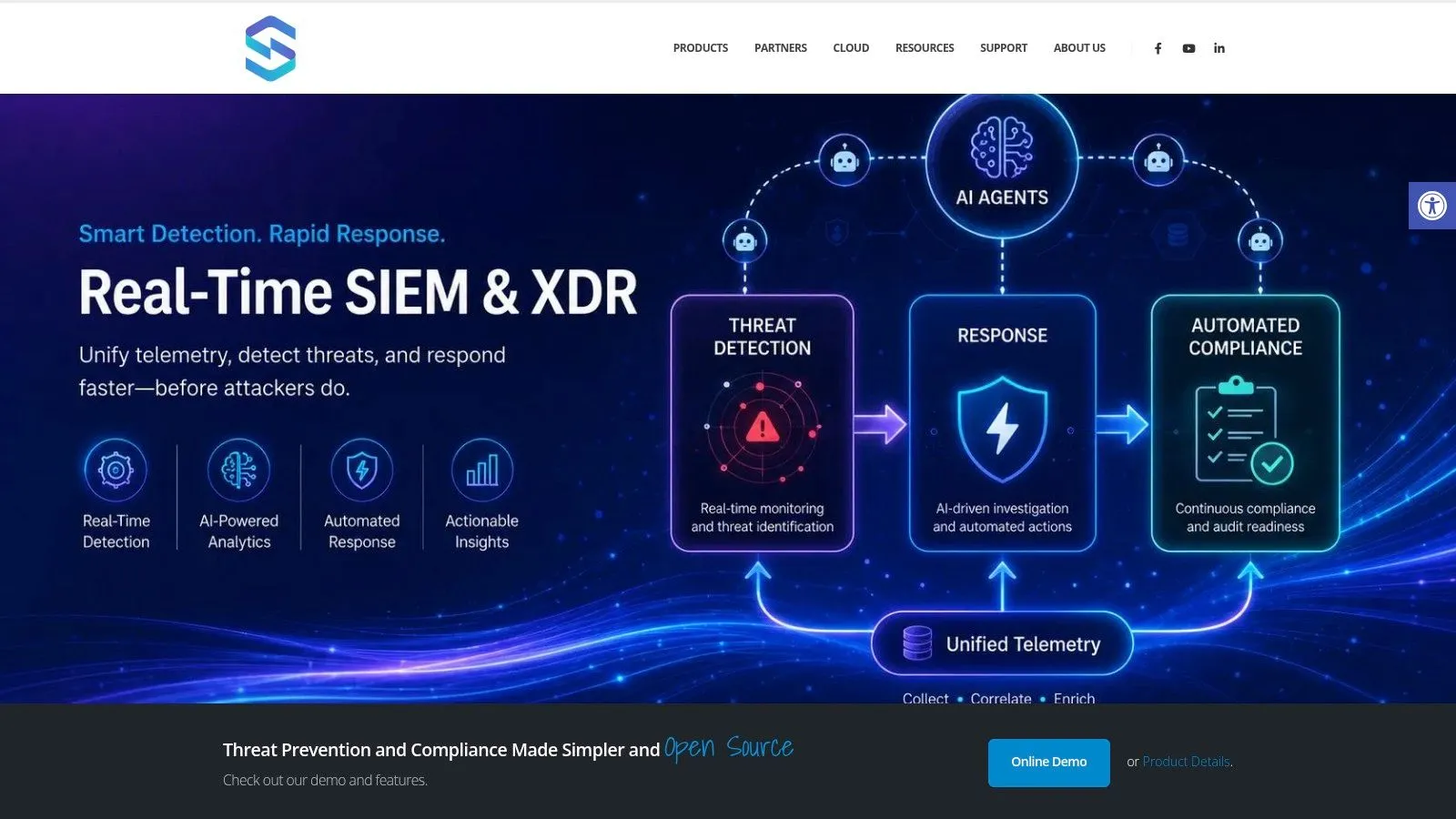
A practical reference architecture
The most effective pattern usually looks like this:
- Collection tier
Gather events from endpoints, servers, IAM, EHR-adjacent systems, cloud workloads, email security, ticketing, and policy repositories. - Correlation tier
Normalize identities, timestamps, assets, and event types. At this stage, a SIEM or XDR layer turns raw telemetry into control-relevant signals. - Evidence tier
Store the resulting artifacts in a way that supports retention, search, and audit retrieval. - Response tier
Execute playbooks for triage, notification, containment, or remediation when control deviations appear.
One option in this category is incident response automation with SOAR workflows, which lets teams connect alerts to repeatable actions such as creating a compliance ticket, notifying a privacy officer, or isolating a device while evidence is preserved. UTMStack is one example of a platform that combines SIEM, SOAR, and compliance workflows in a single stack.
Build the architecture around evidence fidelity first. Fast alerts are useful, but if you can’t reconstruct who had access, what changed, and when it happened, the compliance value is limited.
What doesn’t work is deploying an automation platform before the organization decides which systems are authoritative. If HR is the source for workforce status, IAM for account state, ticketing for approvals, and cloud control planes for configuration truth, the platform needs those boundaries defined early. Otherwise, it produces noise, duplicate exceptions, and endless ownership disputes.
Governance and Risk The Hard Questions of Automation
The most important decisions in hipaa compliance automation aren’t technical defaults. They’re governance choices that determine whether the tooling reduces risk or inadvertently creates a new one.
SaaS versus private deployment is a compliance decision
A question many teams skip too quickly is where the automation system itself runs. A checklist focused on HIPAA automation asks whether the system can be deployed fully on-premises, in a VPC, or private tenancy without outbound data transfer, especially when logs themselves may contain PHI. It frames data residency and evidence immutability as primary design constraints in Onymos’s HIPAA compliance automation checklist for 2025.
That point should reshape procurement conversations. If the platform ingests identity events, application logs, case notes, workflow comments, attachments, or investigation artifacts, then the compliance tooling may become part of the regulated environment in practice, even if nobody intended it to.
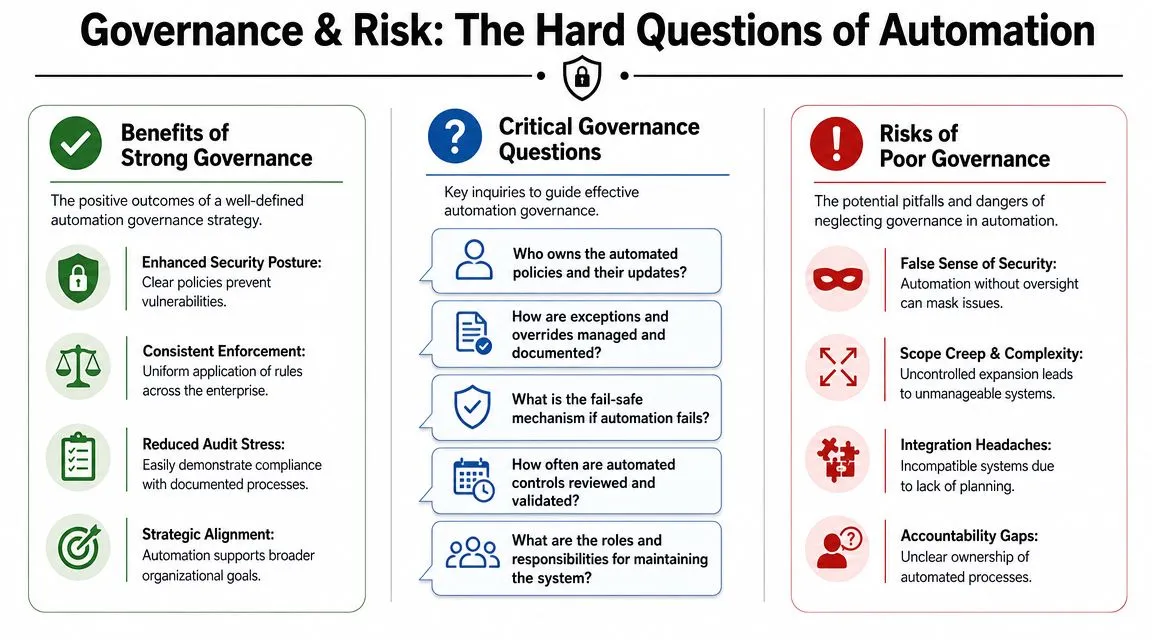
A CISO should force four questions before selecting the deployment model:
- What data enters the platform: raw logs, metadata only, attachments, ticket notes, screenshots, or policy documents.
- Where that data is processed and stored: multi-tenant SaaS, private tenant, customer VPC, or on-premises.
- Whether outbound transfer is required: some architectures assume vendor-hosted analytics or evidence storage.
- How evidence is preserved: immutability, retention controls, export capability, and reconstruction during an audit.
A SaaS model can still be the right choice. But it should be chosen deliberately, with data classification and workflow design in hand, not because it is operationally easy.
Define the automation boundary early
The second hard question is what the machine can decide on its own. Automation is excellent at repeatable control checking. It is much weaker at context-heavy judgment calls. Governance breaks when teams blur the line.
Tasks that are often good candidates for high automation include:
- Routine log review support: aggregate, correlate, and flag events needing human attention.
- Evidence collection: access records, policy acknowledgments, control screenshots, configuration states, approval trails.
- Workflow enforcement: review reminders, overdue escalations, termination tasks, remediation deadlines.
Tasks that should remain human-reviewed include:
- Formal risk acceptance: a system can prepare the evidence, but an accountable leader accepts the residual risk.
- Annual policy review: automation can track due dates and approvals, but leadership still owns the policy language.
- Business associate oversight: the workflow can track contracts and follow-ups, but vendor risk decisions require judgment.
- Audit remediation sign-off: the system can confirm task completion, but someone has to validate the fix is sufficient.
Automation should remove clerical work, not accountability.
The common failure mode is a false sense of continuous compliance. A green dashboard can hide stale mappings, broken connectors, unreviewed exceptions, or workflows that no longer reflect how the environment operates. Good governance assumes those failures will happen and defines who notices, who validates, and who can override the system when necessary.
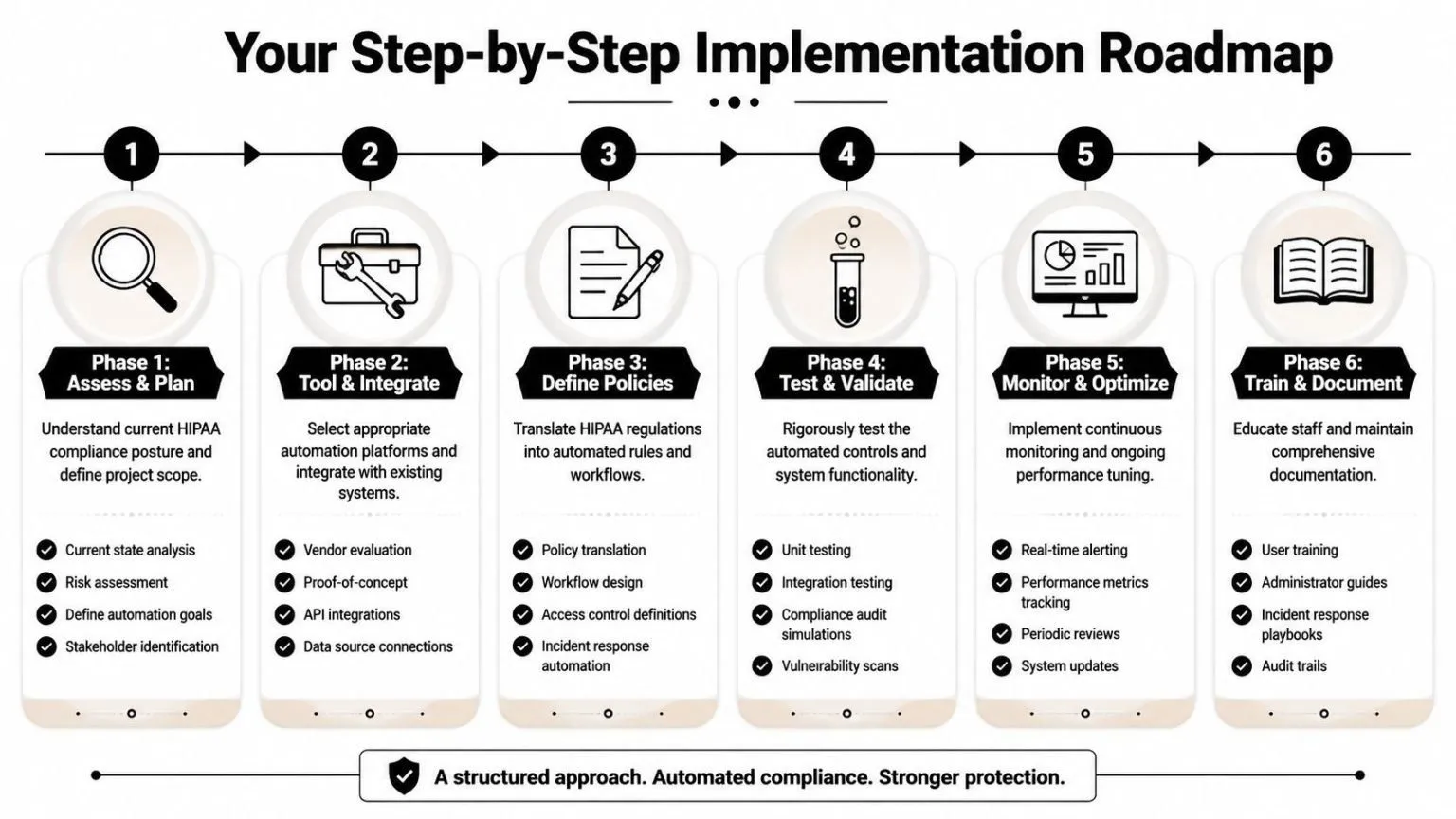
Your Step-by-Step Implementation Roadmap
Most organizations shouldn’t try to automate the entire HIPAA program at once. The safer path is to build the evidence fabric first, then increase enforcement and response in stages. Vendors report gains such as 90% faster compliance workflows and up to 80% automated evidence collection when standardized mappings and always-on checks replace manual sampling, according to Scytale’s overview of HIPAA automation. The implication isn’t that every team will see the same outcome. It’s that the operating model improves when control checks become systematic.
Phase the rollout like a security program
A practical roadmap usually follows six phases.
- Assess and plan
Identify systems that create, store, process, or support ePHI workflows. Map where identity, logging, ticketing, policy records, and training data currently live. Decide which repositories are authoritative. - Select tools and design architecture
Evaluate deployment models first, not last. Decide whether the automation layer belongs in SaaS, a private environment, or on-premises based on the data it will ingest and the evidence it must retain. - Define policies and mappings
Translate HIPAA safeguards into operational checks. Many teams often falter at this stage. They buy tooling before they decide what “good” looks like for account review cadence, privileged access approval, backup validation, and exception handling. - Test and validate
Run simulations with real workflows. Disable an account and verify the evidence trail. Force a failed control and confirm the right owner is notified. Break an ingestion connector and see whether anyone notices.
What to automate first and what to defer
The quickest wins usually come from controls with high repetition and low ambiguity.
- Start with collection-heavy tasks: access-log review support, training status tracking, policy acknowledgment capture, and centralized evidence retention.
- Then automate detection and routing: drift alerts, overdue reviews, privileged access exceptions, and incident workflow creation.
- Add response carefully: disable accounts, isolate assets, or trigger containment only where ownership and rollback are clear.
Leave the following for later, even if the platform can technically support them:
- Complex exception logic tied to specialized clinical workflows
- Cross-functional approvals where legal, compliance, and operations need different review paths
- Executive attestations that still depend on narrative interpretation
Start with controls that produce obvious evidence and predictable actions. Delay the ones that require heavy interpretation.
- Monitor and optimize
Once the system is live, review connector health, exception volume, stale rules, and unresolved findings. Tuning is part of the compliance program, not an afterthought. - Train and document
Every automated control needs named owners, fallback procedures, and clear documentation. If the workflow breaks, staff must know how to operate manually until it’s restored.
What works is phased deployment with explicit ownership. What doesn’t work is trying to automate every safeguard at once and discovering too late that nobody agrees on the system of record.
HIPAA Automation FAQs
Can automation make an organization fully HIPAA compliant
No. Automation supports a HIPAA program. It strengthens evidence collection, continuous monitoring, and workflow execution, but it doesn’t replace governance, policy ownership, risk decisions, workforce accountability, or legal review.
Does this apply to business associates too
Yes. Business associates often have the same operational problem as covered entities. They need to show safeguards, maintain audit trails, track risk, and prove that controls are functioning over time, not just during a questionnaire cycle.
Where can AI help without overreaching
AI can help analysts triage alerts, summarize evidence, identify likely duplicates, and assist with rule tuning. It shouldn’t be the final decision-maker for risk acceptance, disciplinary action, or any compliance assertion that requires accountable human review.
What’s the most common mistake
Treating automation as a reporting project. If the underlying data sources are incomplete, ownership is unclear, or the deployment model creates new PHI exposure, the organization ends up with better-looking reports and the same operational weaknesses.
If you’re building a HIPAA automation program and need a unified place to collect logs, correlate events, orchestrate response, and keep audit evidence usable, UTMStack is worth evaluating. It brings SIEM, SOAR, XDR, and compliance workflows into one platform, which can simplify the architecture for healthcare teams that want fewer disconnected tools and clearer control ownership.