Your SOC probably looks busy on paper and brittle in practice. Alerts land from email, endpoints, cloud workloads, identity providers, firewalls, and ticketing systems. Analysts swivel between consoles, copy indicators into chat, open cases by hand, and race to decide which events deserve containment and which ones are just noise.
That model doesn’t break because people are careless. It breaks because the volume, speed, and interdependence of modern environments outgrew manual response a long time ago. Security teams need a way to turn detection into action without waiting on a chain of handoffs.
That’s where incident response automation matters. Not as a magic button, and not as a collection of disconnected scripts, but as an operating discipline. It starts with clean telemetry, moves through enrichment and decision logic, and ends with controlled response actions, evidence capture, and measurable outcomes.
What Is Incident Response Automation and Why It Matters Now
Incident response automation is the use of orchestrated workflows to handle parts of detection, triage, containment, recovery, and documentation without waiting for an analyst to perform every step manually. In practice, that means systems can collect alerts, enrich them with context, route them correctly, and execute predefined actions such as isolating a device, blocking a connection, or opening an incident ticket.
The pressure behind this shift is simple. The annual cost of IT incidents averages $30.4 million, but automation can reduce that to $16.8 million, nearly a 45% reduction. The same source notes that the number of IT incidents increased by 48%, which is why a manual model has become economically and operationally hard to sustain for most organizations, according to Splunk’s overview of automated incident response.
Why manual response no longer scales
Teams often don’t fail at incident response because they lack effort. They fail because too much of the workflow still depends on people doing repetitive work:
- Analysts correlate alerts by hand across SIEM, EDR, identity, and cloud tools.
- Case creation lags behind detection because teams still rely on tickets, chat messages, and email to coordinate.
- Containment starts too late when every action requires a fresh review instead of a tested playbook.
- Post-incident reporting gets deferred because the team spent its energy on the firefight itself.
Practical rule: If analysts spend more time moving data between tools than making decisions, the response process is already a candidate for automation.
Automation also changes who does what. Machines handle the repeatable mechanics. Humans handle judgment, exceptions, and business trade-offs. That distinction matters even more as teams begin exploring more autonomous systems.
The strategic shift
A lot of organizations still treat incident response automation like a feature they’ll turn on after they buy a platform. That’s backwards. The hard part isn’t flipping a switch. The hard part is defining what data you trust, what actions are reversible, when approvals are required, and how you prove what happened afterward.
That’s why mature automation programs look less like scripts and more like operational policy encoded into workflows.
The Core Architecture of an Automated Security Ecosystem
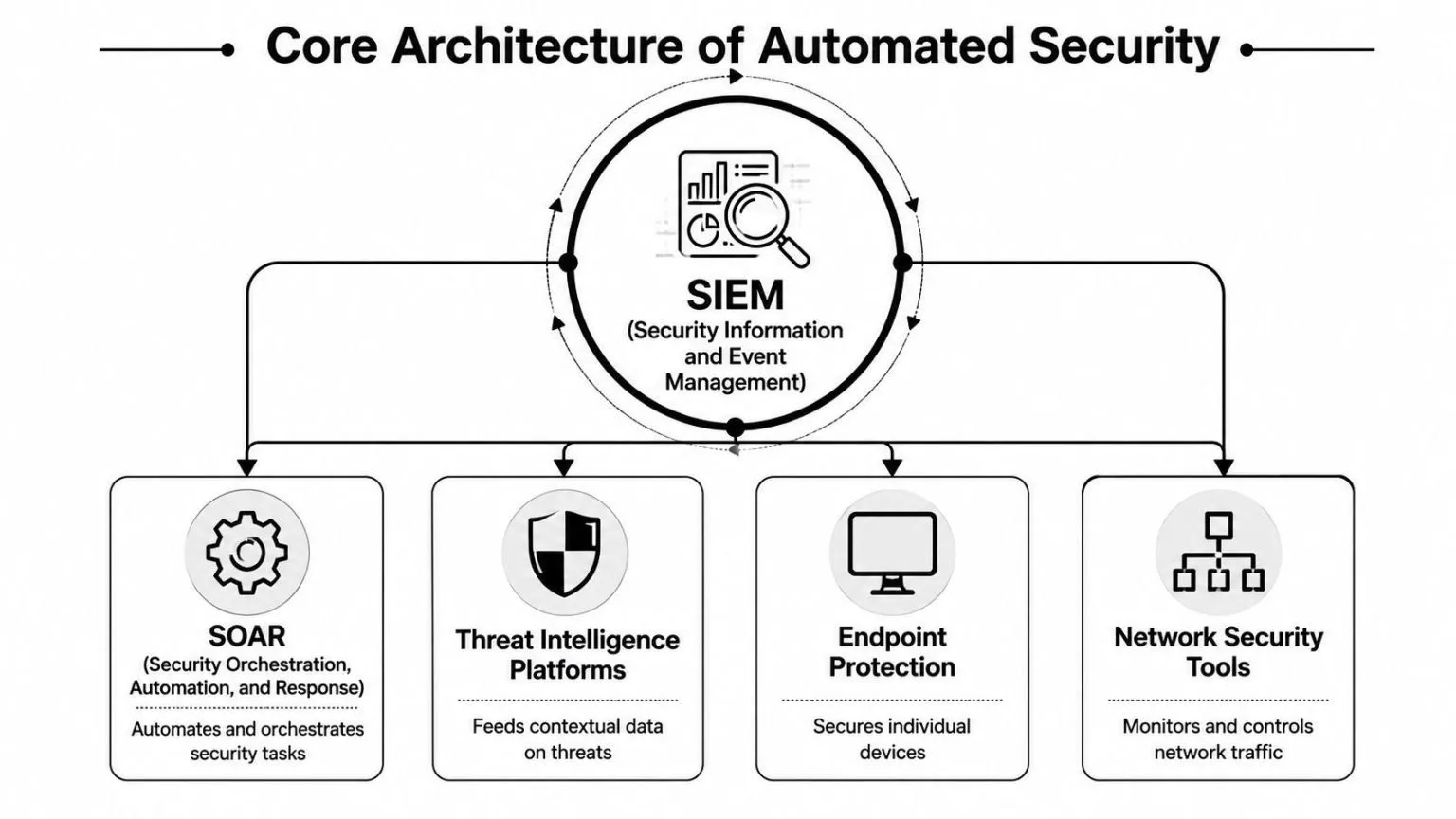
Security automation works best when the stack behaves like a central nervous system. Sensors collect signals. The brain decides what matters. The limbs act. If any part is disconnected, response slows down and quality drops.
From telemetry to action
At the center is the SIEM. It ingests logs, events, and alerts from the environment, normalizes them, correlates them, and gives the team a system of record for security activity. Without this layer, you don’t have enough context to automate safely.
EDR and endpoint tooling contribute host-level signals. They see process behavior, file activity, and local signs of compromise. Network security tools add traffic visibility and enforcement opportunities. Threat intelligence platforms provide context that helps distinguish routine noise from indicators that deserve action.
Then comes the orchestration layer. Effective automation relies on an orchestration layer across SIEM, EDR, and other systems because it can correlate telemetry, enrich alerts, and execute predefined containment actions without waiting for manual handoffs, as described in this explanation of automated incident response architecture.
How the systems work together
The cleanest way to think about the flow is this:
| Component | Primary job | What breaks without it |
|---|---|---|
| SIEM | Ingests and correlates security telemetry | Alerts stay fragmented |
| SOAR | Executes workflows and playbooks | Response remains manual |
| EDR/XDR | Provides endpoint and cross-domain detection context | Containment lacks precision |
| Ticketing and case systems | Track ownership and evidence | Incidents become hard to audit |
A practical architecture usually follows this sequence:
- Collect telemetry from cloud services, endpoints, identity systems, firewalls, and applications.
- Normalize it so detections aren’t tied to one vendor’s format.
- Correlate and enrich alerts with asset, identity, and threat context.
- Decide whether the event is informational, triage-worthy, or actionable.
- Execute a playbook with either automatic or approval-based actions.
- Document every action for review, audit, and tuning.
The orchestration layer should be opinionated about process, not blind about risk.
The build decision matters too. Some teams assemble automation from separate products and custom scripts. Others prefer a unified stack with prebuilt connectors and workflow logic.
For teams evaluating a cloud-delivered SIEM foundation, SIEM on cloud gives a reference point for what a centralized data and detection layer should support before you start automating downstream response.
Key Business and Security Benefits of Automation
The business case for incident response automation isn’t just speed. Speed matters, but executives approve programs when they see cost control, operational consistency, and lower exposure during an incident.
Organizations using AI and automation extensively save about $1.9 million per breach and shorten the breach lifecycle by 80 days, according to TechTarget’s discussion of incident response automation citing Ponemon Institute data. That’s the clearest reason this topic moved from SOC optimization to board-level concern.
Financial impact
When response becomes repeatable, security spend starts working harder.
- Lower breach fallout: Faster containment reduces how long incidents stay active and expensive.
- Better use of skilled staff: Senior analysts spend less time on repetitive triage and more time on threat hunting, architecture, and root-cause work.
- More predictable operating costs: Standard playbooks reduce the hidden cost of ad hoc response, overtime, and inconsistent escalation.
Operational stability
Automation pays off most in the middle of a busy week, not in a slide deck.
A mature workflow doesn’t need an analyst to manually gather user identity data, endpoint status, recent alerts, and ticket context for every event. The system does that first, then routes a cleaner incident to the right responder. That shortens the path between detection and containment and cuts the drag caused by duplicate investigations.
Here’s the practical difference:
| Response Task | Manual Approach (Hours/Days) | Automated Approach (Seconds/Minutes) |
|---|---|---|
| Alert enrichment | Hours | Seconds/Minutes |
| Ticket creation and routing | Hours | Seconds/Minutes |
| Initial containment step | Hours/Days | Seconds/Minutes |
| Evidence collection | Hours | Seconds/Minutes |
| Post-incident documentation | Hours/Days | Seconds/Minutes |
The table is intentionally directional. The exact time varies by team, toolchain, and process design. What matters is the shift from human queue time to machine execution time for repeatable work.
Governance and audit value
One of the least appreciated benefits is control. Good automation doesn’t weaken governance. It improves it.
A manual response often leaves gaps. Someone blocked a user, but where’s the evidence trail? Someone isolated a host, but was that approved? Someone updated the ticket, but did they capture the reason? Automated workflows can create a record of every trigger, decision point, action, and handoff.
The strongest security automation programs don’t hide process. They make process observable.
That visibility matters for regulated environments and for internal trust. Business leaders are more willing to approve disruptive actions when they know the workflow is documented, tested, reversible where possible, and easy to review after the fact.
Common Automation Playbooks and Real-World Examples
Automation becomes credible when you can point to concrete playbooks. Not grand visions. Actual response patterns that analysts run every week.
Phishing triage and response
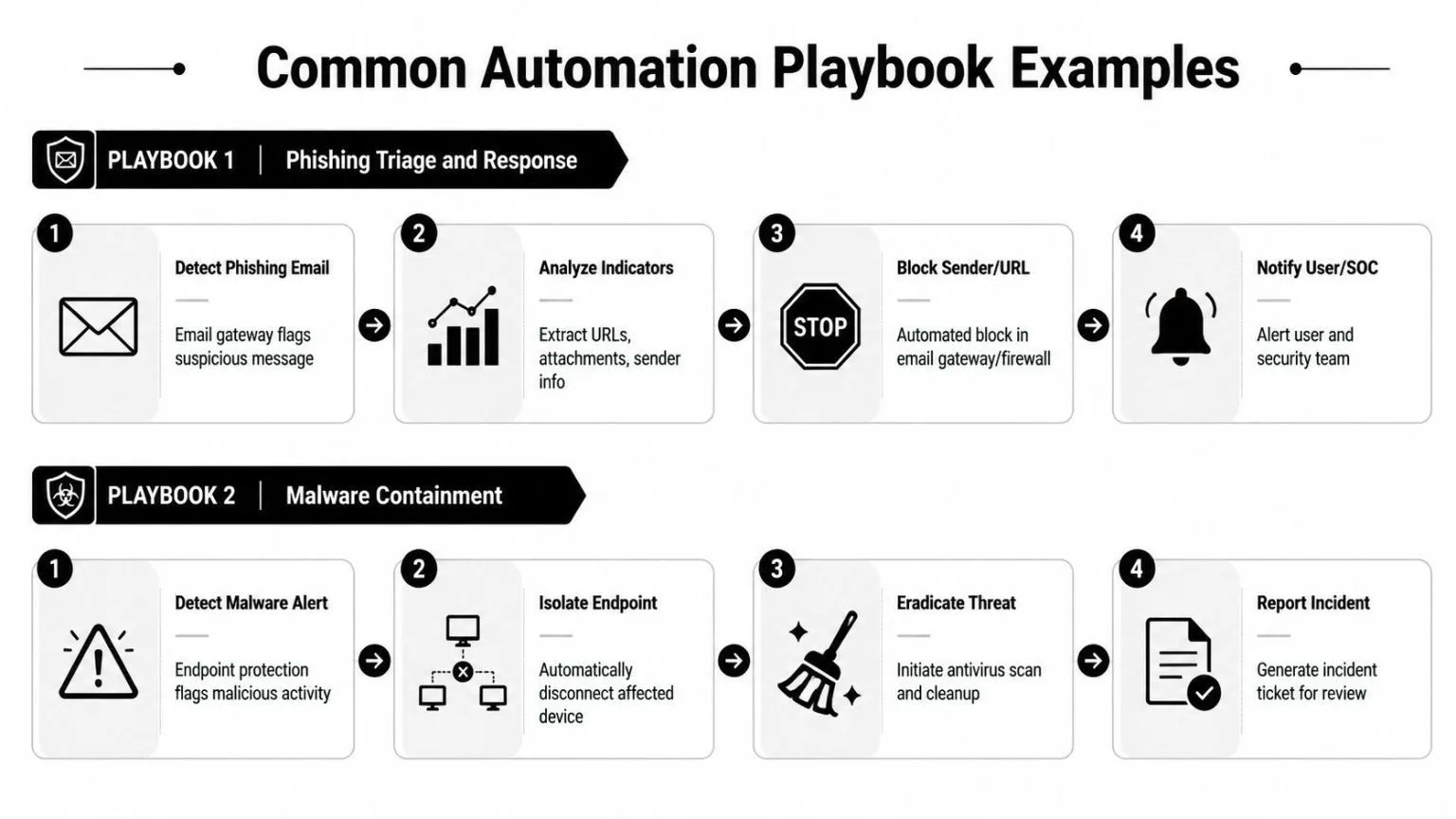
A phishing playbook usually starts in one of two places: the email gateway flags a message, or a user reports it. From there, the workflow should extract the sender, URLs, attachment metadata, subject line, recipient list, and any matching events from identity or endpoint tools.
A useful sequence looks like this:
- Trigger: Inbound email flagged by gateway policy or user report.
- Enrichment: Pull attachment details, inspect URLs, check whether other users received the same message, and look for related clicks or login activity.
- Decision: If indicators meet the response threshold, classify as malicious or suspicious.
- Action: Quarantine the email, block the sender or URL where appropriate, create the incident, and notify affected users and the SOC.
What doesn’t work is over-automating uncertain classifications. If your email detections are noisy, the playbook should stop at enrichment and routing until confidence improves.
For teams building these workflows, incident response playbooks is a useful reference for how prebuilt response logic can map detections to concrete containment actions.
Malware containment
Automation typically delivers obvious value. An endpoint alert lands. The host shows suspicious execution, persistence behavior, or known malware artifacts. Waiting for an analyst to notice, validate, and isolate the endpoint may be too slow.
A disciplined malware playbook typically does the following:
- Confirms the alert source and affected host.
- Pulls recent process and user context from endpoint telemetry.
- Checks for related detections on neighboring assets or the same identity.
- Isolates the endpoint if the action is approved for that class of alert.
- Opens the case and preserves relevant evidence for investigation.
- Routes the incident for eradication and recovery review.
The key design choice is reversibility. Isolating an endpoint is often a strong candidate for automatic action if rollback is straightforward and the business impact is acceptable. Deleting files, killing processes, or forcing broader remediation may require approval.
Suspicious login investigation
Identity incidents are a common source of noise and a common source of risk. A suspicious login playbook should enrich before it acts. That means pulling sign-in details, device posture, user role, recent password changes, MFA activity, and any correlated alerts from endpoint or cloud systems.
Decision rule: Automate account disabling only when the confidence is high and the business impact is understood.
A strong workflow may automatically create a high-priority case, tag the user as under investigation, require step-up review, notify identity administrators, and queue account suspension for approval. For lower-confidence events, it may just gather context and escalate.
Vulnerability and patch-triggered response
Not every incident starts with a classic detection alert. Some start with exposure. A vulnerability scanner, cloud finding, or change-control issue identifies an asset that now presents material risk. That can trigger an incident workflow too.
In these cases, automation helps by coordinating teams. It can open the ticket, assign ownership, attach asset context, map the issue to the affected service, and initiate a patch or rollback workflow where the organization already has a documented path. This is less dramatic than quarantining a host, but it often creates more long-term value because it standardizes operational follow-through.
The common thread across all four examples is simple. Good playbooks remove repetitive work first. They don’t remove judgment where judgment still matters.
Your Five-Phase Implementation Roadmap
Most automation programs fail when teams try to automate everything at once. The safer route is phased maturity. Start with visibility and low-risk wins, then move toward broader orchestration and controlled containment.
Strong incident response automation is a lifecycle system that automates discovery, triage, containment, eradication, recovery, and documentation in a continuous workflow. It depends on collecting telemetry, enriching alerts, and applying rules to trigger playbooks while preserving an evidence trail for reviews and compliance, as outlined in Wiz’s incident response automation guide.
Phase one and two
Phase one starts with goals and baseline measures. Before automating anything, decide what pain you’re trying to remove. It might be triage backlog, delayed containment, inconsistent documentation, or poor handoff quality between security and IT. Define the current process in enough detail that you can tell whether automation improved it.
Phase two is data consolidation. You need dependable inputs before you build dependable actions. Bring together the systems that hold the context analysts already use: SIEM data, endpoint signals, identity events, cloud logs, network telemetry, and ticketing metadata. If the same alert means different things in different tools, your playbooks will inherit that confusion.
A few practical checks help here:
- Normalize event meaning: A host, user, and alert category should resolve consistently across systems.
- Establish ownership: Every playbook needs a business owner, not just a technical maintainer.
- Separate advisory from actionable detections: Not every alert deserves automation.
Phase three through five
Phase three is a good place to begin actual automation. Start with low-risk tasks that remove toil without causing service disruption. Good examples include enrichment, case creation, alert deduplication, responder assignment, and evidence gathering. These wins build trust because they improve workflow without taking risky actions.
Phase four is playbook development and testing. Convert proven manual procedures into structured workflows. Define triggers, required context, decision points, actions, rollback steps, escalation rules, and documentation outputs. Then test them. Not once. Repeatedly, with real stakeholders involved.
A playbook is production code for security operations. Treat it that way.
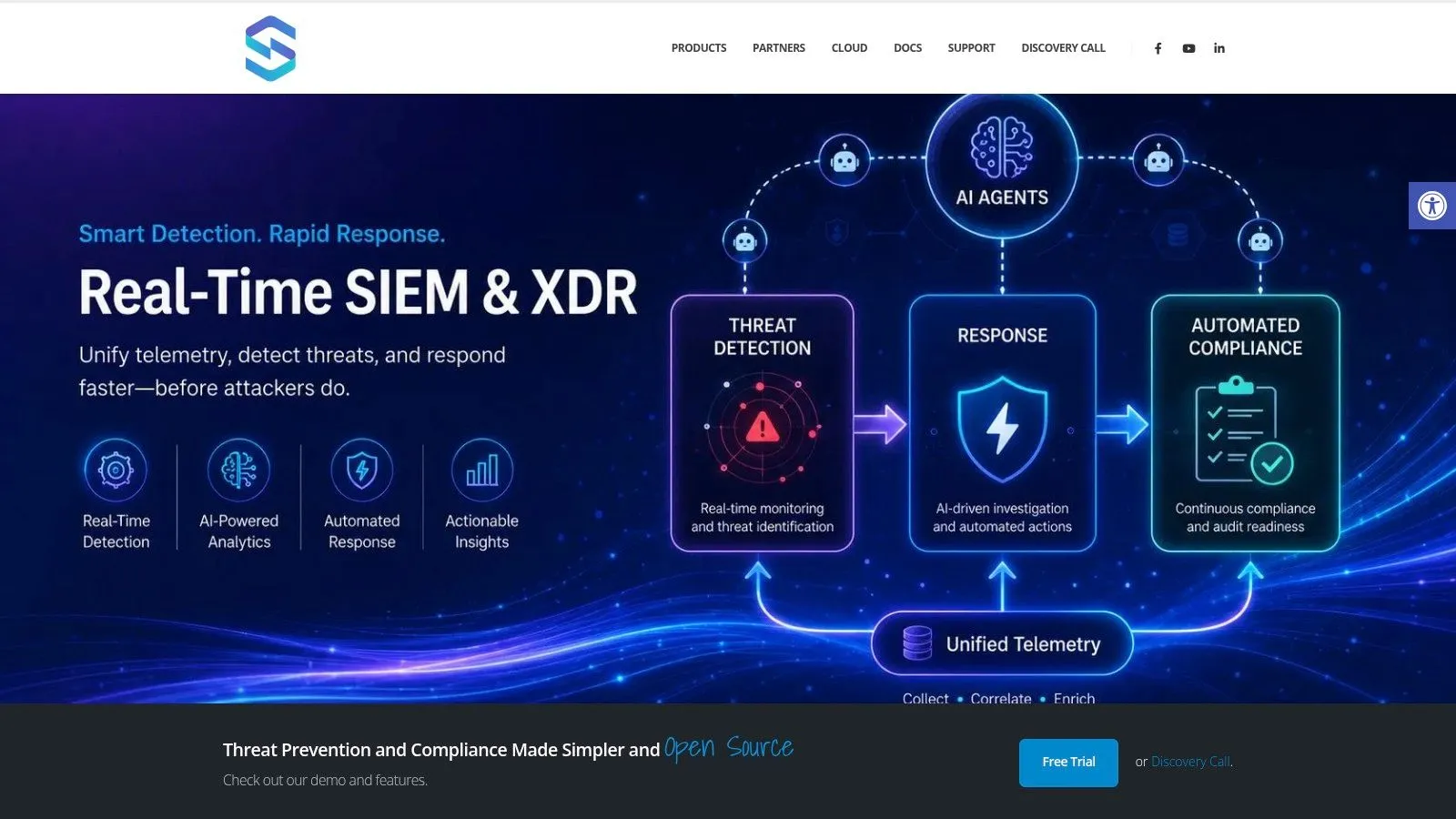
This is a good point to evaluate platforms that combine detection and orchestration in one environment. UTMStack is one example. It combines SIEM, SOAR, and XDR functions with automated response and compliance workflows, which can reduce the integration overhead that often slows early automation efforts.
A short product walkthrough helps when aligning the operating model with the tooling:

Phase five is scale and optimization. Expand from simple actions to deeper orchestration only after the earlier workflows are stable. Add approval paths for disruptive actions. Tune routing rules. Retire playbooks that no longer match the environment. Update evidence requirements for compliance and incident review.
Teams that mature well don’t chase the highest number of automated actions. They build a reliable library of workflows that security, IT, compliance, and leadership all trust.
Measuring Success and Avoiding Common Pitfalls
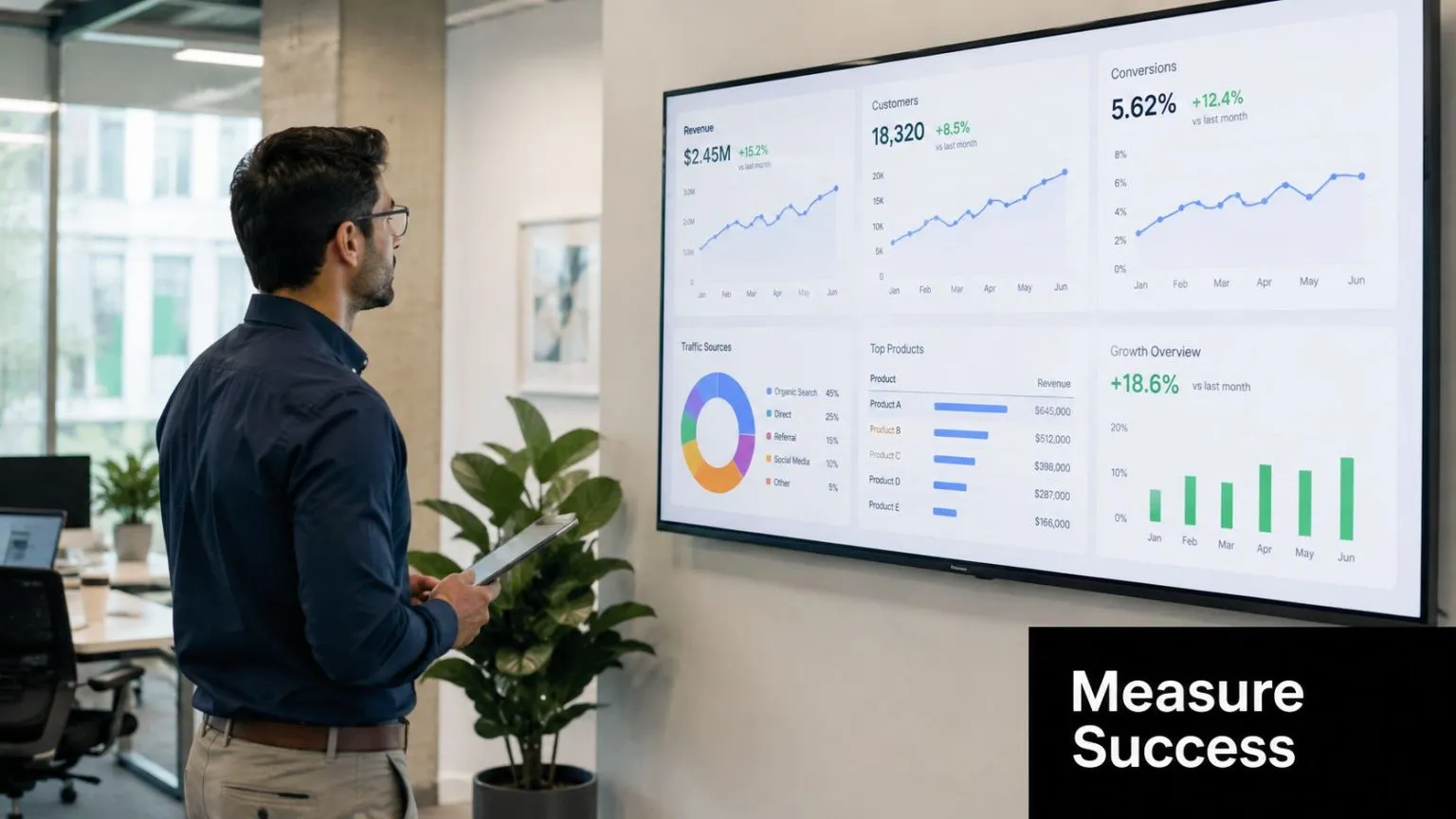
A lot of automation programs look healthy because dashboards show more workflows, more connectors, and more triggered actions. That doesn’t mean the SOC is improving. The hard question is whether the system reduced the work that mattered without creating new noise, new fragility, or new governance problems.
A key concern is whether automation automates bad triage faster. Success depends on the quality of correlation rules, machine learning models, and enrichment data that turn raw alerts into actionable incidents. Without that, automation can amplify noise instead of reducing it, as discussed in Vectra AI’s analysis of incident response automation.
What to measure
Start with metrics that reflect decision quality and response flow, not just activity volume.
| KPI | Why it matters | What to watch for |
|---|---|---|
| MTTA | Shows whether routing and ownership improved | Fast acknowledgment with poor triage is not a win |
| MTTC | Measures how quickly the team contains credible threats | Delays often signal approval friction or missing integrations |
| MTTR | Captures full operational recovery effectiveness | Improvement here matters more than workflow counts |
| False positive handling load | Reveals whether automation is reducing or redistributing noise | Rising review effort means tuning is weak |
| Analyst touch time | Shows whether repetitive work actually dropped | If touch time stays flat, the playbook may be cosmetic |
You don’t need perfect instrumentation on day one. You do need consistency. Pick a few measures, define them clearly, and keep the definitions stable long enough to see trend lines.
Why programs stall
The most common failure pattern is straightforward. Teams automate a flawed manual process, then celebrate because it runs faster. Faster bad decisions are still bad decisions.
Other recurring problems are less obvious:
- Noisy detections feed the pipeline: The workflow executes exactly as designed, but the inputs were poor.
- Playbooks drift out of date: Ownership changes, tools change, escalation paths change, and nobody updates the logic.
- Disruptive actions lack stakeholder agreement: Security wants speed. Operations wants stability. Legal or compliance wants review. If those decisions aren’t settled in advance, the workflow freezes when it matters.
- Auditability gets ignored: A containment action without captured context becomes hard to defend later.
Measure the reduction in analyst effort, not just the increase in automated actions.
There’s also a staffing truth many teams avoid. Automation doesn’t eliminate operational work. It changes the work. Someone still has to maintain connectors, tune logic, review exceptions, validate evidence, and test rollback paths. Programs that budget for build but not upkeep usually plateau.
The healthiest teams treat automation as a product inside the SOC. It has owners, release discipline, test cycles, and success criteria.
Unifying Automation for Security and Compliance
Security teams often build incident response automation one connector at a time. That approach works for a while. Then the hidden costs arrive. One tool holds the detection. Another runs the workflow. A third stores the case. A fourth maps evidence to control requirements. By then, every process improvement depends on integration work.
A unified operating model removes a lot of that friction. The point isn’t vendor consolidation for its own sake. The point is reducing the number of places where context gets lost, response gets delayed, or evidence becomes disconnected from the incident.
Why platform sprawl hurts automation
When data, detection, orchestration, and audit evidence live in separate systems, teams run into the same problems repeatedly:
- Context fragmentation: Analysts can’t see the full incident story without jumping tools.
- Workflow brittleness: A small change in one API or data field breaks a downstream playbook.
- Case inconsistency: The ticket says one thing, the SIEM says another, and the endpoint console has the missing detail.
- Compliance drag: Teams have to reconstruct evidence manually after the response is over.
That last point matters more than many CISOs expect. Regulated environments don’t just need fast response. They need provable response. A platform with centralized log management gives teams a better base for collecting records, preserving timelines, and tying response actions back to policy and control requirements.
Where unified operations help most
The strongest fit for unification is in environments where security and compliance are already intertwined. Healthcare organizations need evidence that response actions were controlled. Financial firms need clear records of who acted and why. Government contractors and other regulated operators often need response documentation that aligns with frameworks such as CMMC, HIPAA, SOC 2, and PCI DSS.
A unified stack helps in three practical ways:
- Detection and response share the same context. That reduces translation errors between alerting and action.
- Evidence is collected as work happens. Teams don’t need to reconstruct incident timelines later.
- Control mapping becomes operational. Compliance stops being a separate reporting exercise and becomes part of the workflow itself.
The discipline of incident response automation pays off. Not in abstract maturity scores, but in day-to-day execution. Fewer manual handoffs. Cleaner escalation. Better containment decisions. Stronger records. Less friction between the SOC, IT, and audit teams.
If you’re evaluating how to operationalize incident response automation without stitching together a fragile toolchain, UTMStack is worth reviewing as one option. It combines SIEM, SOAR, XDR, and compliance workflows in a single platform, which can simplify data ingestion, playbook execution, and evidence collection for hybrid environments.